WebView2をUIとして使えるか試しててみたいと思います。
![]()
C#のWinFormsでWebView2を試す。
WebView2はWebブラウザ(Edge)をWinFormsのコントロールとしてデスクトップアプリケーションで扱うことが出来るとのことですので、試してみたいと思います。プロジェクトの作成mkdir プロジェクト名cd プロジェクト名dot...
maywork.net
2024.10.31
ソースコード
ファイル名:webui_01_vanillajs.csproj
<Project Sdk="Microsoft.NET.Sdk">

  <PropertyGroup>
    <OutputType>WinExe</OutputType>
    <TargetFramework>net8.0-windows</TargetFramework>
    <Nullable>enable</Nullable>
    <ImplicitUsings>enable</ImplicitUsings>
    <UseWPF>true</UseWPF>
  </PropertyGroup>

  <ItemGroup>
    <PackageReference Include="Microsoft.Web.WebView2" Version="1.0.3650.58" />
  </ItemGroup>

</Project>
ファイル名:MainWindow.xaml.cs
using System.Text.Json;
using System.Windows;
using System.IO;
using Microsoft.Web.WebView2.Core;

namespace webui_01_vanillajs;

public partial class MainWindow : Window
{
    public MainWindow()
    {
        InitializeComponent();
        InitializeWebView();
    }
    private async void InitializeWebView()
    {
        var userDataFolder = Path.Combine(
            Environment.GetFolderPath(Environment.SpecialFolder.LocalApplicationData),
            "MyWebView2Sample");

        var env = await CoreWebView2Environment.CreateAsync(
            null,   // Edgeのパス(通常 null)
            userDataFolder);

        await webView.EnsureCoreWebView2Async(env);

        webView.CoreWebView2.WebMessageReceived += WebMessageReceived;

        webView.Source = new Uri(
            Path.Combine(@"J:\csharp\WpfCB\webui_01_vanillajs", "index.html")
        );
    }
    private async void WebMessageReceived(
        object? sender,
        CoreWebView2WebMessageReceivedEventArgs e)
    {
        // JSON を文字列として取得
        var json = e.WebMessageAsJson;


        // 超簡易パース(サンプル用)
        using var doc = JsonDocument.Parse(json);
        var root = doc.RootElement;

        if (root.GetProperty("type").GetString() == "processText")
        {
            var input = root.GetProperty("value").GetString();

            // C# 側の処理
            var result = $"{input}と入力されました。";

            // C# → JS
            await webView.ExecuteScriptAsync(
                $"setResult({JsonSerializer.Serialize(result)});"
            );
        }
}
}
C#ではjsからのリクエストをWebMessageReceivedで受け取り処理をしています。
ファイル名:MainWindow.xaml
<Window x:Class="webui_01_vanillajs.MainWindow"
        xmlns="http://schemas.microsoft.com/winfx/2006/xaml/presentation"
        xmlns:x="http://schemas.microsoft.com/winfx/2006/xaml"
        xmlns:d="http://schemas.microsoft.com/expression/blend/2008"
        xmlns:mc="http://schemas.openxmlformats.org/markup-compatibility/2006"
        xmlns:wv2="clr-namespace:Microsoft.Web.WebView2.Wpf;assembly=Microsoft.Web.WebView2.Wpf"
        xmlns:local="clr-namespace:webui_01_vanillajs"
        mc:Ignorable="d"
        Title="WPF × WebView2 × Vanilla JS" Height="600" Width="800">
    <Grid>
        <!-- WebUI 全面表示 -->
        <wv2:WebView2 x:Name="webView"/>
    </Grid>
</Window>
XAMLはGridにwebView2だけを配置
ファイル名:index.html
<!DOCTYPE html>
<html>
<head>
<meta charset="utf-8">
<title>WebView2 Sample</title>
</head>
<body>
    <input id="textInput" type="text" placeholder="文字を入力">
    <button onclick="sendToHost()">送信</button>

    <div id="result"></div>

<script>
function sendToHost() {
    const text = document.getElementById("textInput").value;

    // JS → C#
    chrome.webview.postMessage({
        type: "processText",
        value: text
    });
}

// C# → JS から呼ばれる関数
function setResult(text) {
    document.getElementById("result").innerText = text;
}
</script>
</body>
</html>
HTMLではView部分を担う。jsからC#側を呼び出し、C#からjsの関数を呼び出しています。
デバック実行のしやすさのため、C#のソースコードと同じ場所にindex.htmlを配置し絶対パスで指定していますが、リリースするバージョンではインストールフォルダに配置することになりそうです。
実行
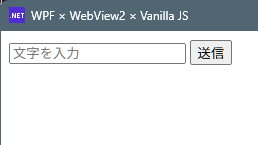
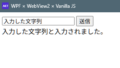
dotnet run- 起動すると、HTMLで作ったテキストボックスとボタンが表示されます。
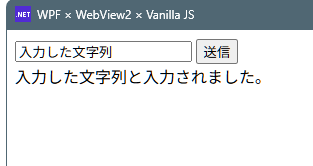
- テキストボックスに文字を入力しボタンを押すと、文字が表示されます。
コメント