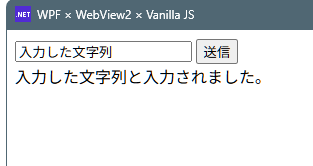
xamlとhtmlでviewの役割が被るので、xaml無し版を作成してみました。
ソースコード
ファイル名:webui_02_vanillajs.csproj
<Project Sdk="Microsoft.NET.Sdk">

  <PropertyGroup>
    <OutputType>WinExe</OutputType>
    <TargetFramework>net8.0-windows</TargetFramework>
    <Nullable>enable</Nullable>
    <ImplicitUsings>enable</ImplicitUsings>
    <UseWPF>true</UseWPF>
  </PropertyGroup>

  <ItemGroup>
    <PackageReference Include="Microsoft.Web.WebView2" Version="1.0.3650.58" />
  </ItemGroup>
</Project>
ファイル名:Program.cs
using System.IO;
using System.Text.Json;
using System.Windows;
using System.Windows.Controls;
using Microsoft.Web.WebView2.Core;
using Microsoft.Web.WebView2.Wpf;

namespace webui_02_vanillajs;
public class Program : Application
{
    [STAThread]
    static void Main()
    {
        var app = new Program();
        app.Run();
    }

    protected override void OnStartup(StartupEventArgs e)
    {
        base.OnStartup(e);

        // Main Window
        var window = new Window
        {
            Title = "WebView2 NoXAML",
            Width = 800,
            Height = 600
        };

        // Grid (Container)
        var grid = new Grid();

        // WebView2 Control
        var webView = new WebView2();
        grid.Children.Add(webView);

        window.Content = grid;
        window.Show();

        InitializeWebView(webView);
    }

    private async void InitializeWebView(WebView2 webView)
    {
        // ユーザーデータ用フォルダ
        var userDataFolder =
            Path.Combine(Environment.GetFolderPath(Environment.SpecialFolder.LocalApplicationData),
            "webui_02_vanillajs");

        var env = await CoreWebView2Environment.CreateAsync(
            null,   // Edge パスを指定(通常 null)
            userDataFolder);

        await webView.EnsureCoreWebView2Async(env);

        webView.CoreWebView2.WebMessageReceived += WebMessageReceived;

        // HTML のパス
        //var htmlPath = Path.Combine(
        //    AppDomain.CurrentDomain.BaseDirectory,
        //    "index.html");
        var htmlPath = @"J:\csharp\WpfCB\webui_02_vanillajs\index.html";

        webView.Source = new Uri(htmlPath);
    }

    private async void WebMessageReceived(
        object? sender,
        CoreWebView2WebMessageReceivedEventArgs e)
    {
       if (sender is not CoreWebView2 core)
            return;
        var json = e.WebMessageAsJson;
        using var doc = JsonDocument.Parse(json);

        if (doc.RootElement.GetProperty("type").GetString() == "processText")
        {
            var input = doc.RootElement.GetProperty("value").GetString();
            var result = $"{input} と入力されました。";

            await core.ExecuteScriptAsync(
                $"setResult({JsonSerializer.Serialize(result)});"
            );
        }
    }
}
ファイル名:index.html
<!DOCTYPE html>
<html>
<head>
<meta charset="utf-8">
<title>WebView2 Sample</title>
</head>
<body>
    <input id="textInput" type="text" placeholder="文字を入力">
    <button onclick="sendToHost()">送信</button>
    <div id="result"></div>

<script>
function sendToHost() {
    const text = document.getElementById("textInput").value;
    chrome.webview.postMessage({
        type: "processText",
        value: text
    });
}

function setResult(text) {
    document.getElementById("result").innerText = text;
}
</script>
</body>
</html>
実行
使い方は前回のXAML有り版と同じになります。
![]()
WPF × WebView2 × バニラJSで作るWebUI
WebView2をUIとして使えるか試しててみたいと思います。ソースコードファイル名:webui_01_vanillajs.csproj<Project Sdk="Microsoft.NET.Sdk"> <PropertyGroup> <O...
maywork.net
2025.12.13
WebUIについて思うこと
個人的に、アプリケーションフレームワークや開発環境で最も重要だと思っているのは、
デバッガーがきちんと動くことです。
デバッガーでトレースできれば、多くの問題は時間をかければ解決できます。
私のような素人でも、試行錯誤しながらソフトウェアを作ることが可能です。
しかし、デバッガーが使えない環境では、頭の中だけでコードを追う必要があり、
難易度は一気に跳ね上がります。
WPFのXAMLは非常に優れた概念だと思いますが、トレースのしにくさという弱点があります。
最終的にはC#に変換されるとはいえ、そのコードは自分が直接書いたものではないため、
デバッグ時に追えても挙動が直感的に理解しづらい場面が多々あります。
一方でWinFormsは、View部分もC#で記述できるためトレースはしやすい反面、
レイアウトを頭の中で組み立てながらコードを書く必要があり、
設計段階での負荷が大きくなりがちです。
今回試しているWebView2を使ったWebUIでは、HTMLでレイアウトを記述し、
Webブラウザーの開発者ツールでデバッグが行えます。
この点は、開発ツールとして非常に魅力的だと感じました。
ただし、C#側とWeb側で環境が分かれているため、
統合された開発体験とは言い難く、そのあたりは少し煩わしさも感じます。
それでも「デバッグできる」という一点だけでも、十分に価値のある選択肢だと思います。
コメント