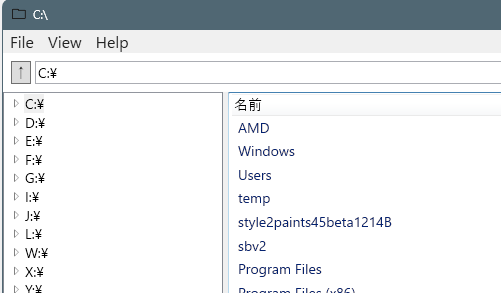
古いエクスプローラーのような見た目のファイルマネージャをWPFの標準コントロールで実装する試みです。
TreeViewやListViewなどでデータバインディングは行っていますが、基本イベントドリブンをコードビハインドで記述するスタイル。

実行イメージ
ソースコード
ファイル名:MyFileManager.csproj
<Project Sdk="Microsoft.NET.Sdk">

  <PropertyGroup>
    <OutputType>WinExe</OutputType>
    <TargetFramework>net8.0-windows</TargetFramework>
    <Nullable>enable</Nullable>
    <ImplicitUsings>enable</ImplicitUsings>
    <UseWPF>true</UseWPF>
    <ApplicationIcon>Assets\app.ico</ApplicationIcon>
  </PropertyGroup>

</Project>
ファイル名:BoolToVisibilityConverter.cs
using System;
using System.Globalization;
using System.Windows;
using System.Windows.Data;

/*
* Boolo値をVisibility列挙体に変換するコンバータ
*/

namespace MyFileManager;
public sealed class BoolToVisibilityConverter : IValueConverter
{
    public object Convert(object value, Type targetType,
                          object parameter, CultureInfo culture)
    {
        bool flag = value is bool b && b;

        // ConverterParameter に "Invert" が来たら反転
        if (parameter as string == "Invert")
            flag = !flag;

        return flag ? Visibility.Visible : Visibility.Collapsed;
    }

    public object ConvertBack(object value, Type targetType,
                              object parameter, CultureInfo culture)
        => throw new NotSupportedException();
}
ファイル名:DirectoryNode.cs
using System.Collections.ObjectModel;
using System.IO;

/*
* FoldeerTree用のディレクトリノード
*/

namespace MyFileManager;
public sealed class DirectoryNode
{
    public string Name { get; }
    public string FullPath { get; }

    public ObservableCollection<DirectoryNode> Children { get; }
        = new ObservableCollection<DirectoryNode>();

    public bool IsLoaded { get; private set; }
    public bool IsDummy { get; }

    private DirectoryNode(string path, bool isDummy)
    {
        FullPath = path;
        IsDummy = isDummy;

        Name = isDummy
            ? string.Empty
            : Path.GetFileName(path.TrimEnd(Path.DirectorySeparatorChar));

        if (string.IsNullOrEmpty(Name))
            Name = path;
    }

    public DirectoryNode(string path)
        : this(path, isDummy: false)
    {
    }

    public static DirectoryNode CreateDummy(string parentPath)
        => new DirectoryNode(parentPath, isDummy: true);

    public void EnsureDummy()
    {
        if (Children.Count == 0)
        {
            Children.Add(CreateDummy(FullPath));
        }
    }

    public void LoadChildren()
    {
        if (IsLoaded) return;

        Children.Clear();
        IsLoaded = true;

        try
        {
            foreach (var dir in FileSystemUtil.GetDirs(FullPath))
            {
                var child = new DirectoryNode(dir);
                child.EnsureDummy();
                Children.Add(child);
            }
        }
        catch
        {
            // Explorer同様、例外は無視
        }
    }
}
ファイル名:FileItem.cs
/*
* FileItemクラスの定義
*/

namespace MyFileManager;
public class FileItem
{
    public string Name { get; set; } = "";
    public string FullPath { get; set; } = "";
    public string Type { get; set; } = "";   // File / Directory
    public long Size { get; set; }
}
ファイル名:FileSystemUtil.cs
using System.IO;

public static class FileSystemUtil
{
    // ここにファイルシステム関連のユーティリティメソッドを追加できます
    public static string[] GetDirs(string path)
    {
        return Directory
            .GetDirectories(path)
            .Select(d => new DirectoryInfo(d))
            .Where(di =>
                !di.Attributes.HasFlag(FileAttributes.Hidden) &&
                !di.Attributes.HasFlag(FileAttributes.System) &&
                !di.Name.StartsWith("."))
            .Select(di => di.FullName)
            .ToArray();
    }

    public static string[] GetFiles(string path)
    {
        return Directory
            .GetFiles(path)
            .Select(f => new FileInfo(f))
            .Where(fi =>
                !fi.Attributes.HasFlag(FileAttributes.Hidden) &&
                !fi.Attributes.HasFlag(FileAttributes.System) &&
                !fi.Name.StartsWith("."))
            .Select(fi => fi.FullName)
            .ToArray();
    }
    public static string[] GetDrives()
    {
        return DriveInfo
            .GetDrives()
            .Where(drive =>
                drive.IsReady &&
                (drive.DriveType.HasFlag(DriveType.Fixed)||drive.DriveType.HasFlag(DriveType.Network))
            )
            .Select(drive => drive.RootDirectory.FullName)
            .ToArray();
    }

}
ファイル名:MainWindow.AddressBar.cs
using System.IO;
using System.Windows;
using System.Windows.Input;

/*
* AddressBarの初期化とイベントハンドラ
*/

namespace MyFileManager;

public partial class MainWindow : Window
{
    public string CurrentDirectory { get; private set; } = "";

    private void UpButton_Click(object sender, RoutedEventArgs e)
    {
        var path = Path.GetDirectoryName(CurrentDirectory) ?? CurrentDirectory;
        SetAddressBarCurrentDirectory(path);
    }

    private void MoveButton_Click(object sender, RoutedEventArgs e)
    {
        Navigate(AddressTextBox.Text);
    }

    private void AddressTextBox_KeyDown(object sender, KeyEventArgs e)
    {
        // Enterキーで移動
        if (e.Key == Key.Enter)
        {
            Navigate(AddressTextBox.Text);
        }
    }

    private void Navigate(string path)
    {
        if (Directory.Exists(path))
        {
            SetAddressBarCurrentDirectory(path);
        }
        else
        {
            MessageBox.Show(
                "ディレクトリが存在しません。",
                "エラー",
                MessageBoxButton.OK,
                MessageBoxImage.Error);
        }
    }

    // アドレスバーのカレントディレクトリ設定
    private void SetAddressBarCurrentDirectory(string path)
    {
        if (CurrentDirectory == path) return;

        CurrentDirectory = path;
        AddressTextBox.Text = path;

        UpdateCurrentDirectory(path);
    }
}
ファイル名:MainWindow.FileListView.cs
using System.Collections.ObjectModel;
using System.IO;
using System.Windows;
using System.Windows.Controls;
using System.Windows.Input;
using System.Diagnostics;
using System.ComponentModel;
using System.Windows.Data;

/*
* FileListViewの初期化とイベントハンドラ
*/

namespace MyFileManager;

public partial class MainWindow : Window
{
    private string _currentDirectory = @"C:\";

    private async void SetFileListViewDirectory(string path)
    {
var sw = Stopwatch.StartNew();
        FileListView.Visibility = Visibility.Collapsed;
        StatusText.Text = "Loading...";

Dispatcher.Invoke(
    System.Windows.Threading.DispatcherPriority.Render,
    new Action(() => { })
);
        _currentDirectory = path;
        var fileItems = new ObservableCollection<FileItem>();

        var dirTask = Task.Run(() => FileSystemUtil.GetDirs(path));

        var dirs = await dirTask;

        var fileTask = Task.Run(() => FileSystemUtil.GetFiles(path));
        foreach (var dir in dirs)
        {
            fileItems.Add(new FileItem
            {
                Name = Path.GetFileName(dir),
                FullPath = dir,
                Type = "Directory",
                Size = 0
            });
        }

        var files = await fileTask;
        foreach (var file in files)
        {
            var info = new FileInfo(file);
            fileItems.Add(new FileItem
            {
                Name = info.Name,
                FullPath = info.FullName,
                Type = "File",
                Size = info.Length
            });
        }
        FileListView.ItemsSource = fileItems;
        FileListView.UpdateLayout();

        FileListView.Visibility = Visibility.Visible;
sw.Stop();
        StatusText.Text = $"LoadingTime : {sw.ElapsedMilliseconds} ms";
    }

    // 選択変更(イベントドリブン)
    private void FileListView_SelectionChanged(object sender, SelectionChangedEventArgs e)
    {
        if (FileListView.SelectedItem is FileItem item)
        {
            //System.Diagnostics.Debug.WriteLine($"Selected: {item.FullPath}");
        }
    }

    // ダブルクリック処理
    private void FileListView_MouseDoubleClick(object sender, MouseButtonEventArgs e)
    {
        if (FileListView.SelectedItem is FileItem item)
        {
            if (item.Type == "Directory")
            {
                UpdateCurrentDirectory(item.FullPath);
            }
            else
            {
                Process.Start(new ProcessStartInfo
                {
                    FileName = item.FullPath,
                    UseShellExecute = true
                });
            }
        }
    }

    /* 右クリックメニュー処理 */
    private FileItem? SelectedItem =>
        FileListView.SelectedItem as FileItem;
    private void FileListView_PreviewMouseRightButtonDown(object sender, MouseButtonEventArgs e)
    {
        var element = e.OriginalSource as DependencyObject;

        while (element != null && element is not ListViewItem)
        {
            element = System.Windows.Media.VisualTreeHelper.GetParent(element);
        }

        if (element is ListViewItem item)
        {
            item.IsSelected = true;
            item.Focus();
        }
    }

    private void Menu_Open_Click(object sender, RoutedEventArgs e)
    {
        if (SelectedItem == null) return;

        if (SelectedItem.Type == "Directory")
        {
            UpdateCurrentDirectory(SelectedItem.FullPath);
        }
        else
        {
            Process.Start(new ProcessStartInfo
            {
                FileName = SelectedItem.FullPath,
                UseShellExecute = true
            });
        }
    }

    private void Menu_OpenInExplorer_Click(object sender, RoutedEventArgs e)
    {
        if (SelectedItem == null) return;

        Process.Start("explorer.exe", $"/select,\"{SelectedItem.FullPath}\"");
    }

    private void Menu_Delete_Click(object sender, RoutedEventArgs e)
    {
        if (SelectedItem == null) return;

        if (MessageBox.Show(
            $"{SelectedItem.Name} を削除しますか?",
            "確認",
            MessageBoxButton.YesNo,
            MessageBoxImage.Warning) != MessageBoxResult.Yes)
            return;

        if (SelectedItem.Type == "Directory")
            Directory.Delete(SelectedItem.FullPath, true);
        else
            File.Delete(SelectedItem.FullPath);

        SetFileListViewDirectory(_currentDirectory);
    }

    /*
    * 列ヘッダクリックでソート
    */
    private ListSortDirection _nameSortDirection = ListSortDirection.Ascending;
    private ListSortDirection _sizeSortDirection = ListSortDirection.Ascending;
    private void NameHeader_Click(object sender, RoutedEventArgs e)
    {
        var view = CollectionViewSource.GetDefaultView(FileListView.ItemsSource);
        if (view == null) return;

        view.SortDescriptions.Clear();
        // 第1キー:種類
        view.SortDescriptions.Add(
            new SortDescription(nameof(FileItem.Type), _nameSortDirection));
        // 第2キー:名前
        view.SortDescriptions.Add(
            new SortDescription(nameof(FileItem.Name), _nameSortDirection));

        // 次回クリック用に反転
        _nameSortDirection =
            _nameSortDirection == ListSortDirection.Ascending
                ? ListSortDirection.Descending
                : ListSortDirection.Ascending;
    }
    private void SizeHeader_Click(object sender, RoutedEventArgs e)
    {
        var view = CollectionViewSource.GetDefaultView(FileListView.ItemsSource);
        if (view == null) return;

        view.SortDescriptions.Clear();
        // 第1キー:種類
        view.SortDescriptions.Add(
            new SortDescription(nameof(FileItem.Type), _sizeSortDirection));
        // 第2キー:サイズ
        view.SortDescriptions.Add(
            new SortDescription(nameof(FileItem.Size), _sizeSortDirection));

        // 次回クリック用に反転
        _sizeSortDirection =
            _sizeSortDirection == ListSortDirection.Ascending
                ? ListSortDirection.Descending
                : ListSortDirection.Ascending;
    }
}
ファイル名:MainWindow.FolderTree.cs
using System.Collections.ObjectModel;
using System.IO;
using System.Windows;
using System.Windows.Controls;

/*
* FolderTreeの初期化とイベントハンドラ
*/

namespace MyFileManager;

public partial class MainWindow : Window
{
    public ObservableCollection<DirectoryNode> RootNodes { get; }
        = new ObservableCollection<DirectoryNode>();

    private void LoadRoots()
    {
        RootNodes.Clear();

        foreach (var drive in FileSystemUtil.GetDrives())
        {
            var node = new DirectoryNode(drive);
            node.EnsureDummy();

            RootNodes.Add(node);
        }
    }

    private void FolderTreeItem_Expanded(object sender, RoutedEventArgs e)
    {
        if (sender is not TreeViewItem item) return;
        if (item.DataContext is not DirectoryNode node) return;

        node.LoadChildren();
    }

    private void FolderTree_SelectedItemChanged(
        object sender,
        RoutedPropertyChangedEventArgs<object> e)
    {
        if (e.NewValue is DirectoryNode node)
        {
            Title = node.FullPath;
            // ListView更新など
            UpdateCurrentDirectory(node.FullPath);
        }
    }

}
ファイル名:MainWindow.xaml.cs
using System.Windows;

namespace MyFileManager;

public partial class MainWindow : Window
{
    public MainWindow()
    {
        InitializeComponent();

        // FolderTreeの初期化
        DataContext = this;
        LoadRoots();

        // FileListViewの初期化
        SetFileListViewDirectory(_currentDirectory);

        // AddressBarの初期化
        SetAddressBarCurrentDirectory(_currentDirectory);

    }

    /* メニューイベントハンドラ */
    private void OnNewWindow(object sender, RoutedEventArgs e)
    {
        new MainWindow().Show();
    }

    private void OnExit(object sender, RoutedEventArgs e)
    {
        Close();
    }

    private void OnRefresh(object sender, RoutedEventArgs e)
    {
        StatusText.Text = "Refreshed";
    }

    private void OnAbout(object sender, RoutedEventArgs e)
    {
        MessageBox.Show(
            "Explorer Sample\nWPF Menu + StatusBar",
            "About",
            MessageBoxButton.OK,
            MessageBoxImage.Information);
    }

    /* ここまでメニューイベントハンドラ */

    /* カレントディレクトリの変更 */
    private void UpdateCurrentDirectory(string path)
    {
        // AddressBar更新
        if (CurrentDirectory != path)
        {
            SetAddressBarCurrentDirectory(path);
        }

        // FileListView更新
        if (_currentDirectory != path)
        {
            SetFileListViewDirectory(path);
        }
    }
}
ファイル名:MainWindow.xaml
<Window x:Class="MyFileManager.MainWindow"
        xmlns="http://schemas.microsoft.com/winfx/2006/xaml/presentation"
        xmlns:x="http://schemas.microsoft.com/winfx/2006/xaml"
        xmlns:d="http://schemas.microsoft.com/expression/blend/2008"
        xmlns:mc="http://schemas.openxmlformats.org/markup-compatibility/2006"
        xmlns:local="clr-namespace:MyFileManager"
        mc:Ignorable="d"
        FontSize="14"
        Title="MyFileManager" Height="450" Width="800">

    <Window.Resources>
        <local:BoolToVisibilityConverter x:Key="BoolToVisibilityConverter"/>
        <Style TargetType="MenuItem">
            <Setter Property="FontSize" Value="16"/>
        </Style>
    </Window.Resources>

    <DockPanel>

        <!-- メニュー ここから-->
        <Menu
            DockPanel.Dock="Top">
            <MenuItem Header="_File">
                <MenuItem Header="_New Window" Click="OnNewWindow"/>
                <Separator/>
                <MenuItem Header="_Exit" Click="OnExit"/>
            </MenuItem>

            <MenuItem Header="_View">
                <MenuItem Header="Refresh" Click="OnRefresh"/>
            </MenuItem>

            <MenuItem Header="_Help">
                <MenuItem Header="_About" Click="OnAbout"/>
            </MenuItem>
        </Menu>
        <!-- メニュー ここまで-->

        <!-- ステータスバー -->
        <StatusBar
            DockPanel.Dock="Bottom">
            <StatusBarItem>
                <TextBlock x:Name="StatusText"
                           Text="Ready"/>
            </StatusBarItem>

            <Separator/>

            <StatusBarItem HorizontalAlignment="Right">
                <TextBlock x:Name="PathText"
                           Text="C:\"/>
            </StatusBarItem>
        </StatusBar>
        <!-- ステータスバー ここまで-->


        <DockPanel>
            <!-- アドレスバーと移動ボタン ここから -->
            <DockPanel
                DockPanel.Dock="Top"
                Margin="8">
                <!-- 上ボタン -->
                <Button Content="↑"
                        DockPanel.Dock="Left"
                        Width="20"
                        Click="UpButton_Click"/>
                <!-- 移動ボタン -->
                <Button Content="移動"
                        DockPanel.Dock="Right"
                        Width="40"
                        Click="MoveButton_Click"/>
                <!-- アドレスバー -->
                <TextBox x:Name="AddressTextBox"
                        Margin="4,0,4,0"
                        VerticalContentAlignment="Center"
                        KeyDown="AddressTextBox_KeyDown"/>
            </DockPanel>
            <!-- アドレスバーと移動ボタン ここまで -->

            <Grid>

                <Grid.ColumnDefinitions>
                    <ColumnDefinition Width="220" />
                    <ColumnDefinition Width="5" />
                    <ColumnDefinition Width="*" />
                </Grid.ColumnDefinitions>

                <!-- 左側フォルダツリー ここから -->
                <TreeView x:Name="FolderTree"
                        ItemsSource="{Binding RootNodes}"
                        SelectedItemChanged="FolderTree_SelectedItemChanged"
                        Grid.Column="0">

                    <TreeView.ItemTemplate>
                        <HierarchicalDataTemplate ItemsSource="{Binding Children}">
                            <TextBlock Text="{Binding Name}"
                                    Visibility="{Binding IsDummy,
                                                    Converter={StaticResource BoolToVisibilityConverter},
                                                    ConverterParameter=Invert}" />
                        </HierarchicalDataTemplate>
                    </TreeView.ItemTemplate>
                    <TreeView.ItemContainerStyle>
                        <Style TargetType="TreeViewItem">
                            <EventSetter Event="Expanded"
                                        Handler="FolderTreeItem_Expanded"/>
                        </Style>
                    </TreeView.ItemContainerStyle>
                </TreeView>
                <!-- 左側フォルダツリー ここまで -->

                <!-- 左右の仕切り ここから-->
                <GridSplitter
                    Grid.Column="1"
                    HorizontalAlignment="Stretch" />
                <!-- 左右の仕切り ここまで-->

                <!-- 右側ファイルリストビュー ここから -->
                <ListView
                    x:Name="FileListView"
                    Grid.Column="2"
                    SelectionChanged="FileListView_SelectionChanged"
                    MouseDoubleClick="FileListView_MouseDoubleClick">

                    <!-- コンテキストメニュー ここから -->
                    <ListView.ContextMenu>
                        <ContextMenu>
                            <MenuItem Header="開く"
                                    Click="Menu_Open_Click" />
                            <MenuItem Header="エクスプローラーで開く"
                                    Click="Menu_OpenInExplorer_Click" />
                            <Separator/>
                            <MenuItem Header="削除"
                                    Click="Menu_Delete_Click" />
                        </ContextMenu>
                    </ListView.ContextMenu>
                    <!-- コンテキストメニュー ここまで -->

                    <ListView.ItemContainerStyle>
                        <Style TargetType="ListViewItem">
                            <Setter
                                Property="HorizontalContentAlignment"
                                Value="Stretch"/>
                        </Style>
                    </ListView.ItemContainerStyle>


                    <ListView.View>
                        <GridView>
                            <GridViewColumn Width="300">
                                <GridViewColumnHeader
                                    Content="名前"
                                    Click="NameHeader_Click"
                                    HorizontalContentAlignment="Left"/>
                                <GridViewColumn.DisplayMemberBinding>
                                    <Binding Path="Name"/>
                                </GridViewColumn.DisplayMemberBinding>
                            </GridViewColumn>
                            <GridViewColumn Width="100">
                                <GridViewColumnHeader
                                    Content="種類"
                                    Click="NameHeader_Click"
                                    HorizontalContentAlignment="Left"/>
                                <GridViewColumn.DisplayMemberBinding>
                                    <Binding Path="Type"/>
                                </GridViewColumn.DisplayMemberBinding>
                            </GridViewColumn>
                            <GridViewColumn Width="100">
                                <GridViewColumnHeader
                                    Content="サイズ"
                                    Click="SizeHeader_Click"
                                    HorizontalContentAlignment="Right"/>
                                <GridViewColumn.CellTemplate>
                                    <DataTemplate>
                                        <TextBlock
                                            Text="{Binding Size}"
                                            HorizontalAlignment="Right"/>
                                    </DataTemplate>
                                </GridViewColumn.CellTemplate>
                            </GridViewColumn>

                        </GridView>
                    </ListView.View>
                </ListView>
                <!-- 右側ファイルリストビュー ここまで -->

            </Grid>
        </DockPanel>

    </DockPanel>
</Window>

コメント