
データをバインディングをする場合バインディングソースとなるオブジェクトはINotifyPropertyChangedの実装である必要があります。
また、コマンドをバインディングする場合、ICommandを実装する必要となります。
この記事ではINotifyPropertyChangedとICommandを実装したサンプルコードを解説することで、バインディングの概要を確認します。
サンプルコード
ファイル名:binding1.csproj
<Project Sdk="Microsoft.NET.Sdk">

  <PropertyGroup>
    <OutputType>WinExe</OutputType>
    <TargetFramework>net8.0-windows</TargetFramework>
    <Nullable>enable</Nullable>
    <ImplicitUsings>enable</ImplicitUsings>
    <UseWPF>true</UseWPF>
  </PropertyGroup>

</Project>
ファイル名:ActionCommand.cs
using System;
using System.Windows.Input;

public class ActionCommand : ICommand
{
    private readonly Action<object?> _execute;
    private readonly Predicate<object?> _canExecute;

    public ActionCommand(Action<object?> execute, Predicate<object?> canExecute)
    {
        _execute = execute;
        _canExecute = canExecute;
    }

    public bool CanExecute(object? parameter)
        => _canExecute(parameter);

    public void Execute(object? parameter)
        => _execute(parameter);

    public event EventHandler? CanExecuteChanged;

    public void RaiseCanExecuteChanged()
        => CanExecuteChanged?.Invoke(this, EventArgs.Empty);
}
ファイル名:MainViewModel.cs
using System.ComponentModel;
using System.Diagnostics;
using System.Runtime.CompilerServices;

namespace binding1;
public class MainViewModel : INotifyPropertyChanged
{
    private string? _selectedValue;
    public string? SelectedValue
    {
        get => _selectedValue;
        set
        {
            if (_selectedValue == value) return;
            _selectedValue = value;
            OnPropertyChanged();

            // ★ parameter の元が変わったので通知
            ActionCommand.RaiseCanExecuteChanged();
        }
    }

    public ActionCommand ActionCommand { get; }

    public MainViewModel()
    {
        ActionCommand = new ActionCommand(
            execute: p =>
            {
                var value = (string)p!;
                // 実行処理
                if (value is not null)
                {
                    Debug.Print($"{value}");
                }
            },
            canExecute: p =>
            {
                return !string.IsNullOrEmpty(p as string);
            }
        );
    }

    public event PropertyChangedEventHandler? PropertyChanged;
    protected void OnPropertyChanged([CallerMemberName] string? name = null)
        => PropertyChanged?.Invoke(this, new PropertyChangedEventArgs(name));
}
ファイル名:MainWindow.xaml.cs
using System.Windows;

namespace binding1;

public partial class MainWindow : Window
{
    public MainWindow()
    {
        InitializeComponent();
    }
}
ファイル名:MainWindow.xaml
<Window x:Class="binding1.MainWindow"
        xmlns="http://schemas.microsoft.com/winfx/2006/xaml/presentation"
        xmlns:x="http://schemas.microsoft.com/winfx/2006/xaml"
        xmlns:d="http://schemas.microsoft.com/expression/blend/2008"
        xmlns:mc="http://schemas.openxmlformats.org/markup-compatibility/2006"
        xmlns:local="clr-namespace:binding1"
        mc:Ignorable="d"
        Title="binding1" Height="150" Width="300">
    <Window.DataContext>
        <local:MainViewModel />
    </Window.DataContext>

    <StackPanel Margin="20">
        <!-- parameter の元 -->
        <TextBox Text="{Binding SelectedValue, UpdateSourceTrigger=PropertyChanged}" />

        <!-- parameter が Command に流れる -->
        <Button Content="Execute"
                Margin="0,10,0,0"
                Command="{Binding ActionCommand}"
                CommandParameter="{Binding SelectedValue}" />
    </StackPanel>
</Window>
サンプルコードの仕様
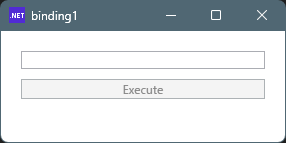
起動時、テキストボックスは空の状態で、ボタンは非活性(押せない)状態です。
テキストボックスに文字を入力すると、ボタンが活性化され押せる状態になります。
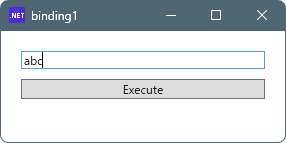
ボタンを押すとテキストボックスの内容が出力されます。

解説
MainWindow.xaml
Viewに相当し、UIのデザインを静的に宣言しています。
・MainWindow.xamlのデータソースをMainViewModelに設定する。
<Window.DataContext>
    <local:MainViewModel />
</Window.DataContext>
・テキストボックスの定義
<TextBox Text="{Binding SelectedValue, UpdateSourceTrigger=PropertyChanged}" />
MainViewModelクラスのSelectedValueプロパティとバインディングすることを宣言しています。
UpdateSourceTrigger=PropertyChangedを指定することで、1文字入力することに変更イベントもとに、内容の変更バインディング(同期処理)が実行されます。
指定しない場合、TextBoxからフォーカスが失われた際、バインディングされます。
・ボタンの定義
<Button Content="Execute"
           Margin="0,10,0,0"
           Command="{Binding ActionCommand}"
           CommandParameter="{Binding SelectedValue}" />
CommandプロパティがActionCommandプロパティとバインディングすることを宣言しています。
また、CommandParameterはSelectedValueとバインディングすることを宣言しています。
SelectedValueは、TextBoxのText(入力値)ともバインドしていますので、TextBoxの入力した内容が、CommandParameterに影響を与えます。
ActionCommand.cs
ICommandの実装です。
コンストラクタで、実行するコードを
Action<object?> executeで、コマンドが有効・無効のフラグを
Predicate<object?> canExecuteで、引数として渡されて、メンバーとしてセットされます。
そして、
public void Execute(object? parameter)や
public bool CanExecute(object? parameter)で、実行されます。
public void RaiseCanExecuteChanged()では、
CanExecuteChanged?.Invoke(this, EventArgs.Empty);で、イベントを発火しています。
こちらは、parameter(CommandParameter)であるSelectedValueが変更された際、呼び出されるようにすることで、
CanExecuteが変化した可能性があることを通知しています。
MainViewModel.cs
まず、
public ActionCommand ActionCommand { get; }は、前項のActionCommandをプロパティとして公開しています。
またコンストラクタ内で、
ActionCommand = new ActionCommand(
    execute: p =>
    {
        var value = (string)p!;
        // 実行処理
        if (value is not null)
        {
             Debug.Print($"{value}");
        }
    },
    canExecute: p =>
    {
         return !string.IsNullOrEmpty(p as string);
    }
);
ActionCommandを生成し、
executeでコマンドで実行したい内容(入力文字のデバック出力)と、
canExecuteで実行の許可フラグ(入力文字がnull又は空ではないこと)
を定義しています。
private string? _selectedValue;
public string? SelectedValue
{
    get => _selectedValue;
    set
    {
        if (_selectedValue == value) return;
        _selectedValue = value;
        OnPropertyChanged();

        // ★ parameter の元が変わったので通知
        ActionCommand.RaiseCanExecuteChanged();
    }
}
SelectedValueプロパティをプロパティと公開し、バインドソースとして機能します。
getはメンバー変数_selectedValueをそのまま返します。
setは、_selectedValueにvalueをセットするわけですが、
セットされるということは値が変更されることに成りますので、
OnPropertyChanged();で、変更を通知しています。
OnPropertyChangedのCallerMemberNameは、nameがnullの場合(引数を省略)プロパティの名前(この場合”SelectedValue”)がセットされます。
また、
ActionCommand.RaiseCanExecuteChanged();で、ActionCommandにも、SelectedValueが変化したことを通知し、
ボタンの実行可能・不可能フラグにに連動(バインディング)します。
流れ
各コードは最終的に
CanExecuteChanged
と
PropertyChanged
にたどり着きますが、
これ以降のコードは記述されていません。
それは、
バインディングシステム側で、
処理されているためと考えられます。
① データの流れ
② 通知の流れ
汎用ベースクラス
INotifyPropertyChangedやICommandの実装は、
毎回同じようなコードになるので、
ベースクラスにまとめて継承する使い方が便利です。
ViewModelのベースクラス
ViewModelBase.cs
using System;
using System.Collections.Generic;
using System.ComponentModel;
using System.Runtime.CompilerServices;

public abstract class ViewModelBase : INotifyPropertyChanged
{
    public event PropertyChangedEventHandler? PropertyChanged;

    protected virtual void OnPropertyChanged([CallerMemberName] string? propertyName = null)
        => PropertyChanged?.Invoke(this, new PropertyChangedEventArgs(propertyName));

    /// <summary>
    /// backing field を更新して PropertyChanged を発火する定番ヘルパー。
    /// </summary>
    protected bool SetProperty<T>(
        ref T field,
        T value,
        Action? onChanged,
        [CallerMemberName] string? propertyName = null)
    {
        if (EqualityComparer<T>.Default.Equals(field, value))
            return false;

        field = value;
        onChanged?.Invoke();
        OnPropertyChanged(propertyName);
        return true;
    }
}

/*
使い方1
public sealed class MainViewModel : ViewModelBase
{
    private string? _name;

    public string? Name
    {
        get => _name;
        set => SetProperty(ref _name, value);
    }
}

使い方2
private string? _firstName;
private string? _lastName;

public string? FirstName
{
    get => _firstName;
    set => SetProperty(ref _firstName, value, () => OnPropertyChanged(nameof(FullName)));
}

public string? LastName
{
    get => _lastName;
    set => SetProperty(ref _lastName, value, () => OnPropertyChanged(nameof(FullName)));
}

public string FullName => $"{FirstName} {LastName}".Trim();


*/
Commandのベースクラス
RelayCommand.cs
public sealed class RelayCommand<T> : ICommand
{
    private readonly Action<T?> _execute;
    private readonly Func<T?, bool>? _canExecute;

    public RelayCommand(Action<T?> execute, Func<T?, bool>? canExecute = null)
    {
        _execute = execute ?? throw new ArgumentNullException(nameof(execute));
        _canExecute = canExecute;
    }

    public bool CanExecute(object? parameter)
        => _canExecute?.Invoke((T?)parameter) ?? true;

    public void Execute(object? parameter)
        => _execute((T?)parameter);

    public event EventHandler? CanExecuteChanged;

    public void RaiseCanExecuteChanged()
        => CanExecuteChanged?.Invoke(this, EventArgs.Empty);
}
/*
使い方(ViewModelBaseと一緒に使う例)
public sealed class MainViewModel : ViewModelBase
{
    private string? _text;

    public string? Text
    {
        get => _text;
        set
        {
            if (SetProperty(ref _text, value))
            {
                SaveCommand.RaiseCanExecuteChanged();
            }
        }
    }

    public RelayCommand SaveCommand { get; }

    public MainViewModel()
    {
        SaveCommand = new RelayCommand(
            execute: Save,
            canExecute: () => !string.IsNullOrWhiteSpace(Text)
        );
    }

    private void Save()
    {
        // 保存処理
    }
}
*/

コメント