
・コードビハインドでMouseMoveイベントを使えば、マウス座標が取得出来るはず。
using System.Windows;

namespace MouseEventSample;

public partial class MainWindow : Window
{
    public MainWindow()
    {
        InitializeComponent();


        Canvas1.MouseMove += (sender, e) =>
        {
            // 座標を取得
            Point p = e.GetPosition(Canvas1);
            Title = $"{p.X} {p.Y}";
        };
    }
}
<Window x:Class="MouseEventSample.MainWindow"
xmlns="http://schemas.microsoft.com/winfx/2006/xaml/presentation"
xmlns:x="http://schemas.microsoft.com/winfx/2006/xaml"
xmlns:d="http://schemas.microsoft.com/expression/blend/2008"
xmlns:mc="http://schemas.openxmlformats.org/markup-compatibility/2006"
xmlns:local="clr-namespace:MouseEventSample"
mc:Ignorable="d"
Title="MainWindow" Height="768" Width="768">
<Canvas
x:Name="Canvas1"
Width="512"
Height="512">
</Canvas>
</Window>
Canvas上マウスカーソルを移動させると、ウィンドウのタトルに座標が表示されるはずが、MainWindowのまま変化しない。

CanvasのBackgroundが設定されていない(null)状態だとマウス移動のイベントが発生しないらしい。
<Window x:Class="MouseEventSample.MainWindow"
        xmlns="http://schemas.microsoft.com/winfx/2006/xaml/presentation"
        xmlns:x="http://schemas.microsoft.com/winfx/2006/xaml"
        xmlns:d="http://schemas.microsoft.com/expression/blend/2008"
        xmlns:mc="http://schemas.openxmlformats.org/markup-compatibility/2006"
        xmlns:local="clr-namespace:MouseEventSample"
        mc:Ignorable="d"
        Title="MainWindow" Height="768" Width="768">
        <Canvas
            x:Name="Canvas1"
            Width="512"
            Height="512"
            Background="Transparent">
                <!-- Background を色(透明)をセットしないとイベントが発生しない -->
        </Canvas>
</Window>
BackgroundにTransparentをセットしたところ、見た目変わらず、タイトルに座標が表示されるようになった。

・Canvas領域が見えないので枠線を書いてみる。
<Window x:Class="MouseEventSample.MainWindow"
        xmlns="http://schemas.microsoft.com/winfx/2006/xaml/presentation"
        xmlns:x="http://schemas.microsoft.com/winfx/2006/xaml"
        xmlns:d="http://schemas.microsoft.com/expression/blend/2008"
        xmlns:mc="http://schemas.openxmlformats.org/markup-compatibility/2006"
        xmlns:local="clr-namespace:MouseEventSample"
        mc:Ignorable="d"
        Title="MainWindow" Height="768" Width="768">
        <Border
            HorizontalAlignment="Center"
            VerticalAlignment="Center"
            BorderBrush="Black"
            BorderThickness="5">
            <!-- HorizontalAlignment 水平方向:中心基準 -->
            <!-- VerticalAlignment 垂直方向:中心基準 -->
            <Canvas
                x:Name="Canvas1"
                Width="512"
                Height="512"
                Background="Transparent">
                    <!-- Background を色(透明)をセットしないとイベントが発生しない -->
            </Canvas>
        </Border>
</Window>

Borderで少し太めの枠線を引いて見ました。
枠内でマウスを移動すると、タイトルに座標が表示されることを確認しました。
・CanvasサイズがWindowサイズより大きい場合スクロールするようにしたい。
GridとScrollViewerを追加しウィンドウサイズを小さくしています。
<Window x:Class="MouseEventSample.MainWindow"
        xmlns="http://schemas.microsoft.com/winfx/2006/xaml/presentation"
        xmlns:x="http://schemas.microsoft.com/winfx/2006/xaml"
        xmlns:d="http://schemas.microsoft.com/expression/blend/2008"
        xmlns:mc="http://schemas.openxmlformats.org/markup-compatibility/2006"
        xmlns:local="clr-namespace:MouseEventSample"
        mc:Ignorable="d"
        Title="MainWindow" Height="256" Width="256">
    <Grid>
        <ScrollViewer
            HorizontalScrollBarVisibility="Auto"
            VerticalScrollBarVisibility="Auto">
            <Border
                HorizontalAlignment="Center"
                VerticalAlignment="Center"
                BorderBrush="Black"
                BorderThickness="5">
                <!-- HorizontalAlignment 水平方向:中心基準 -->
                <!-- VerticalAlignment 垂直方向:中心基準 -->
                <Canvas
                    x:Name="Canvas1"
                    Width="512"
                    Height="512"
                    Background="Transparent">
                        <!-- Background を色(透明)をセットしないとイベントが発生しない -->
                </Canvas>
            </Border>
        </ScrollViewer>
    </Grid>
</Window>
スクロールバーが表示される。
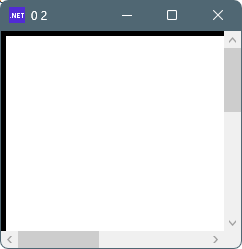
スクロールすることが確認できました。また、座標も取得出来ました。
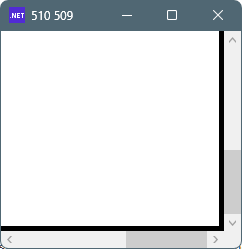
・座標が0.5と出るのが気になるので対策します。
<Window x:Class="MouseEventSample.MainWindow"
        xmlns="http://schemas.microsoft.com/winfx/2006/xaml/presentation"
        xmlns:x="http://schemas.microsoft.com/winfx/2006/xaml"
        xmlns:d="http://schemas.microsoft.com/expression/blend/2008"
        xmlns:mc="http://schemas.openxmlformats.org/markup-compatibility/2006"
        xmlns:local="clr-namespace:MouseEventSample"
        mc:Ignorable="d"
        UseLayoutRounding="True"
        SnapsToDevicePixels="True"
        Title="MainWindow" Height="600" Width="600">
    <Grid>
        <ScrollViewer
            HorizontalScrollBarVisibility="Auto"
            VerticalScrollBarVisibility="Auto">
            <Border
                HorizontalAlignment="Center"
                VerticalAlignment="Center"
                BorderBrush="Black"
                BorderThickness="5">
                <!-- HorizontalAlignment 水平方向:中心基準 -->
                <!-- VerticalAlignment 垂直方向:中心基準 -->
                <Canvas
                    x:Name="Canvas1"
                    Width="512"
                    Height="512"
                    Background="Transparent">
                        <!-- Background を色(透明)をセットしないとイベントが発生しない -->
                </Canvas>
            </Border>
        </ScrollViewer>
    </Grid>
</Window>
Windowに以下の2行を追加
UseLayoutRounding="True"
SnapsToDevicePixels="True"
色々試してみて、Canvas上の座標を確認することが出来ました。


コメント