WPFのItemsControlでページャーを作ります。
ソースコード
ファイル名:PagerDemo.csproj
<Project Sdk="Microsoft.NET.Sdk">

  <PropertyGroup>
    <OutputType>WinExe</OutputType>
    <TargetFramework>net10.0-windows</TargetFramework>
    <Nullable>enable</Nullable>
    <ImplicitUsings>enable</ImplicitUsings>
    <UseWPF>true</UseWPF>
  </PropertyGroup>

</Project>
ファイル名:Helpers\RoutedCommandHelper.cs
using System.Windows;
using System.Windows.Input;

namespace PagerDemo;
public static class RoutedCommandHelper
{
    public static RoutedUICommand Create(
        Window window,
        string? name,
        Action<ExecutedRoutedEventArgs> execute,
        Func<bool>? canExecute = null,
        Key? key = null,
        ModifierKeys modifiers = ModifierKeys.None)
    {
        var cmd = name == null
            ? new RoutedUICommand()
            : new RoutedUICommand(name, name, window.GetType());

        ExecutedRoutedEventHandler exec = (_, e) =>
            execute(e);

        CanExecuteRoutedEventHandler can = (_, e) =>
            e.CanExecute = canExecute?.Invoke() ?? true;

        window.CommandBindings.Add(
            new CommandBinding(cmd, exec, can));

        if (key != null)
        {
            window.InputBindings.Add(
                new KeyBinding(cmd, key.Value, modifiers));
        }

        return cmd;
    }
}
ファイル名:Helpers\ViewModelBase.cs
// 汎用的な ViewModel 基底クラス実装。
using System.ComponentModel;
using System.Runtime.CompilerServices;

namespace PagerDemo;
public abstract class ViewModelBase : INotifyPropertyChanged
{
    public event PropertyChangedEventHandler? PropertyChanged;

    protected void OnPropertyChanged([CallerMemberName] string? name = null)
        => PropertyChanged?.Invoke(this, new PropertyChangedEventArgs(name));
}
ファイル名:MainViewState.cs
using System.Collections.ObjectModel;

namespace PagerDemo;
public class MainViewState : ViewModelBase
{
    public ObservableCollection<PagerItem> PagerItems { get; } = [];
    public int PagerItemsMax { get; set;} = 0;
    public int PagerItemsCurrent { get; set;} = 0;
}
ファイル名:MainWindow.xaml.cs
using System.Windows;
using System.Windows.Input;

namespace PagerDemo;

public partial class MainWindow : Window
{
    public MainViewState State { get; } = new();
    public RoutedUICommand NavigateCommand { get; private set; }
    public MainWindow()
    {
        InitializeComponent();

        NavigateCommand = RoutedCommandHelper.Create(
            window: this,
            name: "Navigate",
            execute: Navigate);

        DataContext = this;

        this.Loaded += (sender, e) =>
        {
            // 初期値
            SetCurrentValue(1, 20);
        };
    }
    void SetCurrentValue(int value, int max)
    {
        State.PagerItems.Clear();
        State.PagerItemsMax = max;
        State.PagerItemsCurrent = value;

        if (value <= 0 || max <= 0) return;

        // --- 先頭 ---
        State.PagerItems.Add(new PagerItem
        {
            DisplayName = "1",
            Value = 1
        });

        if (max == 1) return;

        // ページ数が少ない場合は全部表示
        if (max <= 6)
        {
            for (int i = 2; i <= max; i++)
            {
                State.PagerItems.Add(new PagerItem
                {
                    DisplayName = i.ToString(),
                    Value = i
                });
            }
            return;
        }

        // -----------------------------
        // 中央表示範囲の計算(最大5)
        // -----------------------------

        const int windowSize = 5;

        int start = value - 1;
        int end   = value + 4;

        // 左端補正
        if (start < 2)
        {
            start = 2;
            end = start + windowSize - 1;
        }

        // 右端補正
        if (end > max - 1)
        {
            end = max - 1;
            start = end - windowSize + 1;
        }

        // --- 中央ページ ---
        for (int i = start; i <= end; i++)
        {
            State.PagerItems.Add(new PagerItem
            {
                DisplayName = i.ToString(),
                Value = i
            });
        }

        // --- 末尾 ---
        State.PagerItems.Add(new PagerItem
        {
            DisplayName = max.ToString(),
            Value = max
        });

        // -----------------------------
        // 「...」補正
        // -----------------------------

        // 先頭側
        if (State.PagerItems[1].Value != 2)
        {
            State.PagerItems[1].DisplayName = "...";
        }

        // 末尾側
        int lastMiddleIndex = State.PagerItems.Count - 2;
        if (State.PagerItems[lastMiddleIndex].Value != max - 1)
        {
            State.PagerItems[lastMiddleIndex].DisplayName = "...";
        }
    }
    void Navigate(ExecutedRoutedEventArgs e)
    {
        var x = e.Parameter as PagerItem;
        if (x is null) return;

        //System.Diagnostics.Debug.Print($"{x.Value}");
        SetCurrentValue(x.Value, State.PagerItemsMax);
    }
}
ファイル名:PagerItem.cs
// ページャーの項目を表すクラス
namespace PagerDemo;
public sealed class PagerItem
{
    public string DisplayName { get; set; } = "";
    public int Value { get; set; } = 0;
}
ファイル名:MainWindow.xaml
<Window x:Class="PagerDemo.MainWindow"
        xmlns="http://schemas.microsoft.com/winfx/2006/xaml/presentation"
        xmlns:x="http://schemas.microsoft.com/winfx/2006/xaml"
        xmlns:d="http://schemas.microsoft.com/expression/blend/2008"
        xmlns:mc="http://schemas.openxmlformats.org/markup-compatibility/2006"
        xmlns:local="clr-namespace:PagerDemo"
        mc:Ignorable="d"
        Title="PagerDemo" Height="200" Width="400">
    <Grid Margin="8">
        <ItemsControl
            ItemsSource="{Binding State.PagerItems}"
            HorizontalAlignment="Center"
            VerticalAlignment="Top"
            Height="24">

            <ItemsControl.ItemsPanel>
                <ItemsPanelTemplate>
                    <StackPanel Orientation="Horizontal"/>
                    <!-- ItemsControlの項目を水平方向に配置 -->
                </ItemsPanelTemplate>
            </ItemsControl.ItemsPanel>

            <ItemsControl.ItemTemplate>
                <DataTemplate>
                    <StackPanel Orientation="Horizontal">
                        <!-- ItemsControlのItemを水平方向に配置 -->

                        <!-- 区切り -->
                        <TextBlock Text="  "
                            Margin="3,0"
                            VerticalAlignment="Center" />

                        <!-- クリック可能なページャー要素 -->
                        <Button Content="{Binding DisplayName}"
                                FontSize="18"
                                Padding="2,0"
                                Margin="0"
                                Background="Transparent"
                                BorderThickness="0"
                                Cursor="Hand"
                                VerticalAlignment="Center"
                                Command="{Binding DataContext.NavigateCommand,
                                                    RelativeSource={RelativeSource AncestorType=ItemsControl}}"
                                CommandParameter="{Binding}" />
                                <!-- Command ItemsControlをソースに指定 -->
                                <!-- CommandParameter BreadcrumbItemとバインド -->
                    </StackPanel>
                </DataTemplate>
            </ItemsControl.ItemTemplate>
        </ItemsControl>
    </Grid>
</Window>
実行例
スクリーンショット
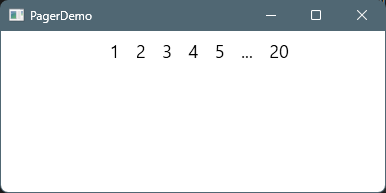
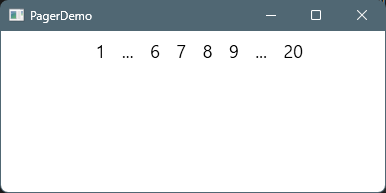
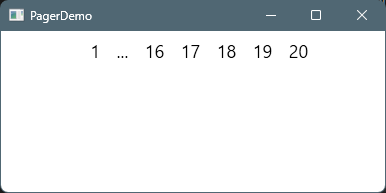
それらしく作ったつもりですが、「…」周りと、全体の件数がの制御がコントロールしきれていません。とりあえず動作に支障はなさそうです。
コメント