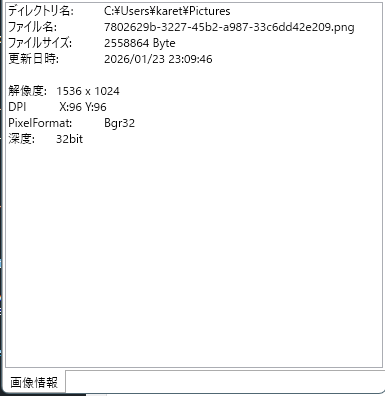
タブとユーザーコントロールを使ったアプリの雛形として、
機能的に簡易な画像ファイルの情報を取得するアプリを作成しました。
ソースコード
ファイル名:ImageInfo.csproj
<Project Sdk="Microsoft.NET.Sdk">

  <PropertyGroup>
    <OutputType>WinExe</OutputType>
    <TargetFramework>net10.0-windows</TargetFramework>
    <Nullable>enable</Nullable>
    <ImplicitUsings>enable</ImplicitUsings>
    <UseWPF>true</UseWPF>
  </PropertyGroup>

</Project>
通常のWPFプロジェクト
ファイル名:MainWindow.xaml
<Window x:Class="ImageInfo.MainWindow"
        xmlns="http://schemas.microsoft.com/winfx/2006/xaml/presentation"
        xmlns:x="http://schemas.microsoft.com/winfx/2006/xaml"
        xmlns:d="http://schemas.microsoft.com/expression/blend/2008"
        xmlns:mc="http://schemas.openxmlformats.org/markup-compatibility/2006"
        xmlns:local="clr-namespace:ImageInfo"
        mc:Ignorable="d"
        Title="MainWindow" Height="800" Width="400">
        <TabControl
                x:Name="TabHost"
                TabStripPlacement="Bottom"/>
</Window>
メインウィンドウのXAML。
タブコントロール(TabHost)を一つ配置し、タブ内にUserControlを配置します。
今回のアプリはタブが一つですが、複数のタブで切り替えることで、
一つのアプリに多数のフォームを実装することが出来ます。。
TabStripPlacementはタブの位置です。
下側に配置する設定にしました。
ファイル名:MainWindow.xaml.cs
using System.Windows;
using System.Windows.Controls;

namespace ImageInfo;

public partial class MainWindow : Window
{
    public MainWindow()
    {
        InitializeComponent();
        // タブのアイテムを動的に追加するループ
        TabItem? firstTab = null;
        foreach (var factory in TabViewRegistry.Tabs)
        {
            var view = factory();

            var tab = new TabItem
            {
                Header = view.Title,
                Content = view   // ← UserControl
            };
            if (firstTab is null)
            {
                firstTab = tab;
            }
            TabHost.Items.Add(tab);
        }
        TabHost.SelectedItem = firstTab;
    }
}

// mkdir C:\Users\karet\Tools\ImageInfo
// dotnet build .\ImageInfo.csproj -c Release -o "C:\Users\karet\Tools\ImageInfo"
メインウィンドウのコードビハインド(C#)
コンストラクタで、TabViewRegistry.Tabsから、
タブに配置するUserControl(View)を取得しています。
今回は1件だけなのでforeachにする必要は無いですが、増えた場合を想定したコードになっています。
データバインディングではなく、TabHost.Items.Add(tab)でコントロールのItemsに直接追加しています。
TabHost.SelectedItem = firstTab;で先頭(左側)のタブが初期表示されるようにしています。
ファイル名:TabViewRegistry.cs
using ImageInfo.Views;


namespace ImageInfo;

public static class TabViewRegistry
{
    public static IReadOnlyList<Func<ITabView>> Tabs { get; } =
        [
            () => new ImageInfoView(),
        ];
}
タブの情報を管理するクラスです。
タブを増やしたい場合はTabsの要素にUserControl(View)のインスタンスを増やします。
ファイル名:Views\ITabView.cs
namespace ImageInfo.Views;

public interface ITabView
{
    string Title { get; }
}
こちらのインターフェイスを実装したクラスが、TabViewRegistry.Tabsの要素になれます。
ファイル名:Views\ImageInfoView.xaml.cs
using System.IO;
using System.Windows.Controls;
using System.Windows.Media;
using System.Windows.Media.Imaging;
using ImageInfo.Helpers;

namespace ImageInfo.Views;
public partial class ImageInfoView : UserControl, ITabView
{
    public string Title => "画像情報";
    public ImageInfoView()
    {
        InitializeComponent();

        Wiring.AcceptFilesPreview(Border1, files =>
        {
            if (files.Length == 0) return;

            string file = files[0];
            if (!File.Exists(file)) return;

            BitmapSource bmp = BitmapImageHelper.Load(file);
            PreviewImage.Source = bmp;

            var info = new FileInfo(file);

            string text = "";
            text += "ディレクトリ名:\t" + Path.GetDirectoryName(file) + "\n";
            text += "ファイル名:\t" + Path.GetFileName(file) + "\n";
            text += "ファイルサイズ:\t" + info.Length.ToString() + " Byte\n";
            text += "更新日時:\t" + info.LastWriteTime.ToString("yyyy/MM/dd HH:mm:ss") + "\n";
            text += "\n";
            text += "解像度:\t" + bmp.PixelWidth + " x " + bmp.PixelHeight + "\n";
            text += "DPI\t X:" + bmp.DpiX + " Y:" + bmp.DpiY + "\n";

            int bitsPerPixel = bmp.Format.BitsPerPixel;
            text += $"PixelFormat:\t{bmp.Format}\n";
            text += $"深度:\t{bitsPerPixel}bit\n";

            text += "\n";

            InfoText.Text = text;
        }, ".jpeg", ".png", ".bmp", ".jpg");
    }
}
タブ要素の本体
UserControlを継承し、ITabViewを実装していることが確認できます。
ITabViewのTitel(サンプルコードでは画像情報)はタブのタイトルとして表示されます。
ファイル名:Views\ImageInfoView.xaml
<UserControl x:Class="ImageInfo.Views.ImageInfoView"
             xmlns="http://schemas.microsoft.com/winfx/2006/xaml/presentation"
             xmlns:x="http://schemas.microsoft.com/winfx/2006/xaml">

    <Grid>
        <Grid.RowDefinitions>
            <!-- プレビュー&D&D -->
            <RowDefinition Height="*"/>
            <!-- 情報エリア -->
            <RowDefinition Height="*"/>
        </Grid.RowDefinitions>

        <!-- プレビュー&D&D -->
        <Grid
            Grid.Row="0">
            <Border
                x:Name="Border1"
                BorderThickness="4"
                CornerRadius="6"
                BorderBrush="Black"
                Background="Transparent"
                Margin="5">
                <Canvas>
                    <Image
                        x:Name="PreviewImage"
                        Width="{Binding ActualWidth, RelativeSource={RelativeSource FindAncestor, AncestorType=Border}}"
                        Height="{Binding ActualHeight, RelativeSource={RelativeSource FindAncestor, AncestorType=Border}}"
                        Stretch="Uniform" />
                    <TextBlock>こちらにドラッグアンドドロップして下さい</TextBlock>
                </Canvas>
            </Border>
        </Grid>

        <!-- 情報エリア -->
        <Grid
            Grid.Row="1">
            <TextBox
                x:Name="InfoText"/>
        </Grid>
    </Grid>

</UserControl>
タブ要素のXAML側。
XAMLの先頭部分がUserControlとなっているあたりが若干異なりますが、
基本的にMainWindow.xamlと同じです。
MainWindow.xamlのTabHost内で表示されるViewになります。
Helpers
ヘルパー類で、staticメソッドのライブラリですので、
他のアプリで再利用可能です。
ファイル名:Helpers\BitmapImageHelper.cs
using System.IO;
using System.Windows.Media.Imaging;

namespace ImageInfo.Helpers;

public static class BitmapImageHelper
{
    public static BitmapImage Load(string path)
    {
        var bmp = new BitmapImage();

        using var fs = new FileStream(
            path,
            FileMode.Open,
            FileAccess.Read,
            FileShare.ReadWrite);

        bmp.BeginInit();
        bmp.CacheOption = BitmapCacheOption.OnLoad;
        bmp.StreamSource = fs;
        bmp.EndInit();
        bmp.Freeze();

        return bmp;
    }
}
ファイル名:Helpers\Wiring.cs
// イベントなどの配線関連のヘルパー群
using System.Windows;

namespace ImageInfo.Helpers;
public static class Wiring
{
    /*
     * コントロールにファイルのドラッグアンドドロップするヘルパー(Preview版)
     * 受け入れ拡張子をオプション指定する機能あり。
     */
    public static void AcceptFilesPreview(
        FrameworkElement el,
        Action<string[]> onFiles,
        params string[] exts)
    {
        el.AllowDrop = true;

        DragEventHandler? over = null;
        DragEventHandler? drop = null;

        over = (_, e) =>
        {
            if (e.Data.GetDataPresent(DataFormats.FileDrop))
                e.Effects = DragDropEffects.Copy;
            else
                e.Effects = DragDropEffects.None;

            // このイベントはここで処理済みであることを通知する
            // (以降のコントロールへイベントを伝播させない)
            e.Handled = true;
        };

        drop = (_, e) =>
        {
            if (!e.Data.GetDataPresent(DataFormats.FileDrop))
                return; // ファイルドロップ以外は処理せず、次の要素へイベントを流す

            var files = (string[])e.Data.GetData(DataFormats.FileDrop)!;

            if (exts?.Length > 0)
            {
                files = files
                    .Where(f => exts.Any(x =>
                        f.EndsWith(x, StringComparison.OrdinalIgnoreCase)))
                    .ToArray();
            }

            if (files.Length > 0)
                onFiles(files);

            // 外部ファイルのドロップはここで責任を持って処理したことを示す
            // (以降の RoutedEvent の伝播を終了させる)
            e.Handled = true;
        };

        el.PreviewDragOver += over; // Preview(Tunnel)段階で受信
        el.PreviewDrop += drop;     // Preview(Tunnel)段階で受信
    }

}
App.xaml
アプリケーションオブジェクト。
今回は変更点無し。
ファイル名:App.xaml.cs
using System.Configuration;
using System.Data;
using System.Windows;

namespace ImageInfo;

/// <summary>
/// Interaction logic for App.xaml
/// </summary>
public partial class App : Application
{
}
ファイル名:App.xaml
<Application x:Class="ImageInfo.App"
             xmlns="http://schemas.microsoft.com/winfx/2006/xaml/presentation"
             xmlns:x="http://schemas.microsoft.com/winfx/2006/xaml"
             xmlns:local="clr-namespace:ImageInfo"
             StartupUri="MainWindow.xaml">
    <Application.Resources>

    </Application.Resources>
</Application>
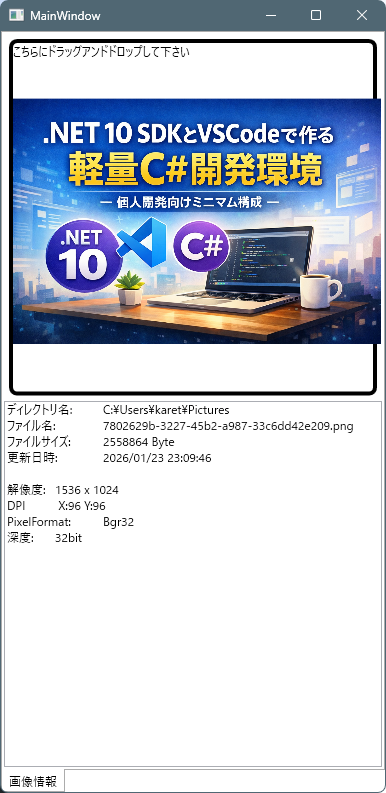
実行例
画像ファイルをドラッグアンドドロップすると、画像の情報が表示されます。

コメント