WPF には一覧から項目を選択するためのコントロールは用意されていますが、
「選択専用」や「編集機能付き」といった
実用的なセレクターダイアログは標準では用意されていません。
この記事では、コードビハインドのみで実装した
再利用可能な汎用セレクターダイアログを紹介します。
選択専用セレクター
ソースコード
ファイル名:Helpers\SelectorDialog.cs
// セレクターダイアログ
using System.Windows;
using System.Windows.Controls;

namespace Maywork.WPF.Helpers;
public sealed class SelectorDialog<T> : Window
{
    private readonly ListView _listView;
    private readonly Button _okButton;
    private readonly Button _cancelButton;

    public T? SelectedItem { get; private set; }

    // コンストラクタ
    public SelectorDialog(IEnumerable<T> items, string? title = null)
    {


        // ダイアログのタイトル・サイズの定義
        Title = title ?? "Select item";
        Width = 520;
        Height = 420;
        MinWidth = 360;
        MinHeight = 260;

        // 起動時の位置を親ウィンドウの中央に配置
        WindowStartupLocation = WindowStartupLocation.CenterOwner;

        ResizeMode = ResizeMode.CanResize;  // リサイズ可
        ShowInTaskbar = false;  // タスクバーに表示しない

        // ===== Root Grid =====
        var root = new Grid
        {
            Margin = new Thickness(12)  // マージン
        };
        // <RowDefinition Height="*" /> ... ウィンドウサイズと連動し可変
        root.RowDefinitions.Add(new RowDefinition { Height = new GridLength(1, GridUnitType.Star) });
        // <RowDefinition Height="Auto" /> ... 内容に合わせてサイズが決定
        root.RowDefinitions.Add(new RowDefinition { Height = GridLength.Auto });

        // ===== ListView (Row 0) =====
        _listView = new ListView
        {
            Margin = new Thickness(0, 0, 0, 10),  // マージン
            ItemsSource = items?.ToList() ?? new List<T>(), // 引数itemsをアイテムソースとしてセット
        };
        // リストビューの選択が変更された
        _listView.SelectionChanged += (_, __) =>
        {
            // リストビュー選択された状態でOKボタンを有効化
            _okButton!.IsEnabled = _listView.SelectedItem != null;
        };

        Grid.SetRow(_listView, 0);  // リストビューをGridの0行目に配置
        root.Children.Add(_listView);   // リストビューをダイアログ(Window)に登録

        // ===== Buttons Panel (Row 1) =====
        var buttonPanel = new StackPanel
        {
            Orientation = Orientation.Horizontal,   // 水平積み
            HorizontalAlignment = HorizontalAlignment.Right // 右寄せ
        };

        // OKボタン
        _okButton = new Button
        {
            Content = "OK",
            Width = 90,
            IsEnabled = false,
            IsDefault = true, // Enterキー押下で押された扱いに成る
            Margin = new Thickness(0, 0, 8, 0)
        };
        // OKボタンクリックイベント
        _okButton.Click += (_, __) =>
        {
            SelectedItem = (T?)_listView.SelectedItem;
            DialogResult = true;
            Close();
        };

        // キャンセルボタン
        _cancelButton = new Button
        {
            Content = "Cancel",
            Width = 90,
            IsCancel = true, // Escキー押下で押された扱いに成る
        };
        // キャンセルボタンクリックイベント
        _cancelButton.Click += (_, __) =>
        {
            SelectedItem = default;
            DialogResult = false;
            Close();
        };

        // スタックパネルにボタンを追加
        buttonPanel.Children.Add(_okButton);
        buttonPanel.Children.Add(_cancelButton);

        // スタックパネルをGridの1番に
        Grid.SetRow(buttonPanel, 1);
        // スタックパネルをダイアログ(Window)に追加
        root.Children.Add(buttonPanel);

        // ダイアログ(Window)のContentにroot(Grid)をセット
        Content = root;
    }
}
ファイル名:ListSelectorDialogDemo.csproj
<Project Sdk="Microsoft.NET.Sdk">

  <PropertyGroup>
    <OutputType>WinExe</OutputType>
    <TargetFramework>net10.0-windows</TargetFramework>
    <Nullable>enable</Nullable>
    <ImplicitUsings>enable</ImplicitUsings>
    <UseWPF>true</UseWPF>
  </PropertyGroup>

</Project>
ファイル名:MainWindow.xaml
<Window x:Class="ListSelectorDialogDemo.MainWindow"
        xmlns="http://schemas.microsoft.com/winfx/2006/xaml/presentation"
        xmlns:x="http://schemas.microsoft.com/winfx/2006/xaml"
        xmlns:d="http://schemas.microsoft.com/expression/blend/2008"
        xmlns:mc="http://schemas.openxmlformats.org/markup-compatibility/2006"
        xmlns:local="clr-namespace:ListSelectorDialogDemo"
        mc:Ignorable="d"
        FontSize="12"
        Title="ListSelectorDialogDemo" Height="200" Width="400">
    <Grid>
        <WrapPanel Margin="16">
            <Button x:Name="EditButton" Padding="8" >選択</Button>
        </WrapPanel>
    </Grid>
</Window>
ファイル名:MainWindow.xaml.cs
using System.Windows;

using Maywork.WPF.Helpers;

namespace ListSelectorDialogDemo;


public partial class MainWindow : Window
{
    public MainWindow()
    {
        InitializeComponent();

        EditButton.Click += (_, __) =>
        {
            var items = new[] { "りんご", "バナナ", "マンゴー" };

            var dlg = new SelectorDialog<string>(items, "Selector")
            {
                Owner = this // MainWindow など
            };

            if (dlg.ShowDialog() == true)
            {
                var selected = dlg.SelectedItem;
                MessageBox.Show($"選択: {selected}");
            }
        };
    }
}
実行例
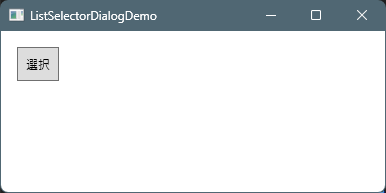
- 起動→ボタンを押す
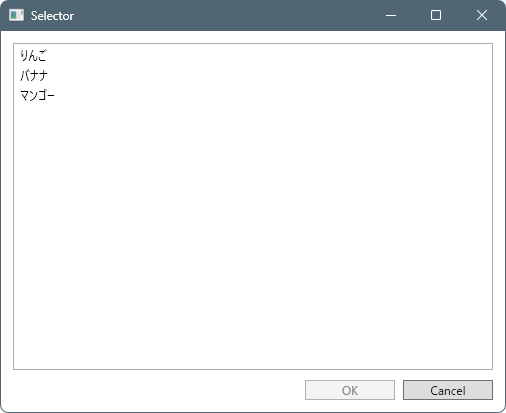
- ダイアログが表示→選択→OK
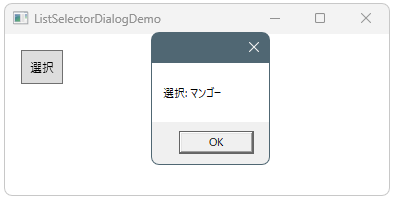
- 結果が表示される。
構成
MyWpfApp
├─ App.xaml.cs
├─ MainWindow.xaml.cs
│
├─ Helpers
│     ├─ SelectorDialog.cs
│     │   └─ 汎用・選択専用ダイアログ
│     │
│     └─ (どのアプリにも再利用可能)
│
└─ MainWindow.xaml.cs
編集機能付きセレクター
ソースコード
MyWpfApp
├─ App.xaml.cs
├─ MainWindow.xaml.cs
│
├─ Helpers
│ ├─ SelectorDialog.cs
│ │ └─ 汎用・選択専用ダイアログ
│ │
│ └─ (どのアプリにも再利用可能)
│
└─ MainWindow.xaml.cs
ファイル名:CollectionEditorDialogDemo.csproj
<Project Sdk="Microsoft.NET.Sdk">

  <PropertyGroup>
    <OutputType>WinExe</OutputType>
    <TargetFramework>net10.0-windows</TargetFramework>
    <Nullable>enable</Nullable>
    <ImplicitUsings>enable</ImplicitUsings>
    <UseWPF>true</UseWPF>
  </PropertyGroup>

</Project>
ファイル名:Helpers\CollectionEditorDialog.cs
using System.Collections.ObjectModel;
using System.Windows;
using System.Windows.Controls;

namespace Maywork.WPF.Helpers;

// 汎用コレクション編集ダイアログ
public sealed class CollectionEditorDialog<T> : Window
{
    private readonly ListView _listView;
    private readonly ObservableCollection<T> _items;

    public T? SelectedItem { get; private set; }

    // 呼び出し元から注入される処理
    public Func<T?>? AddItem { get; init; }
    public Func<T, T?>? EditItem { get; init; }
    public Action<T>? DeleteItem { get; init; }

    public IReadOnlyList<T> ResultItems => _items.ToList();

    public CollectionEditorDialog(IEnumerable<T> items, string? title = null)
    {
        // ---- Window 設定 ----
        Title = title ?? "Collection Editor";
        Width = 520;
        Height = 420;
        MinWidth = 360;
        MinHeight = 260;

        // 起動時の位置を親ウィンドウの中央に配置
        WindowStartupLocation = WindowStartupLocation.CenterOwner;
        ResizeMode = ResizeMode.CanResize;   // リサイズ可
        ShowInTaskbar = false;               // タスクバーに表示しない

        _items = new ObservableCollection<T>(items ?? Enumerable.Empty<T>());

        // ===== Root Grid =====
        var root = new Grid { Margin = new Thickness(12) };
        // <RowDefinition Height="*" />    ... ウィンドウサイズと連動し可変
        root.RowDefinitions.Add(new RowDefinition { Height = new GridLength(1, GridUnitType.Star) });
        // <RowDefinition Height="Auto" /> ... 内容に合わせてサイズが決定
        root.RowDefinitions.Add(new RowDefinition { Height = GridLength.Auto });

        // ===== ListView =====
        _listView = new ListView
        {
            Margin = new Thickness(0, 0, 0, 10),
            ItemsSource = _items
        };
        Grid.SetRow(_listView, 0);
        root.Children.Add(_listView);

        // ===== Buttons =====
        var panel = new StackPanel {
            Orientation = Orientation.Horizontal,
            HorizontalAlignment = HorizontalAlignment.Right
        };

        var addBtn    = new Button {
            Content = "Add",
            Width = 90,
            Margin = new Thickness(0, 0, 8, 0)
        };
        var editBtn   = new Button {
            Content = "Edit",
            Width = 90,
            Margin = new Thickness(0, 0, 8, 0),
            IsEnabled = false
        };
        var deleteBtn = new Button {
            Content = "Delete",
            Width = 90,
            Margin = new Thickness(0, 0, 16, 0),
            IsEnabled = false
        };
        var okBtn     = new Button {
            Content = "OK",
            Width = 90,
            IsDefault = true,
            IsEnabled = false
        };
        var cancelBtn = new Button {
            Content = "Cancel",
            Width = 90,
            IsCancel = true
        };

        _listView.SelectionChanged += (_, __) =>
        {
            bool hasSelection = _listView.SelectedItem != null;
            okBtn.IsEnabled = hasSelection;
            editBtn.IsEnabled = hasSelection;
            deleteBtn.IsEnabled = hasSelection;
        };

        // --- Add ---
        addBtn.Click += (_, __) =>
        {
            if (AddItem == null) return;

            var item = AddItem();
            if (item != null)
            {
                _items.Add(item);
                _listView.SelectedItem = item;
            }
        };

        // --- Edit ---
        editBtn.Click += (_, __) =>
        {
            if (EditItem == null) return;
            if (_listView.SelectedItem is not T item) return;

            var edited = EditItem(item);
            if (edited != null)
            {
                int index = _items.IndexOf(item);
                _items[index] = edited;
                _listView.SelectedItem = edited;
            }
        };

        // --- Delete ---
        deleteBtn.Click += (_, __) =>
        {
            if (DeleteItem == null) return;
            if (_listView.SelectedItem is not T item) return;

            DeleteItem(item);
            _items.Remove(item);
        };

        // --- OK / Cancel ---
        okBtn.Click += (_, __) =>
        {
            SelectedItem = (T?)_listView.SelectedItem;
            DialogResult = true;
            Close();
        };

        cancelBtn.Click += (_, __) =>
        {
            DialogResult = false;
            Close();
        };

        panel.Children.Add(addBtn);
        panel.Children.Add(editBtn);
        panel.Children.Add(deleteBtn);
        panel.Children.Add(okBtn);
        panel.Children.Add(cancelBtn);

        Grid.SetRow(panel, 1);
        root.Children.Add(panel);

        Content = root;
    }
}
ファイル名:Helpers\UserEditorDialog.cs
using System.Windows;
using System.Windows.Controls;

namespace Maywork.WPF.Helpers;

// string を1項目編集するだけのエディタダイアログ
public sealed class UserEditorDialog : Window
{
    private readonly TextBox _textBox;

    public string Result { get; private set; } = "";

    // 追加用
    public UserEditorDialog(string? title=null)
        : this(string.Empty, title)
    {
    }

    // 編集用
    public UserEditorDialog(string value, string? title=null)
    {
        Title = title ?? "Edit item";
        Width = 320;
        Height = 140;
        MinWidth = 260;
        MinHeight = 120;

        WindowStartupLocation = WindowStartupLocation.CenterOwner;
        ResizeMode = ResizeMode.NoResize;
        ShowInTaskbar = false;

        // ===== Root =====
        var root = new Grid { Margin = new Thickness(12) };
        root.RowDefinitions.Add(new RowDefinition { Height = GridLength.Auto });
        root.RowDefinitions.Add(new RowDefinition { Height = GridLength.Auto });

        // ===== TextBox =====
        _textBox = new TextBox
        {
            Text = value,
            MinWidth = 240,
            Margin = new Thickness(0, 0, 0, 10)
        };
        Grid.SetRow(_textBox, 0);
        root.Children.Add(_textBox);

        // ===== Buttons =====
        var panel = new StackPanel
        {
            Orientation = Orientation.Horizontal,
            HorizontalAlignment = HorizontalAlignment.Right
        };

        var okBtn = new Button
        {
            Content = "OK",
            Width = 80,
            IsDefault = true,
            Margin = new Thickness(0, 0, 8, 0)
        };
        okBtn.Click += (_, __) =>
        {
            Result = _textBox.Text;
            DialogResult = true;
            Close();
        };

        var cancelBtn = new Button
        {
            Content = "Cancel",
            Width = 80,
            IsCancel = true
        };
        cancelBtn.Click += (_, __) =>
        {
            DialogResult = false;
            Close();
        };

        panel.Children.Add(okBtn);
        panel.Children.Add(cancelBtn);

        Grid.SetRow(panel, 1);
        root.Children.Add(panel);

        Content = root;
    }
}
ファイル名:MainWindow.xaml
<Window x:Class="CollectionEditorDialogDemo.MainWindow"
        xmlns="http://schemas.microsoft.com/winfx/2006/xaml/presentation"
        xmlns:x="http://schemas.microsoft.com/winfx/2006/xaml"
        xmlns:d="http://schemas.microsoft.com/expression/blend/2008"
        xmlns:mc="http://schemas.openxmlformats.org/markup-compatibility/2006"
        xmlns:local="clr-namespace:CollectionEditorDialogDemo"
        mc:Ignorable="d"
        FontSize="12"
        Title="CollectionEditorDialogDemo" Height="200" Width="400">
    <Grid>
        <WrapPanel Margin="16">
            <Button x:Name="EditButton" Padding="8" >選択</Button>
        </WrapPanel>
    </Grid>
</Window>
ファイル名:MainWindow.xaml.cs
using System.Windows;

using Maywork.WPF.Helpers;

namespace CollectionEditorDialogDemo;

public partial class MainWindow : Window
{
    public MainWindow()
    {
        InitializeComponent();

        EditButton.Click += (_, __) =>
        {
            var items = new List<string>
            {
                "りんご",
                "ばなな",
                "マンゴー"
            };

            var dlg = new CollectionEditorDialog<string>(items, "String Collection")
            {
                Owner = this,

                AddItem = () =>
                {
                    var editor = new UserEditorDialog("追加");
                    if (editor.ShowDialog() != true)
                        return null;

                    var newItem = editor.Result;

                    // --- DB連携する場合はここ ---
                    // INSERT 処理
                    // SaveChanges() 等
                    // ----------------------------

                    return newItem;
                },

                EditItem = item =>
                {
                    var editor = new UserEditorDialog(item, "変更");
                    if (editor.ShowDialog() != true)
                        return null;

                    var editedItem = editor.Result;

                    // --- DB連携する場合はここ ---
                    // UPDATE 処理
                    // SaveChanges() 等
                    // ----------------------------

                    return editedItem;
                },

                DeleteItem = item =>
                {
                    if (MessageBox.Show(
                            $"\"{item}\" を削除しますか?",
                            "確認",
                            MessageBoxButton.YesNo,
                            MessageBoxImage.Question)
                        != MessageBoxResult.Yes)
                    {
                        return;
                    }

                    // --- DB連携する場合はここ ---
                    // DELETE 処理
                    // SaveChanges() 等
                    // ----------------------------
                }
            };

            if (dlg.ShowDialog() == true)
            {
                var selected = dlg.SelectedItem;
                MessageBox.Show($"選択: {selected}");
            }
        };
    }
}
実行例
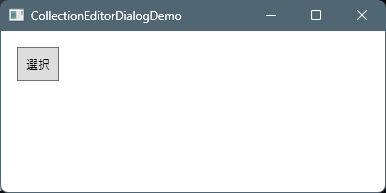
起動
- 起動→ボタンを押す
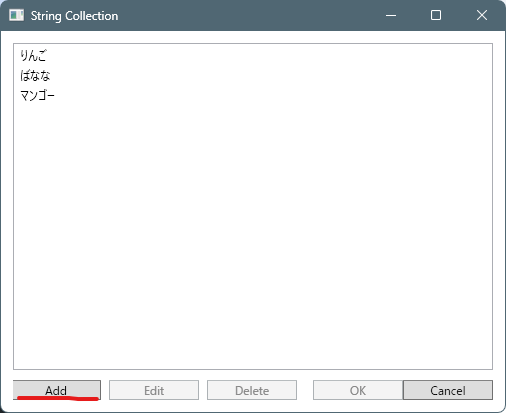
- 「Add」を押す
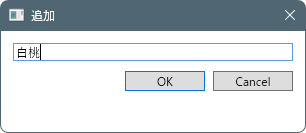
- 追加要素を入力→OK
- リストビューに追加された様子
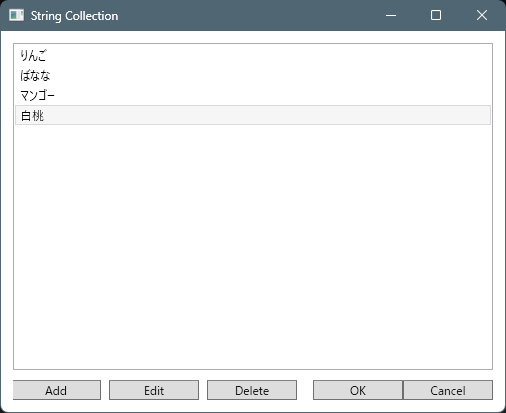
追加
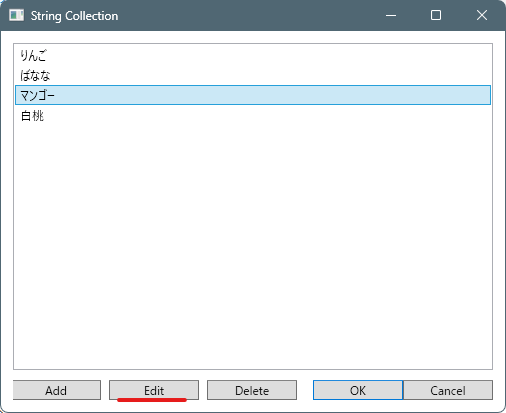
編集
- 要素を選択→「Edit」を押す
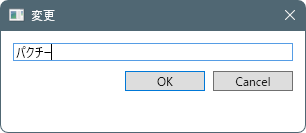
- 編集→OK
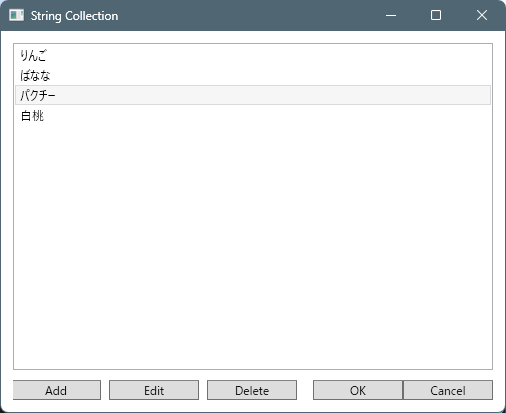
- リストビューが編集された様子
削除
- 要素を選択→「Delete」を押す
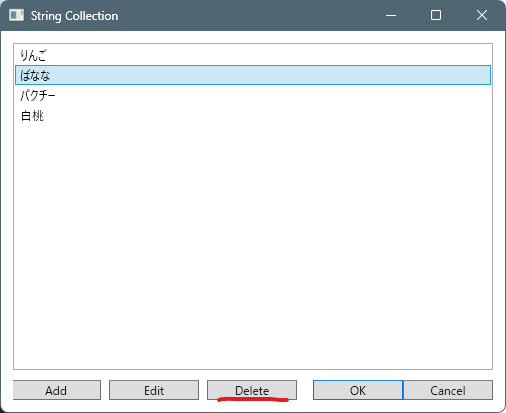
- 削除確認
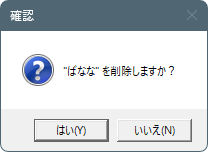
- リストビューが削除された様子
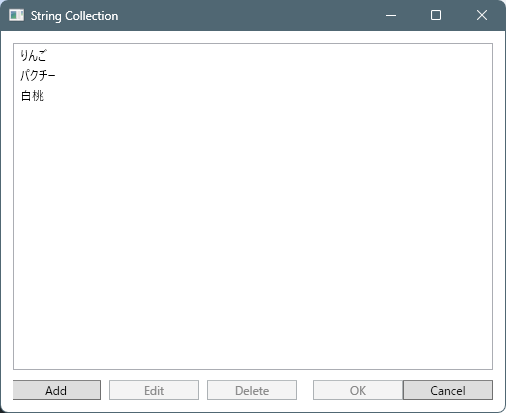
構成
MyWpfApp
├─ App.xaml.cs
├─ MainWindow.xaml.cs
│
├─ Helpers
│     ├─ CollectionEditorDialog.cs
│     │   └─ 汎用・編集機能付きセレクター
│     │
│     ├─ UserEditorDialog.cs
│     │   └─ アプリ固有の編集UI
│     │
│     └─ (どのアプリにも再利用可能)
│
└─ MainWindow.xaml.cs
UserEditorDialogをHelpersに入れてしまっていますが、文字列なら動きますが、それ以外の場合は独自に作る必要がありますね。
コメント