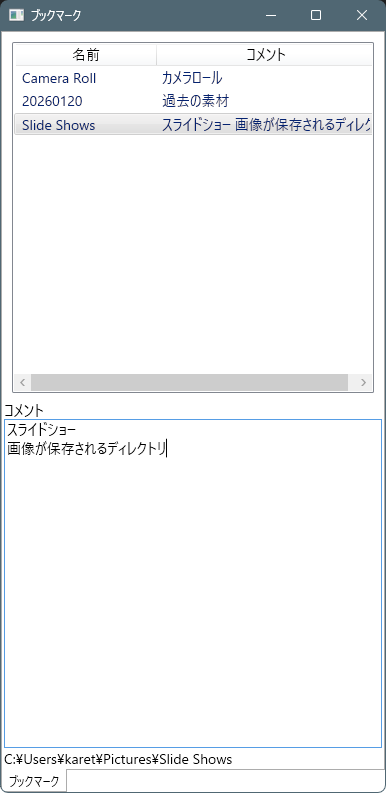
ソースコード
ファイル名:App.xaml
<Application x:Class="BookMarker.App"
             xmlns="http://schemas.microsoft.com/winfx/2006/xaml/presentation"
             xmlns:x="http://schemas.microsoft.com/winfx/2006/xaml"
             xmlns:local="clr-namespace:BookMarker"
             StartupUri="MainWindow.xaml">
    <Application.Resources>

    </Application.Resources>
</Application>
ファイル名:App.xaml.cs
using System.Configuration;
using System.Data;
using System.Windows;

namespace BookMarker;

/// <summary>
/// Interaction logic for App.xaml
/// </summary>
public partial class App : Application
{
}
ファイル名:BookMarker.csproj
<Project Sdk="Microsoft.NET.Sdk">

  <PropertyGroup>
    <OutputType>WinExe</OutputType>
    <TargetFramework>net10.0-windows</TargetFramework>
    <Nullable>enable</Nullable>
    <ImplicitUsings>enable</ImplicitUsings>
    <UseWPF>true</UseWPF>
  </PropertyGroup>

</Project>
ファイル名:Helpers\AppPathHelper.cs
// アプリケーション固有の保存パスを一元管理する Helper。
using System.Reflection;

namespace Maywork.WPF.Helpers;

public static class AppPathHelper
{
    /// アプリケーション名。
    public static string AppName { get; } = GetDefaultAppName();

    // ------------------------------------------------------------
    // static ctor
    // ------------------------------------------------------------

    static AppPathHelper()
    {
        EnsureDirectories();
    }

    // ------------------------------------------------------------
    // public paths
    // ------------------------------------------------------------

    /// 設定ファイル・ユーザー設定用(APPDATA)
    public static string Roaming =>
        System.IO.Path.Combine(
            Environment.GetFolderPath(
                Environment.SpecialFolder.ApplicationData),
            AppName);

    /// キャッシュ・ログ・一時データ用(LOCALAPPDATA)
    public static string Local =>
        System.IO.Path.Combine(
            Environment.GetFolderPath(
                Environment.SpecialFolder.LocalApplicationData),
            AppName);

    public static string SettingsFile =>
        System.IO.Path.Combine(Roaming, "settings.json");

    public static string CacheDir =>
        System.IO.Path.Combine(Local, "cache");

    public static string LogDir =>
        System.IO.Path.Combine(Local, "log");

    public static string TempDir =>
        System.IO.Path.Combine(Local, "temp");

    // ------------------------------------------------------------
    // helpers
    // ------------------------------------------------------------

    private static string GetDefaultAppName()
    {
        var asm = Assembly.GetEntryAssembly();
        return asm?.GetName().Name ?? "Application";
    }

    /// <summary>
    /// 必要なディレクトリをすべて作成する。
    /// </summary>
    public static void EnsureDirectories()
    {
        System.IO.Directory.CreateDirectory(Roaming);
        System.IO.Directory.CreateDirectory(Local);
        System.IO.Directory.CreateDirectory(CacheDir);
        System.IO.Directory.CreateDirectory(LogDir);
        System.IO.Directory.CreateDirectory(TempDir);
    }
}

/*

 【APPDATA (Roaming)】
 ・ユーザー設定ファイル
 ・UIレイアウト
 ・履歴情報
 ・ユーザー辞書など

 ※PC移行・ドメイン環境ではローミング対象。


 【LOCALAPPDATA (Local)】
 ・キャッシュデータ
 ・ログファイル
 ・一時ファイル
 ・画像サムネイル

 ※削除されても再生成可能なデータを保存する。
*/
ファイル名:Helpers\ViewModelBase.cs
// 汎用的な ViewModel 基底クラス実装。
using System.ComponentModel;
using System.Runtime.CompilerServices;

namespace Maywork.WPF.Helpers;

public abstract class ViewModelBase : INotifyPropertyChanged
{
    public event PropertyChangedEventHandler? PropertyChanged;

    protected void OnPropertyChanged([CallerMemberName] string? name = null)
        => PropertyChanged?.Invoke(this, new PropertyChangedEventArgs(name));
}
ファイル名:Helpers\Wiring.cs
// イベントなどの配線関連のヘルパー群
using System.Windows;
using System.Windows.Input;

namespace Maywork.WPF.Helpers;
public static class Wiring
{
    /*
     * コントロールにファイルのドラッグアンドドロップするヘルパー(Preview版)
     * 受け入れ拡張子をオプション指定する機能あり。
     */
    public static void AcceptFilesPreview(
        FrameworkElement el,
        Action<string[]> onFiles,
        params string[] exts)
    {
        el.AllowDrop = true;

        DragEventHandler? over = null;
        DragEventHandler? drop = null;

        over = (_, e) =>
        {
            if (e.Data.GetDataPresent(DataFormats.FileDrop))
                e.Effects = DragDropEffects.Copy;
            else
                e.Effects = DragDropEffects.None;

            // このイベントはここで処理済みであることを通知する
            // (以降のコントロールへイベントを伝播させない)
            e.Handled = true;
        };

        drop = (_, e) =>
        {
            if (!e.Data.GetDataPresent(DataFormats.FileDrop))
                return; // ファイルドロップ以外は処理せず、次の要素へイベントを流す

            var files = (string[])e.Data.GetData(DataFormats.FileDrop)!;

            if (exts?.Length > 0)
            {
                files = files
                    .Where(f => exts.Any(x =>
                        f.EndsWith(x, StringComparison.OrdinalIgnoreCase)))
                    .ToArray();
            }

            if (files.Length > 0)
                onFiles(files);

            // 外部ファイルのドロップはここで責任を持って処理したことを示す
            // (以降の RoutedEvent の伝播を終了させる)
            e.Handled = true;
        };

        el.PreviewDragOver += over; // Preview(Tunnel)段階で受信
        el.PreviewDrop += drop;     // Preview(Tunnel)段階で受信
    }

    public static void Hotkey(
        UIElement element,
        Key key,
        ModifierKeys mods,
        Action action,
        Func<bool>? canExecute = null)
    {
        var cmd = new RoutedUICommand();
        ExecutedRoutedEventHandler exec = (_, __) => action();
        CanExecuteRoutedEventHandler can = (_, e) => e.CanExecute = canExecute?.Invoke() ?? true;

        var cb = new CommandBinding(cmd, exec, can);
        var kb = new KeyBinding(cmd, key, mods);

        element.CommandBindings.Add(cb);
        element.InputBindings.Add(kb);
    }
}
ファイル名:MainWindow.xaml
<Window x:Class="BookMarker.MainWindow"
        xmlns="http://schemas.microsoft.com/winfx/2006/xaml/presentation"
        xmlns:x="http://schemas.microsoft.com/winfx/2006/xaml"
        xmlns:d="http://schemas.microsoft.com/expression/blend/2008"
        xmlns:mc="http://schemas.openxmlformats.org/markup-compatibility/2006"
        xmlns:local="clr-namespace:BookMarker"
        mc:Ignorable="d"
        Title="ブックマーク" Height="800" Width="400">
        <TabControl
                x:Name="TabHost"
                TabStripPlacement="Bottom"/>
</Window>
ファイル名:MainWindow.xaml.cs
using System.Windows;
using System.Windows.Controls;

namespace BookMarker;

public partial class MainWindow : Window
{
    public MainWindow()
    {
        InitializeComponent();

        // タブのアイテムを動的に追加するループ
        TabItem? firstTab = null;
        foreach (var factory in TabViewRegistry.Tabs)
        {
            var view = factory();

            var tab = new TabItem
            {
                Header = view.Title,
                Content = view   // ← UserControl
            };
            if (firstTab is null)
            {
                firstTab = tab;
            }
            TabHost.Items.Add(tab);
        }
        TabHost.SelectedItem = firstTab;

        this.Closed += (_, __) =>
        {
            foreach(TabItem item in TabHost.Items)
            {
                var obj = item.Content;
                if (obj is IDisposable disposable)
                {
                    disposable.Dispose();
                }
            }
        };
    }

}
ファイル名:TabViewRegistry.cs
using BookMarker.Views;


namespace BookMarker;

public static class TabViewRegistry
{
    public static IReadOnlyList<Func<ITabView>> Tabs { get; } =
        [
            () => new BookMarkerView(),
        ];
}
ファイル名:Utilities\SubProcUtil.cs
using System.Diagnostics;

namespace Maywork.Utilities;

public static class SubProcUtil
{
    public static bool Launch(string path)
    {
        bool result = true;
        try
        {
            Process.Start(new ProcessStartInfo(path) { UseShellExecute = true });
        }
        catch
        {
            result = false;
        }

        return result;
    }
}
ファイル名:Utilities\TsvUtil.cs
using System.IO;

namespace Maywork.Utilities;

static class TsvUtil
{
    // エスケープ(保存時)
    public static string EscapeForTsv(string text)
    {
        return text
            .Replace("\t", "\u001F")
            .Replace("\r\n", "\u001E")
            .Replace("\n", "\u001E");
    }
    // アンエスケープ(回復時)
    public static string UnescapeFromTsv(string text)
    {
        return text
            .Replace("\u001E", "\n")
            .Replace("\u001F", "\t");
    }
    // ===== レコード単位 =====

    // 1レコードをTSV行に変換
    public static string JoinRecord(IEnumerable<string> fields)
    {
        return string.Join(
            "\t",
            fields.Select(EscapeForTsv)
        );
    }

    // TSV行を1レコードに分解
    public static string[] SplitRecord(string line)
    {
        return line
            .Split('\t')
            .Select(UnescapeFromTsv)
            .ToArray();
    }

    // 1. まとめて保存(上書き)
    public static void WriteFile(string path, IEnumerable<IEnumerable<string>> records)
    {
        File.WriteAllLines(path, records.Select(JoinRecord));
    }

    // 2. 追記
    public static void AppendRecord(string path, IEnumerable<string> fields)
    {
        File.AppendAllLines(path, [JoinRecord(fields)]);
    }

    // 3. 1行ずつ読み込み(メモリに優しい)
    public static IEnumerable<string[]> ReadFile(string path)
    {
        if (!File.Exists(path)) yield break;

        foreach (var line in File.ReadLines(path))
        {
            if (string.IsNullOrWhiteSpace(line)) continue;
            yield return SplitRecord(line);
        }
    }
}
/*
使用例
using Maywork.Utilities;

string path = @".\test.tsv";

// 書き込み
TsvUtil.WriteFile(path, [["aa\tAA", "bb\r\nBB"],["cc", "dd"]]);

// 読み込み
foreach (string[] fields in TsvUtil.ReadFile(path))
{
    Console.WriteLine($"a:{fields[0]} b:{fields[1]}");
}
*/
ファイル名:Views\BookMakerItem.cs
using System.IO;
using System.Runtime.CompilerServices;

using Maywork.WPF.Helpers;

namespace BookMarker.Views;
public class BookMakerItem : ViewModelBase
{
    public string Name {get; set;} = "";
    public string Parent {get; set;} = "";
    public bool IsDir {get; set;} = false;
    public string Ext {get; set;} = "";
    public string FullName {get; set;} = "";

    string _comment = "";
    public string Comment
    {
        get => _comment;
        set
        {
            if (_comment == value) return;
            _comment = value;
            OnPropertyChanged(nameof(Comment));
            OnPropertyChanged(nameof(DispComment));
        }
    }

    public string DispComment
    {
        get
        {
            return _comment?.Replace("\r", "").Replace("\n", " ") ?? "";
        }
    }

    static public BookMakerItem FromPath(string path, string comment="")
    {
        var item = new BookMakerItem
        {
            IsDir = Directory.Exists(path),
            Ext = Path.GetExtension(path).ToLower(),
            Name = Path.GetFileName(path),
            Parent = Path.GetDirectoryName(path) ?? "",
            FullName = path
        };
        if (!string.IsNullOrEmpty(comment))
        {
            item.Comment = comment;
        }

        return item;
    }

}
ファイル名:Views\BookMakerState.cs
using System.Collections.ObjectModel;

using Maywork.WPF.Helpers;

namespace BookMarker.Views;

public class BookMakerState : ViewModelBase
{
    public ObservableCollection<BookMakerItem> Items = [];
}
ファイル名:Views\BookMarkerView.xaml
<UserControl x:Class="BookMarker.Views.BookMarkerView"
             xmlns="http://schemas.microsoft.com/winfx/2006/xaml/presentation"
             xmlns:x="http://schemas.microsoft.com/winfx/2006/xaml"
             FontSize="14">

    <Grid>
        <Grid.RowDefinitions>
            <!-- リストビュー -->
            <RowDefinition Height="*"/>
            <!-- テキストエリア -->
            <RowDefinition Height="*"/>
        </Grid.RowDefinitions>

        <!-- リストビュー -->
        <Grid Grid.Row="0"
              x:Name="Grid0">
            <ListView
                x:Name="List"
                Margin="8"
                SelectionMode="Single">
                <ListView.ItemContainerStyle>
                    <Style TargetType="ListViewItem">
                        <Setter
                            Property="FontSize"
                            Value="14"/>
                        <Setter
                            Property="Padding"
                            Value="4"/>
                    </Style>
                </ListView.ItemContainerStyle>
                <ListView.View>
                    <GridView AllowsColumnReorder="False">
                        <GridViewColumn
                            Header="名前"
                            Width="140"
                            DisplayMemberBinding="{Binding Name}"/>
                        <GridViewColumn
                            Header="コメント"
                            Width="220"
                            DisplayMemberBinding="{Binding DispComment}"/>
                    </GridView>
                </ListView.View>
            </ListView>
        </Grid>
        <!-- テキストエリア -->
        <Grid Grid.Row="1">
            <Grid.RowDefinitions>
                <!-- ラベル -->
                <RowDefinition Height="Auto"/>
                <!-- テキストボックス -->
                <RowDefinition Height="*"/>
                <!-- パス -->
                <RowDefinition Height="Auto"/>
            </Grid.RowDefinitions>
            <Grid Grid.Row="0">
                <StackPanel Orientation="Horizontal"
                                HorizontalAlignment="Left">
                    <TextBlock>コメント</TextBlock>
                </StackPanel>
            </Grid>
            <Grid Grid.Row="1">
                <TextBox x:Name="TextBox1"
                         AcceptsReturn="True"
                         TextWrapping="Wrap"
                         Text="{Binding SelectedItem.Comment, ElementName=List, UpdateSourceTrigger=PropertyChanged}" />
            </Grid>
            <TextBlock Grid.Row="2"
                       Text="{Binding SelectedItem.FullName, ElementName=List}" />
        </Grid>
    </Grid>

</UserControl>
ファイル名:Views\BookMarkerView.xaml.cs
using System.Diagnostics;
using System.IO;
using System.Windows;
using System.Windows.Controls;

using Maywork.WPF.Helpers;
using Maywork.Utilities;
using System.Windows.Input;
using System.Collections;
using System.Windows.Media;

namespace BookMarker.Views;
public partial class BookMarkerView : UserControl, ITabView, IDisposable
{
    public string Title => "ブックマーク";
    public BookMakerState State = new();

    // ドラッグ開始を判定するための開始位置
    private Point _startPoint;


    // 保存
    void SaveItems()
    {
        string savePath = Path.Combine(AppPathHelper.Roaming, "bookmark.tsv");

        List<List<string>> items = [[]];
        foreach(var item in State.Items)
        {
            items.Add([item.FullName, item.Comment]);
        }
        // 書き込み
        TsvUtil.WriteFile(savePath, items);
    }

    // 読み込み
    void LoadItems()
    {
        State.Items.Clear();
        string loadPath = Path.Combine(AppPathHelper.Roaming, "bookmark.tsv");
        if (!File.Exists(loadPath)) return;

        foreach (string[] fields in TsvUtil.ReadFile(loadPath))
        {

            string path = fields[0];
            string comment = fields[1];

            State.Items.Add( BookMakerItem.FromPath(path, comment));
        }
    }
    // コンストラクタ
    public BookMarkerView()
    {
        InitializeComponent();

        List.ItemsSource = State.Items;
        this.DataContext = State;

        // D&D
        Wiring.AcceptFilesPreview(Grid0, files =>
        {
            var file = files.FirstOrDefault();
            if (file is null) return;

            AddItem(file);
        },[]);
        Loaded += (_, __) => Init();

        List.SelectionChanged += (_, __) => List_SelectionChanged();

        // Delete
        List.PreviewKeyDown += (_, e) =>
        {
            if (e.Key != Key.Delete)
                return;

            var items = List.ItemsSource as IList;
            if (items == null)
                return;

            var selected = List.SelectedItems.Cast<object>().ToList();

            foreach (var item in selected)
                items.Remove(item);

            e.Handled = true;
        };

        List.PreviewMouseLeftButtonDown += List_PreviewMouseLeftButtonDown;
        List.PreviewMouseMove += List_PreviewMouseMove;
        List.MouseDoubleClick += (_, __) =>
        {
            // 選択されているアイテムをキャストして取得
            var item = List.SelectedItem as BookMakerItem;
            if (item is null) return;

            SubProcUtil.Launch(item.FullName);
        };
    }
    public void Dispose() => SaveItems();

    // 要素の追加
    void AddItem(string path)
    {
        // すでに同じpathを持つアイテムがあるかチェック
        bool isDuplicate = State.Items.Any(x => x.FullName == path);
        if (isDuplicate) return;

        State.Items.Add( BookMakerItem.FromPath(path) );
    }

    // 初期化
    bool initFlag = false;
    void Init()
    {
        if (initFlag) return;

        LoadItems();

        initFlag = true;
    }

    // 選択の変更
    void List_SelectionChanged()
    {
        // 選択されているアイテムをキャストして取得
        var item = List.SelectedItem as BookMakerItem;
        if (item is null) return;
    }

    private void List_PreviewMouseLeftButtonDown(object sender, MouseButtonEventArgs e)
    {
        // マウスを押した位置を記録
        _startPoint = e.GetPosition(null);
    }

    private void List_PreviewMouseMove(object sender, MouseEventArgs e)
    {
        if (e.LeftButton != MouseButtonState.Pressed)
            return;

        Point mousePos = e.GetPosition(null);
        Vector diff = _startPoint - mousePos;

        if (Math.Abs(diff.X) < SystemParameters.MinimumHorizontalDragDistance &&
            Math.Abs(diff.Y) < SystemParameters.MinimumVerticalDragDistance)
            return;

        var listView = sender as ListView;
        if (listView == null)
            return;

        // ★ マウス直下の要素を取得
        DependencyObject? obj =
            listView.InputHitTest(e.GetPosition(listView)) as DependencyObject;

        // ★ ListViewItem を親方向に探索
        while (obj != null && obj is not ListViewItem)
        {
            obj = VisualTreeHelper.GetParent(obj);
        }

        // ScrollBar 等はここで弾かれる
        if (obj is not ListViewItem item)
            return;

        // 選択アイテム取得
        if (item.DataContext is not BookMakerItem o)
            return;

        if (string.IsNullOrEmpty(o.FullName))
            return;

        // ドラッグ開始
        string[] paths = { o.FullName };
        DataObject data = new(DataFormats.FileDrop, paths);

        DragDrop.DoDragDrop(listView, data, DragDropEffects.Copy);
    }


}
ファイル名:Views\ITabView.cs
namespace BookMarker.Views;

public interface ITabView
{
    string Title { get; }
}
コメント