NuGet パッケージ追加
dotnet add package Tesseracttessdata の取得
GitHubのリポジトリ
https://github.com/tesseract-ocr/tessdata_best
jpn.traineddata
jpn_vert.traineddata
を ./tessdata フォルダに配置します。
コンソールサンプル
画像ファイルから文字列を抽出
Program.cs
using System;
using Tesseract;

namespace TesseractDemo;
class Program
{
    static void Main()
    {
        // tessdata フォルダへのパス
        var tessDataPath = @"./tessdata";

        using var engine = new TesseractEngine(
            tessDataPath,
            "jpn",                // 日本語
            EngineMode.Default);

        using var img = Pix.LoadFromFile("sample.png");
        using var page = engine.Process(img);

        string text = page.GetText();

        Console.WriteLine("=== OCR Result ===");
        Console.WriteLine(text);

        Console.WriteLine($"Confidence: {page.GetMeanConfidence():P}");
    }
}
/*
テスト画像:

https://maywork.net/wp/wp-content/uploads/2018/10/logo.png
sample.pngというファイル名でカレントディレクトリに保存


実行例:


dotnet run
=== OCR Result ===
球 惑 堂 本 舗
創業 平成 参 拾 年

Confidence: 82.00%

*/
単語ごとに文字と座標を取得する
Program.cs
using System;
using Tesseract;

namespace TesseractDemo;
class Program
{
    static void Main()
    {
        // tessdata フォルダへのパス
        var tessDataPath = @"./tessdata";

        using var engine = new TesseractEngine(
            tessDataPath,
            "jpn",                // 日本語
            EngineMode.Default);

        using var img = Pix.LoadFromFile("sample.png");
        using var page = engine.Process(img);

		// イテレータを作成(PageIteratorLevelをWordにすると単語単位で取得可能)
		using (var iter = page.GetIterator())
		{
			iter.Begin();

			do
			{
				// テキストの取得
				string label = iter.GetText(PageIteratorLevel.Word);

				// 座標(矩形)の取得
				if (iter.TryGetBoundingBox(PageIteratorLevel.Word, out Rect bounds))
				{
					Console.WriteLine($"Text: {label}");
					Console.WriteLine($"  Location: X={bounds.X1}, Y={bounds.Y1}, Width={bounds.Width}, Height={bounds.Height}");
					Console.WriteLine($"  Confidence: {iter.GetConfidence(PageIteratorLevel.Word):P}");
					Console.WriteLine("--------------------------");
				}

			} while (iter.Next(PageIteratorLevel.Word)); // 次の単語へ
		}
    }
}
/*
テスト画像:

https://maywork.net/wp/wp-content/uploads/2018/10/logo.png
sample.pngというファイル名でカレントディレクトリに保存


実行例:


dotnet run

Text: 球
  Location: X=18, Y=28, Width=473, Height=89
  Confidence: 8,350.87%
--------------------------
Text: 惑
  Location: X=162, Y=24, Width=110, Height=125
  Confidence: 9,179.91%
--------------------------
Text: 堂
  Location: X=271, Y=24, Width=87, Height=125
  Confidence: 9,291.83%
--------------------------
Text: 本
  Location: X=357, Y=24, Width=79, Height=125
  Confidence: 9,297.00%
--------------------------
Text: 舗
  Location: X=435, Y=24, Width=56, Height=125
  Confidence: 967.23%
--------------------------
Text: 創業
  Location: X=90, Y=143, Width=122, Height=45
  Confidence: 9,686.70%
--------------------------
Text: 平成
  Location: X=235, Y=144, Width=73, Height=44
  Confidence: 9,321.76%
--------------------------
Text: 参
  Location: X=331, Y=144, Width=23, Height=43
  Confidence: 9,151.46%
--------------------------
Text: 拾
  Location: X=354, Y=139, Width=47, Height=67
  Confidence: 8,152.60%
--------------------------
Text: 年
  Location: X=400, Y=144, Width=23, Height=44
  Confidence: 9,291.30%
--------------------------
*/
PageIteratorLevel.Wordを指定しているので「創業」や「平成」が単語として認識しています。
他の種類としては
Block … 文章の塊
TextLine … 行単位
Symbol … 1文字づつ
などがあります。Symbolを試した見たところ、「平成」が「平」と「成」で別々に認識していました。
WPFでGUIを作る
using System.IO;
using System.Windows;
using System.Windows.Media.Imaging;
using System.Windows.Shapes;
using System.Windows.Media;
using Tesseract;
using System.Windows.Controls;

namespace OcrViewer;

public partial class MainWindow : Window
{
    private BitmapImage? _currentBitmap;

    public MainWindow()
    {
        InitializeComponent();
    }

    private void Window_Drop(object sender, DragEventArgs e)
    {
        if (!e.Data.GetDataPresent(DataFormats.FileDrop))
            return;

        var files = (string[])e.Data.GetData(DataFormats.FileDrop);
        var path = files[0];

        ShowImage(path);
        RunOcrPerCharacter(path);
    }

    private void ShowImage(string path)
    {
        var bmp = new BitmapImage(new Uri(path));
        _currentBitmap = bmp;

        MainImage.Source = bmp;

        RootCanvas.Width = bmp.PixelWidth;
        RootCanvas.Height = bmp.PixelHeight;

        MainImage.Width = bmp.PixelWidth;
        MainImage.Height = bmp.PixelHeight;
    }

    private void RunOcrPerCharacter(string imagePath)
    {
        RootCanvas.Children.Clear();
        RootCanvas.Children.Add(MainImage);

        string tessPath = System.IO.Path.Combine(
            AppContext.BaseDirectory,
            "tessdata");

        using var engine = new TesseractEngine(tessPath, "jpn", EngineMode.Default);

        // 文字単位認識向け
        engine.DefaultPageSegMode = PageSegMode.SingleBlock;

        using var img = Pix.LoadFromFile(imagePath);
        using var page = engine.Process(img);

        using var iter = page.GetIterator();
        iter.Begin();

        do
        {
            string? text = iter.GetText(PageIteratorLevel.Symbol);

            if (string.IsNullOrWhiteSpace(text))
                continue;

            if (iter.TryGetBoundingBox(PageIteratorLevel.Symbol, out Tesseract.Rect bounds))
            {
                DrawRectangle(bounds, text);
            }

        } while (iter.Next(PageIteratorLevel.Symbol));
    }

    private void DrawRectangle(Tesseract.Rect bounds, string text)
    {
        var rect = new Rectangle
        {
            Width = bounds.Width,
            Height = bounds.Height,
            Stroke = Brushes.Red,
            StrokeThickness = 1
        };

        Canvas.SetLeft(rect, bounds.X1);
        Canvas.SetTop(rect, bounds.Y1);

        RootCanvas.Children.Add(rect);

        // 文字も重ねて表示(デバッグ用)
        var label = new System.Windows.Controls.TextBlock
        {
            Text = text,
            Foreground = Brushes.Blue,
            FontSize = 24
        };

        Canvas.SetLeft(label, bounds.X1);
        Canvas.SetTop(label, bounds.Y1 - 28);

        RootCanvas.Children.Add(label);
    }
}
<Window x:Class="OcrViewer.MainWindow"
xmlns="http://schemas.microsoft.com/winfx/2006/xaml/presentation"
xmlns:x="http://schemas.microsoft.com/winfx/2006/xaml"
xmlns:d="http://schemas.microsoft.com/expression/blend/2008"
xmlns:mc="http://schemas.openxmlformats.org/markup-compatibility/2006"
xmlns:local="clr-namespace:OcrViewer"
mc:Ignorable="d"
Title="OCR Viewer" Height="800" Width="1000"
AllowDrop="True"
Drop="Window_Drop">
<Grid>
<ScrollViewer HorizontalScrollBarVisibility="Auto"
VerticalScrollBarVisibility="Auto">
<Canvas x:Name="RootCanvas" Background="Black">
<Image x:Name="MainImage" Stretch="None" />
</Canvas>
</ScrollViewer>
</Grid>
</Window>
実行結果:
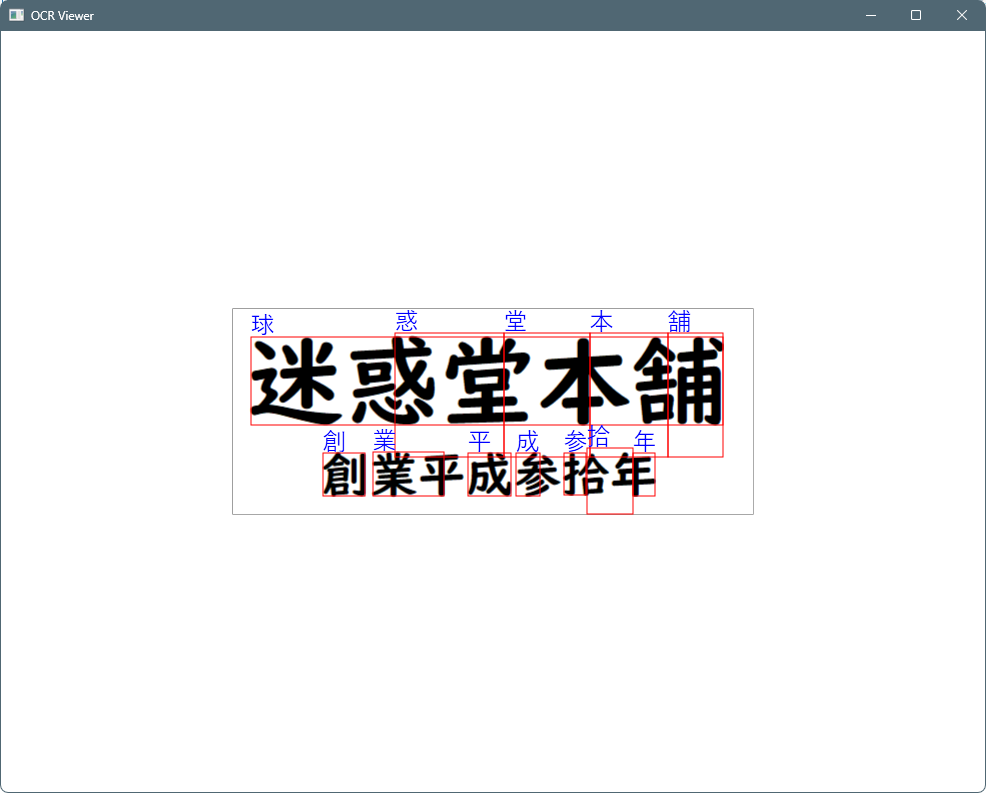
コードの書き方が悪いのか、盛大にズレていますね。
コメント