画像ファイルを OpenCVのフィルター機能で加工する場合、
通常は複数のフィルターを順番に実行することになります。
例えば、
- グレースケール化
- ノイズ除去
- ぼかし処理
- 2値化
- リサイズ
といった処理を組み合わせて画像を加工します。
また、画像の内容によって フィルターのパラメータを調整する必要があります。
このような画像処理は、一般的には
Python + OpenCV + NumPy
を使って スクリプトで処理するケースが多いと思います。
ただしこの方法だと、
パラメータを変更する
スクリプトを実行する
結果を確認する
という手順を繰り返す必要があり、
パラメータ調整の試行錯誤が少し面倒です。
そこで、
GUIでフィルターのパラメータを調整しながら、結果をプレビューできるツール
があると便利だと思い、
WPFとOpenCVを使って画像加工アプリケーションを作成してみました。
ソースコード
プロジェクトファイル
OpenCvFilterMaker2.csproj
<Project Sdk="Microsoft.NET.Sdk">

  <PropertyGroup>
    <OutputType>WinExe</OutputType>
    <TargetFramework>net10.0-windows</TargetFramework>
    <Nullable>enable</Nullable>
    <ImplicitUsings>enable</ImplicitUsings>
    <UseWPF>true</UseWPF>
	<ApplicationIcon>Assets/App.ico</ApplicationIcon>
  </PropertyGroup>

  <ItemGroup>
    <PackageReference Include="OpenCvSharp4" Version="4.13.0.20260302" />
    <PackageReference Include="OpenCvSharp4.runtime.win" Version="4.13.0.20260302" />
    <PackageReference Include="OpenCvSharp4.WpfExtensions" Version="4.13.0.20260302" />
    <PackageReference Include="ReactiveProperty.WPF" Version="9.8.0" />
  </ItemGroup>

	<ItemGroup>
		<Resource Include="Assets\**\*.*" />
	</ItemGroup>

</Project>
OpenCvSharp4とReactivePropertyを使います。
View(XAML)
MainWindow.xaml
<Window x:Class="OpenCvFilterMaker2.MainWindow"
        xmlns="http://schemas.microsoft.com/winfx/2006/xaml/presentation"
        xmlns:x="http://schemas.microsoft.com/winfx/2006/xaml"
        xmlns:d="http://schemas.microsoft.com/expression/blend/2008"
        xmlns:mc="http://schemas.openxmlformats.org/markup-compatibility/2006"
        xmlns:local="clr-namespace:OpenCvFilterMaker2"
        xmlns:h="clr-namespace:Maywork.WPF.Helpers"
        mc:Ignorable="d"
        h:DisposeDataContextBehavior.Enable="True"
        Title="{Binding Title.Value}" Height="450" Width="800">

    <!-- データコンテキスト -->
    <Window.DataContext>
        <local:MainWindowViewModel/>
    </Window.DataContext>

    <!-- リソース -->
    <Window.Resources>
        <ResourceDictionary>
            <!-- 外部リソースファイルの読み込み -->
            <ResourceDictionary.MergedDictionaries>
                <ResourceDictionary Source="/Resources/GrayscaleFilter.xaml"/>
                <ResourceDictionary Source="/Resources/ThresholdFilter.xaml"/>
            </ResourceDictionary.MergedDictionaries>

            <!-- コンバータ -->
            <h:BoolToVisibilityConverter x:Key="BoolToVis"/>

            <!-- スタイル -->

            <!-- Control -->
            <Style TargetType="Control">
                <Setter Property="FontFamily" Value="Yu Gothic UI"/>
                <Setter Property="FontSize" Value="13"/>
            </Style>
            <!-- Grid -->
            <Style TargetType="Grid">
                <Setter Property="Margin" Value="0"/>
            </Style>

            <!-- MenuItem -->
            <Style TargetType="MenuItem">
                <Setter Property="Margin" Value="4"/>
            </Style>

            <!-- GridSplitter -->
            <Style x:Key="ColumnGridSplitter"
                TargetType="GridSplitter">
                <Setter Property="Width" Value="5"/>
                <Setter Property="HorizontalAlignment" Value="Center"/>
                <Setter Property="VerticalAlignment" Value="Stretch"/>
                <Setter Property="Background" Value="Gray"/>
                <Setter Property="ShowsPreview" Value="True"/>
                <Setter Property="ResizeDirection" Value="Columns"/>
                <Setter Property="Margin" Value="2"/>
            </Style>
            <!-- CheckBox -->
            <Style TargetType="CheckBox">
                <Setter Property="VerticalAlignment" Value="Center"/>
                <Setter Property="Margin" Value="0,0,5,0"/>
            </Style>
            <!-- TextBlock -->
            <Style TargetType="TextBlock">
                <Setter Property="VerticalAlignment" Value="Center"/>
            </Style>
            <!-- Button -->
            <Style TargetType="Button">
                <Setter Property="Margin" Value="5"/>
                <Setter Property="Padding" Value="5"/>
            </Style>
        </ResourceDictionary>
    </Window.Resources>

    <Grid h:Gd.Rows="Auto,*">
        <Menu Grid.Row="0">
            <MenuItem Header="ファイル">
                <MenuItem Header="フィルター読み込み..."
                        Command="{Binding LoadPipelineCommand}" />
                <MenuItem Header="フィルター保存..."
                        Command="{Binding SavePipelineCommand}" />
                <Separator/>
                <MenuItem Header="自動保存"
                        IsCheckable="True"
                        IsChecked="{Binding IsAutoSaveEnabled.Value}" />
                <MenuItem Header="保存フォルダを開く"
                        Command="{Binding OpenFilteredFolderCommand}" />
            </MenuItem>
            <MenuItem
                Header="フィルター"
                ItemsSource="{Binding FilterMenus}">

                <MenuItem.ItemContainerStyle>
                    <Style TargetType="MenuItem">
                        <Setter Property="Header" Value="{Binding MenuHeader}" />
                        <Setter Property="Command" Value="{Binding MenuCommand}" />
                    </Style>
                </MenuItem.ItemContainerStyle>

            </MenuItem>
        </Menu>
        <Grid Grid.Row="1"
            h:Gd.Cols="*,Auto,2*">
            <Grid Grid.Column="0" h:Gd.Rows="*,*">
                <!-- 上:フィルターの一覧 -->
                <StackPanel Grid.Row="0">
                    <ListView
                        SelectedItem="{Binding SelectedFilter.Value}"
                        ItemsSource="{Binding Filters}">
                        <ListView.InputBindings>
                            <KeyBinding Key="Delete"
                                        Command="{Binding RemoveFilterCommand}"/>
                            <KeyBinding Key="Up"
                                        Modifiers="Control"
                                        Command="{Binding MoveUpCommand}"/>
                            <KeyBinding Key="Down"
                                        Modifiers="Control"
                                        Command="{Binding MoveDownCommand}"/>
                        </ListView.InputBindings>
                        <ListView.ItemTemplate>
                            <DataTemplate>
                                <StackPanel Orientation="Horizontal">
                                    <CheckBox IsChecked="{Binding IsEnabled.Value}"/>
                                    <TextBlock Text="{Binding Name.Value}"/>
                                </StackPanel>
                            </DataTemplate>
                        </ListView.ItemTemplate>
                    </ListView>
                    <WrapPanel>
                        <Button Content="▶️"
                                ToolTip="フィルター実行"
                                Command="{Binding ExecuteFiltersCommand}" />
                        <Button Content="❌️"
                                ToolTip="フィルターキャンセル"
                                Command="{Binding CancelCommand}"
                                IsEnabled="{Binding IsProcessing.Value}" />
                        <Button Content="="
                                ToolTip="フィルターリセット"
                                Command="{Binding ResetFiltersCommand}" />
                        <Button Content="Clear"
                                ToolTip="フィルタークリア"
                                Command="{Binding ClearFiltersCommand}" />
                        <Button Content="Clip"
                                ToolTip="結果をコピー"
                                Command="{Binding CopyResultToClipboardCommand}" />
                    </WrapPanel>
                </StackPanel>
                <!-- 下:フィルターの詳細 -->
                <ContentControl
                    Content="{Binding SelectedFilter.Value}"
                    Grid.Row="1"/>
            </Grid>
            <GridSplitter
                Grid.Column="1"
                Style="{StaticResource ColumnGridSplitter}"/>
            <Grid
                Grid.Column="2"
                h:FileDropHelper.Enable="True"
                h:FileDropHelper.DropCommand="{Binding FileDropCommand}">
                <ScrollViewer h:ImageScaleHelper.Enable="True">
                    <Canvas>
                        <Image Source="{Binding ImagePreview.Value}" />
                    </Canvas>
                </ScrollViewer>
            </Grid>
        </Grid>
    </Grid>
</Window>
ViewModel
MainWindowViewModel.cs
using Maywork.WPF.Helpers;
using Cv=OpenCvSharp;
using Reactive.Bindings;
using Reactive.Bindings.Extensions;
using System.Collections.ObjectModel;
using System.ComponentModel;
using System.Diagnostics;
using System.IO;
using System.Reactive.Disposables;
using System.Reactive.Linq;
using System.Runtime.CompilerServices;
using System.Text.Json;
using System.Windows;
using System.Windows.Controls;
using System.Windows.Media;
using System.Windows.Media.Imaging;

namespace OpenCvFilterMaker2;
public class MainWindowViewModel : INotifyPropertyChanged, IDisposable
{
	#region
    public event PropertyChangedEventHandler? PropertyChanged;

    protected void OnPropertyChanged([CallerMemberName] string? name = null)
        => PropertyChanged?.Invoke(this, new PropertyChangedEventArgs(name));
    private CompositeDisposable Disposable { get; } = [];
	public void Dispose() => Disposable.Dispose();

    #endregion

    // フィールド


	// キャンセルトークン
	private CancellationTokenSource? _cts;

    // プロパティ
    private ReactivePropertySlim<Cv.Mat?> CurrentMat { get; set; }

    public ReactivePropertySlim<bool> IsProcessing { get; private set; }
	public ReactivePropertySlim<string> Title { get; private set; }
	public ReactivePropertySlim<BitmapSource?> ImagePreview { get; private set; }
    public ObservableCollection<CvFilterBase> FilterMenus { get; private set; }
    public ObservableCollection<CvFilterBase> Filters { get; private set; }
    public ReactivePropertySlim<CvFilterBase?> SelectedFilter { get; private set; }
    public ReactivePropertySlim<bool> IsAutoSaveEnabled { get; private set; }

    // コマンド
    public AsyncReactiveCommand<string[]> FileDropCommand { get; }
    public ReactiveCommandSlim LoadPipelineCommand { get; }
    public ReactiveCommandSlim SavePipelineCommand { get; }
    public ReactiveCommandSlim RemoveFilterCommand { get; }
    public ReactiveCommandSlim MoveUpCommand { get; }
    public ReactiveCommandSlim MoveDownCommand { get; }
    public ReactiveCommandSlim ExecuteFiltersCommand { get; }
    public ReactiveCommandSlim CancelCommand { get; }
    public ReactiveCommandSlim ResetFiltersCommand { get; }
    public ReactiveCommandSlim ClearFiltersCommand { get; }
    public ReactiveCommandSlim CopyResultToClipboardCommand { get; }
    public ReactiveCommandSlim OpenFilteredFolderCommand { get; }

    // コンストラクタ
    public MainWindowViewModel()
	{

        // Mat
        CurrentMat = new ReactivePropertySlim<Cv.Mat?>()
            .AddTo(Disposable);

        // 実行中フラグ
        IsProcessing = new ReactivePropertySlim<bool>(false)
			.AddTo(Disposable);
        // タイトル
        Title = new ReactivePropertySlim<string>("OpenCvFilterMaker2")
            .AddTo(Disposable);
		// プレビュー画像オブジェクト
		ImagePreview = new ReactivePropertySlim<BitmapSource?>()
            .AddTo(Disposable);
        // フィルターメニュー
        FilterMenus = new ReactiveCollection<CvFilterBase>()
            .AddTo(Disposable);
        // ドラックアンドドロップ
        FileDropCommand = IsProcessing
			.Inverse()
			.ToAsyncReactiveCommand<string[]>()
			.WithSubscribe(async files => await LoadImagesAsync(files))
			.AddTo(Disposable);

        // フィルターメニューの初期化
        InitFilterMenus();


        // フィルターパイプライン
        Filters = new ReactiveCollection<CvFilterBase>()
            .AddTo(Disposable);
        // 選択中のフィルター
        SelectedFilter = new ReactivePropertySlim<CvFilterBase?>()
            .AddTo(Disposable);


        // パイプライン読み込み
        LoadPipelineCommand = new ReactiveCommandSlim()
            .WithSubscribe(() => LoadPipelineFromFile())
            .AddTo(Disposable);

        // パイプライン保存
        SavePipelineCommand = new ReactiveCommandSlim()
            .WithSubscribe(() => SavePipelineToFile())
            .AddTo(Disposable);

        // フィルターの削除
        RemoveFilterCommand = IsProcessing
            .Inverse()
            .ToReactiveCommandSlim()
            .WithSubscribe(() =>
            {
                if (SelectedFilter.Value is CvFilterBase f) Filters.Remove(f);
            })
            .AddTo(Disposable);

        // フィルターの実行順を上げる
        MoveUpCommand = IsProcessing
            .Inverse()
            .ToReactiveCommandSlim()
            .WithSubscribe(() => FiltesPosMode(-1))
            .AddTo(Disposable);

        // フィルターの実行順を下げる
        MoveDownCommand = IsProcessing
            .Inverse()
            .ToReactiveCommandSlim()
            .WithSubscribe(() => FiltesPosMode(+1))
            .AddTo(Disposable);

        // フィルター実行の可否
        var canExecute =
            Observable.CombineLatest(
                IsProcessing,
                CurrentMat,
                Filters.CollectionChangedAsObservable()
                    .Select(_ => Filters.Count)
                    .StartWith(Filters.Count),
                (p, m, c) => !p && m != null && c > 0
            );

        // フィルターの実行
        ExecuteFiltersCommand = canExecute
            .ToReactiveCommandSlim()
            .WithSubscribe(() => ExecuteFilters())
            .AddTo(Disposable);

        // フィルターのキャンセル
        CancelCommand = IsProcessing
            .ToReactiveCommandSlim()
            .WithSubscribe(()=> _cts?.Cancel())
            .AddTo(Disposable);

        // フィルターのリセット
        var canReset =
            Observable.CombineLatest(
                IsProcessing,
                CurrentMat,
                (p, m) => !p && m != null
            );
        ResetFiltersCommand = canReset
            .ToReactiveCommandSlim()
            .WithSubscribe(() =>
            {
                if (CurrentMat.Value is null) return;
                var result = OpenCvSharp.WpfExtensions.BitmapSourceConverter.ToBitmapSource(CurrentMat.Value);
                result.Freeze(); // UIスレッド安全化
                ImagePreview.Value = ImageHelper.To96Dpi(result);
            })
            .AddTo(Disposable);

        // フィルターのクリア
        var canClear =
            Observable.CombineLatest(
                IsProcessing,
                Filters.CollectionChangedAsObservable()
                    .Select(_ => Filters.Count)
                    .StartWith(Filters.Count),
                (p, c) => !p &&  c > 0
            );
        ClearFiltersCommand = canClear
            .ToReactiveCommandSlim()
            .WithSubscribe(() => Filters.Clear())
            .AddTo(Disposable);

        // 結果のコピー
        var canCopy =
            Observable.CombineLatest(
                IsProcessing,
                ImagePreview,
                (p, i) => !p && i is not null
            );
        CopyResultToClipboardCommand = canCopy
            .ToReactiveCommandSlim()
            .WithSubscribe(() =>
            {
                if (ImagePreview.Value is null)
                    return;

                var img = ImagePreview.Value;
                // Freezeされていない場合は安全のためFreeze
                if (img.CanFreeze && !img.IsFrozen)
                    img.Freeze();

                Clipboard.SetImage(img);
            })
            .AddTo(Disposable);

        // 自動保存フラグ
        IsAutoSaveEnabled = new ReactivePropertySlim<bool>(false)
            .AddTo(Disposable);

        // 自動保存先フォルダを開く
        OpenFilteredFolderCommand = new ReactiveCommandSlim()
            .WithSubscribe(() =>
            {
                string folder = GetTodayFolder();

                if (!Directory.Exists(folder))
                    return;

                Process.Start(new ProcessStartInfo
                {
                    FileName = folder,
                    UseShellExecute = true
                });
            })
            .AddTo(Disposable);

    }
    // フィルターの実行
    private async void ExecuteFilters()
    {
        if (CurrentMat.Value == null || IsProcessing.Value)
            return;

        _cts = new CancellationTokenSource();
        var token = _cts.Token;

        IsProcessing.Value = true;

        try
        {
            var result = await Task.Run(() =>
            {
                Cv.Mat current = CurrentMat.Value.Clone();

                foreach (var filter in Filters)
                {
                    token.ThrowIfCancellationRequested();

                    var next = filter.Execute(current);
                    current.Dispose();
                    current = next;
                }

                return current;
            }, token);

            if (IsAutoSaveEnabled.Value)
                SaveResultImage(result);

            var bmp = OpenCvSharp.WpfExtensions
                .BitmapSourceConverter.ToBitmapSource(result);

            bmp.Freeze();
            ImagePreview.Value = ImageHelper.To96Dpi(bmp);

            result.Dispose();
        }
        catch (OperationCanceledException)
        {
            Debug.WriteLine("Processing canceled.");
        }
        finally
        {
            IsProcessing.Value = false;
            _cts.Dispose();  _cts = null;
        }
    }
    // フィルターの実行順の変更
    void FiltesPosMode(int delta)
    {
        if (SelectedFilter?.Value is not { } filter) return;

        int index = Filters.IndexOf(filter);
        int newIndex = index + delta;

        if (newIndex < 0 || newIndex >= Filters.Count) return;

        Filters.Move(index, newIndex);
    }
    // 画像の複数ロード
    async Task LoadImagesAsync(string[] files)
	{
        string[] images = files
            .Where(file => ImageHelper.IsSupportedImage(file))
            .ToArray();
        if (images.Length == 0) return;

        _cts = new CancellationTokenSource();
        var token = _cts.Token;

        IsProcessing.Value = true;

        try
        {
            foreach (var file in images)
            {
                await LoadImageAsync(file, token);
            }
        }
        catch (OperationCanceledException)
        {
            Debug.WriteLine("Processing canceled.");
        }
        finally
        {
            IsProcessing.Value = false;
            _cts.Dispose(); _cts = null;
        }

    }

    // 画像ファイルのロード
    async Task LoadImageAsync(string file, CancellationToken token)
	{
		token.ThrowIfCancellationRequested();

        CurrentMat.Value?.Dispose();

        CurrentMat.Value = await Task.Run(()=>OpenCvHelper.Load(file), token);

		token.ThrowIfCancellationRequested();

		var bmp = await Task.Run(()=>
		{
			var b = OpenCvSharp.WpfExtensions
				.BitmapSourceConverter.ToBitmapSource(CurrentMat.Value);
			b = ImageHelper.To96Dpi(b);
			b.Freeze();
			return b;
		}, token);

		ImagePreview.Value = bmp;
	}
    // メニューの初期化
    void InitFilterMenus()
    {
        var types = typeof(CvFilterBase).Assembly
            .GetTypes()
            .Where(t =>
                typeof(CvFilterBase).IsAssignableFrom(t) &&
                !t.IsAbstract);
        foreach (var type in types)
        {
            var obj = (CvFilterBase)Activator.CreateInstance(type)!;

            obj.MenuCommand = new ReactiveCommand()
                .WithSubscribe(() =>
                {
                    //MessageBox.Show($"{type.FullName}");
                    var x = (CvFilterBase)Activator.CreateInstance(type)!;
                    Filters?.Add(x);
                    SelectedFilter?.Value = x;
                })
                .AddTo(Disposable);
            FilterMenus.Add(obj);
        }
    }
    // パイプラインの保存
    public void SavePipeline(string path)
    {
        var list = Filters
            .Select(f => FilterDto.ToDto(f))
            .ToList();

        var json = JsonSerializer.Serialize(
            list,
            new JsonSerializerOptions { WriteIndented = true });

        System.IO.File.WriteAllText(path, json);
    }
    private void SavePipelineToFile()
    {
        var dialog = new Microsoft.Win32.SaveFileDialog
        {
            Filter = "JSON Files (*.json)|*.json",
            DefaultExt = ".json",
            FileName = "pipeline.json"
        };

        if (dialog.ShowDialog() != true)
            return;

        SavePipeline(dialog.FileName);
    }
    // パイプラインの読み込み
    public void LoadPipeline(string path)
    {
        var json = System.IO.File.ReadAllText(path);

        var list = JsonSerializer
            .Deserialize<List<FilterDto>>(json);


        Filters.Clear();
        foreach (var dto in list!)
        {
            Filters.Add(FilterDto.FromDto(dto));
        }
    }
    private void LoadPipelineFromFile()
    {
        var dialog = new Microsoft.Win32.OpenFileDialog
        {
            Filter = "JSON Files (*.json)|*.json",
            DefaultExt = ".json"
        };

        if (dialog.ShowDialog() != true)
            return;

        try
        {
            LoadPipeline(dialog.FileName);
        }
        catch (Exception ex)
        {

            Debug.Print($"`{ex.Message}");
            throw;
        }
    }

    // 結果画像を保存
    private static void SaveResultImage(Cv.Mat mat)
    {
        string folder = GetTodayFolder();
        string path = GetNextSequentialFilePath(folder);

        Cv.Cv2.ImWrite(path, mat);
    }
    private static string GetTodayFolder()
    {
        string pictures = Environment.GetFolderPath(
            Environment.SpecialFolder.MyPictures);

        string baseFolder = Path.Combine(pictures, "Filtered");

        if (!Directory.Exists(baseFolder))
            Directory.CreateDirectory(baseFolder);

        string todayFolder = Path.Combine(
            baseFolder,
            DateTime.Now.ToString("yyyyMMdd"));

        if (!Directory.Exists(todayFolder))
            Directory.CreateDirectory(todayFolder);

        return todayFolder;
    }
    private static string GetNextSequentialFilePath(string folder)
    {
        var files = Directory
            .GetFiles(folder, "*.png")
            .Select(Path.GetFileNameWithoutExtension)
            .Where(name => !string.IsNullOrWhiteSpace(name))
            .Select(name => int.TryParse(name, out var n) ? n : -1)
            .Where(n => n >= 0)
            .OrderBy(n => n)
            .ToList();

        int nextNumber = files.Count == 0
            ? 1
            : files.Last() + 1;

        string fileName = $"{nextNumber:000}.png";

        return Path.Combine(folder, fileName);
    }
}
フィルターのベースクラス
CvFilterBase.cs
using OpenCvSharp;
using Reactive.Bindings;
using System;
using System.Collections.Generic;
using System.ComponentModel;
using System.Diagnostics;
using System.Reactive.Disposables;
using System.Runtime.CompilerServices;
using System.Text;
using System.Windows.Input;
using Cv = OpenCvSharp;

namespace OpenCvFilterMaker2;

public abstract class CvFilterBase : INotifyPropertyChanged
{
    #region
    public event PropertyChangedEventHandler? PropertyChanged;

    protected void OnPropertyChanged([CallerMemberName] string? name = null)
        => PropertyChanged?.Invoke(this, new PropertyChangedEventArgs(name));
    protected CompositeDisposable Disposable { get; } = [];
    public void Dispose() => Disposable.Dispose();

    #endregion
    public string MenuHeader { get; set; } = string.Empty;
    public ICommand? MenuCommand { get; set; }

    public ReactivePropertySlim<bool> IsEnabled { get; set; } = new(true);
    public ReactivePropertySlim<string> Name { get; set; } = new("");

    public Cv.Mat Execute(Cv.Mat input)
    {
        if (input == null || input.Empty())
            throw new ArgumentException("Input Mat is null or empty");

        try
        {
            if (!IsEnabled.Value)
                return input.Clone();

            return Apply(input);
        }
        catch (Exception ex)
        {
            Debug.WriteLine(
                $"Type={input.Type()} Depth={input.Depth()} Ch={input.Channels()}");
            throw new Exception($"Filter '{Name}' failed.", ex);
        }
    }

    protected abstract Cv.Mat Apply(Cv.Mat input);
}
グレースケール化フィルター
GrayscaleFilter.cs
using Cv = OpenCvSharp;
using Reactive.Bindings;
using Reactive.Bindings.Extensions;
using System;
using System.Collections.Generic;
using System.Text;
using static OpenCvSharp.Stitcher;

namespace OpenCvFilterMaker2;

public class GrayscaleFilter : CvFilterBase
{
    public ReactivePropertySlim<bool> ForceCloneIfGray { get; set; }
        = new ReactivePropertySlim<bool>(true);
    public GrayscaleFilter()
    {
        MenuHeader = "グレースケール";
        IsEnabled.Value = true;

        ForceCloneIfGray.Subscribe(_ =>
            {
                UpdateName();
            }).AddTo(Disposable);
        UpdateName();
    }

    private void UpdateName()
    {
        Name.Value = $"Grayscale(ForceCloneIfGray={ForceCloneIfGray.Value})";

    }
    protected override Cv.Mat Apply(Cv.Mat input)
    {
        // すでに1chなら
        int channels = input.Channels();
        if (channels == 1)
        {
            return ForceCloneIfGray.Value
                ? input.Clone()
                : input;
        }
        var gray = new Cv.Mat();

        if (channels == 3)
        {
            Cv.Cv2.CvtColor(input, gray, Cv.ColorConversionCodes.BGR2GRAY);
        }
        else if (channels == 4)
        {
            Cv.Cv2.CvtColor(input, gray, Cv.ColorConversionCodes.BGRA2GRAY);
        }
        else
        {
            throw new NotImplementedException($"{input.GetType()}");
        }
        return gray;
    }
}
Resources/GrayscaleFilter.xaml
<ResourceDictionary
    xmlns="http://schemas.microsoft.com/winfx/2006/xaml/presentation"
    xmlns:x="http://schemas.microsoft.com/winfx/2006/xaml"
    xmlns:local="clr-namespace:OpenCvFilterMaker2">

    <!-- Grayscale用テンプレート -->
    <DataTemplate DataType="{x:Type local:GrayscaleFilter}">
        <StackPanel Margin="10">
            <TextBlock Text="GrayscaleFilter Settings"
                       FontWeight="Bold"
                       Margin="0,0,0,10"/>

            <CheckBox Content="Force Clone If Gray"
                      IsChecked="{Binding ForceCloneIfGray.Value}"
                      Margin="0,0,0,5"/>
        </StackPanel>
    </DataTemplate>

</ResourceDictionary>
2値化フィルター
ThresholdFilter.cs
using Reactive.Bindings;
using Reactive.Bindings.Extensions;
using Cv = OpenCvSharp;

namespace OpenCvFilterMaker2;

public class ThresholdFilter : CvFilterBase
{
    public ReactivePropertySlim<bool> AutoConvertToGray { get; set; }
        = new ReactivePropertySlim<bool>(true);
    public ReactivePropertySlim<double> MaxValue { get; set; }
        = new ReactivePropertySlim<double>(255.0d);
    public ReactivePropertySlim<double> ThresholdValue { get; set; }
        = new ReactivePropertySlim<double>(127.0d);
    public ThresholdFilter()
    {
        MenuHeader = "2値化";
        IsEnabled.Value = true;

        AutoConvertToGray
            .Subscribe(_ =>UpdateName())
            .AddTo(Disposable);

        MaxValue
            .Subscribe(_ => UpdateName())
            .AddTo(Disposable);

        ThresholdValue
            .Subscribe(_ => UpdateName())
            .AddTo(Disposable);

        UpdateName();
    }

    private void UpdateName()
    {
        Name.Value = $"Threshold(Thredhold={ThresholdValue.Value}, Max={MaxValue.Value}, Gray={AutoConvertToGray.Value})";

    }
    protected override Cv.Mat Apply(Cv.Mat input)
    {
        Cv.Mat work = input;

        Cv.Mat gray;

        if (AutoConvertToGray.Value && work.Channels() > 1)
        {
            gray = new Cv.Mat();

            var code = work.Channels() == 4
                ? Cv.ColorConversionCodes.BGRA2GRAY
                : Cv.ColorConversionCodes.BGR2GRAY;

            Cv.Cv2.CvtColor(work, gray, code);
        }
        else
        {
            gray = work.Clone();
        }

        if (!ReferenceEquals(work, input))
            work.Dispose();

        var dst = new Cv.Mat();
        Cv.Cv2.Threshold(gray, dst, ThresholdValue.Value, MaxValue.Value,
            Cv.ThresholdTypes.Binary);

        gray.Dispose();
        return dst;
    }
}
Resources\ThresholdFilter.xaml
<ResourceDictionary
    xmlns="http://schemas.microsoft.com/winfx/2006/xaml/presentation"
    xmlns:x="http://schemas.microsoft.com/winfx/2006/xaml"
    xmlns:local="clr-namespace:OpenCvFilterMaker2">

    <!-- 2値化用テンプレート -->
    <DataTemplate DataType="{x:Type local:ThresholdFilter}">
        <StackPanel Margin="10">
            <TextBlock Text="Binary Threshold Settings"
                    FontWeight="Bold"
                    Margin="0,0,0,10"/>

            <CheckBox Content="Auto Convert To Gray"
                    IsChecked="{Binding AutoConvertToGray.Value}"
                    Margin="0,0,0,5"/>

            <StackPanel Orientation="Horizontal">
                <TextBlock Text="Threshold Value:"
                        VerticalAlignment="Center"
                        Margin="0,0,5,0"/>
                <TextBox Width="60"
                        Text="{Binding ThresholdValue.Value}"/>
            </StackPanel>

            <StackPanel Orientation="Horizontal">
                <TextBlock Text="Max Value:"
                        VerticalAlignment="Center"
                        Margin="0,0,5,0"/>
                <TextBox Width="60"
                        Text="{Binding MaxValue.Value}"/>
            </StackPanel>
        </StackPanel>
    </DataTemplate>

</ResourceDictionary>
FilterDto.cs
using Reactive.Bindings;
using System.Reflection;
using System.Text.Json;
using System.Windows.Input;

namespace OpenCvFilterMaker2;

public class FilterDto
{
    public string Type { get; set; } = "";

    public Dictionary<string, object> Parameters { get; set; } = [];


    // フィルター → DTO 変換
    public static FilterDto ToDto(CvFilterBase filter)
    {
        var dto = new FilterDto
        {
            Type = filter.GetType().Name
        };

        var props = filter.GetType()
            .GetProperties()
            .Where(p => p.CanRead)
            .Where(p => !typeof(ICommand).IsAssignableFrom(p.PropertyType));

        foreach (var p in props)
        {
            var obj = p.GetValue(filter);

            if (obj is IReactiveProperty rp)
            {
                dto.Parameters[p.Name] = rp.Value ?? "";
            }
            else
            {
                dto.Parameters[p.Name] = obj ?? "";
            }
        }

        return dto;
    }
    // DTO → フィルター復元
    public static CvFilterBase FromDto(FilterDto dto)
    {
        var type = Assembly.GetExecutingAssembly()
            .GetTypes()
            .FirstOrDefault(t => t.Name == dto.Type);

        if (type == null)
            throw new Exception($"Unknown filter type: {dto.Type}");

        var filter = (CvFilterBase)Activator.CreateInstance(type)!;


        var props = filter.GetType()
            .GetProperties()
            .Where(p => p.CanRead)
            .Where(p => !typeof(ICommand).IsAssignableFrom(p.PropertyType));

        foreach (var p in props)
        {
            if (!dto.Parameters.TryGetValue(p.Name, out var val))
                continue;

            var obj = p.GetValue(filter);

            if (obj is IReactiveProperty rp)
            {
                if (rp.Value is not null)
                {
                    if (val is JsonElement je)
                    {
                        var type2 = rp.Value.GetType();
                        val = je.Deserialize(type2);
                    }

                    rp.Value = val;
                }
            }
            else
            {
                if (val is JsonElement je)
                {
                    val = je.Deserialize(p.PropertyType);
                }

                if (p.CanWrite)
                    p.SetValue(filter, val);
            }
        }
        return filter;
    }

}
その他ヘルパー類
BoolToVisibilityConverter.cs
DisposeDataContextBehavior.cs
FileDropHelper.cs
Gd.cs
ImageHelper.cs
ImageScaleHelper.cs
OpenCvHelper.cs
使い方
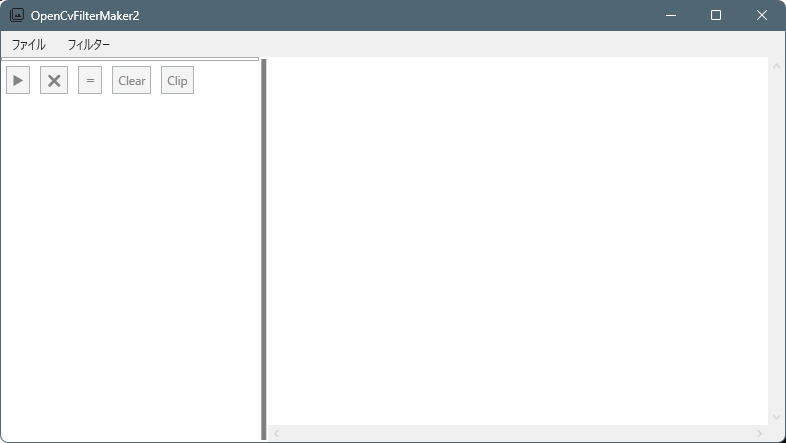
・起動時
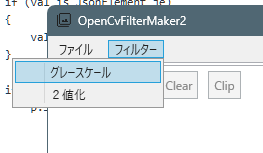
・フィルターを追加
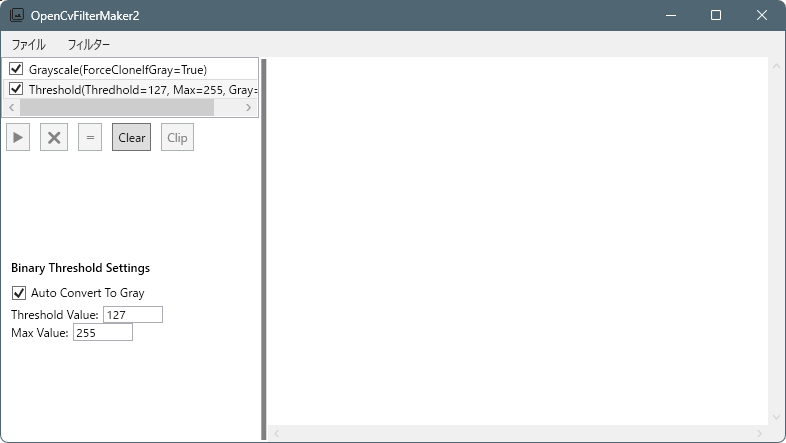
・画像ファイルをドロップ
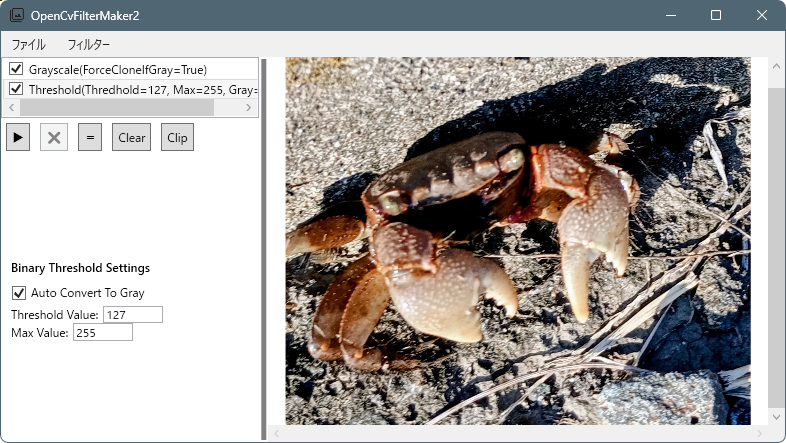
こちらの、プレビュー画像は、Ctrl+マウスホイールで拡縮・ホイールドラックでパン(画像スクロール)機能があります。
・フィルター実行ボタン「▶️」を押すとフィルターが実行されます。
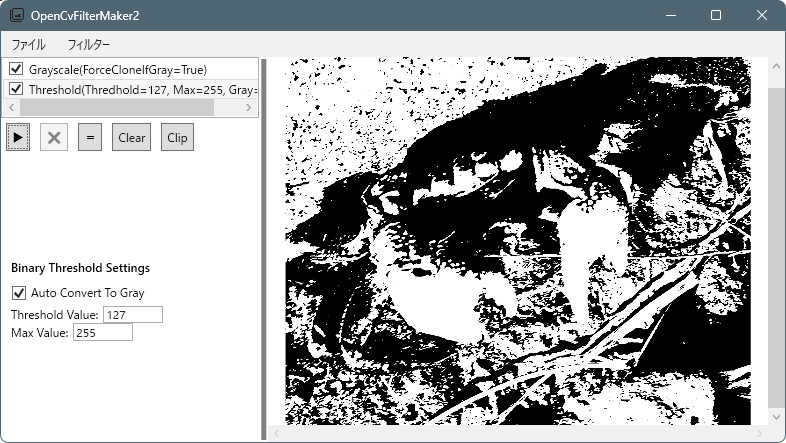
・フィルターキャンセルボタン「❌️」を押すとフィルターが実行がキャンセルされます。
・フィルターリセットボタン「=」を押すと元画像が表示されます。
・Clearボタンを押すとフィルターが全て削除されます。
・Clipボタンを押すと、表示されている画像がクリップボードへコピーされます。
・フィルターの実行順の変更・削除
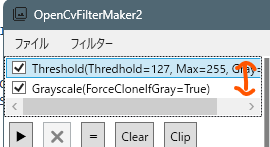
フィルターを選択します。
Ctrl+↑でフィルターの順番を上げます。
Ctrl+↓でフィルターの順番を下げます。
Deleteでフィルターを削除。
・フィルター手順の保存・読み込み
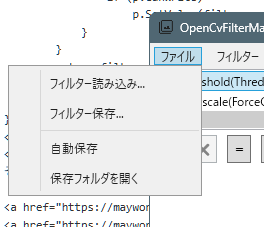
フィルターの手順をjson形式で保存できます。
読み込むことで、フィルター手順を復元することが出来ます。
・自動保存
有効の場合ピクチャフォルダに日付フォルダが作成され、連番で画像が作成されます。
フィルターを実行都度画像が保存されます。
デフォルトはOFFで保存されません。
・保存フォルダを開く
エクスプローラーで自動保存フォルダを開きます。
感想
現時点では、実装しているフィルターは
「グレースケール化」と「2値化」だけですが、
今後少しずつ種類を増やしていく予定です。
また、このアプリケーションはフィルターを
簡単に追加できる構造になっています。
例えば、
・フィルター処理を実装したクラス
(例: GrayscaleFilter.cs)
・パラメータ調整用のUIリソース
(Resources/GrayscaleFilter.xaml)
この2つを追加することで、新しいフィルター機能を
アプリケーションに組み込むことができます。
仕組みとしては簡易的ではありますが、
フィルターを後から追加できる
「プラグイン」のような構造になっています。
コメント