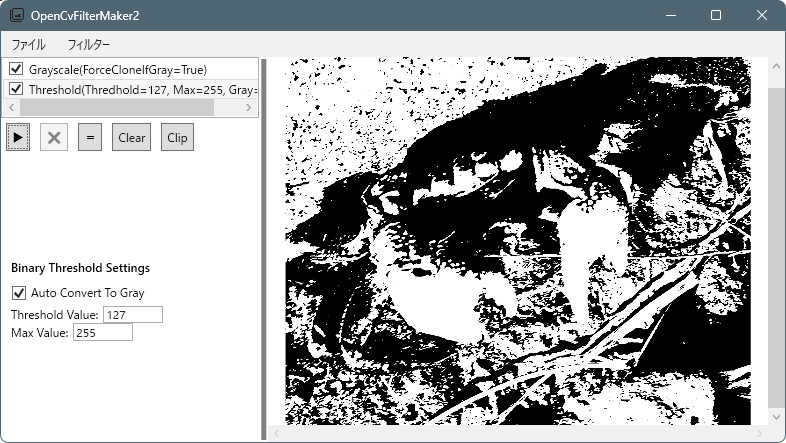
画像をスキャナで取り込む際、本来はモノクロの原稿であっても、カラースキャンすると赤や青などの色付きノイズが発生することがあります。
モノクロ原稿の場合、理想的には RGBの値はほぼ同じ(R=G=B) になるはずですが、スキャナの特性や紙質、インクの影響などにより、部分的に色が偏ったピクセルが混ざることがあります。
このようなピクセルは、グレースケール化や2値化を行う際にノイズとして残りやすく、結果として画質を悪化させる原因になります。
そこで今回は、**OpenCV(OpenCvSharp)を使って「カラーノイズを検出し、白または黒に置き換えるフィルター」**を作成してみました。
基本的なアイデアはシンプルで、各ピクセルの RGBの差分(max−min) を調べ、
差が大きい場合は「モノクロではないノイズ」と判断して処理を変えるという方法です。
また、閾値を自動調整する機能も追加し、画像ごとに最適な値をある程度自動で決められるようにしています。
この記事では、この カラーノイズ除去フィルターのアルゴリズムと実装例を紹介します。
ソースコード
ColorNoiseRemovalFilter.cs
using OpenCvSharp;
using Reactive.Bindings;
using Reactive.Bindings.Extensions;
using System.Reactive.Linq;
using Cv = OpenCvSharp;

namespace OpenCvFilterMaker2;

public class ColorNoiseRemovalFilter : CvFilterBase
{
    public ReactivePropertySlim<int> KernelSize { get; set; }
        = new ReactivePropertySlim<int>(3);

    public ReactivePropertySlim<double> ThresholdValue { get; set; }
        = new ReactivePropertySlim<double>(160.0d);
    public ReactivePropertySlim<int> DiffSize { get; set; }
        = new ReactivePropertySlim<int>(16);
    public ReactivePropertySlim<bool> IsAuto { get; set; }
        = new ReactivePropertySlim<bool>(true);
    public ReactivePropertySlim<bool> IsManual { get; set; }
        = new ReactivePropertySlim<bool>(false);

    public ColorNoiseRemovalFilter()
    {
        MenuHeader = "カラーノイズ除去";
        IsEnabled.Value = true;

        KernelSize.Subscribe(value =>
        {
            int newValue = value < 3 ? 3 : value;
            if (newValue % 2 == 0)
                newValue += 1;

            KernelSize.Value = newValue;
            UpdateName();
        })
        .AddTo(Disposable);

        ThresholdValue
            .Subscribe(_ => UpdateName())
            .AddTo(Disposable);

        DiffSize
            .Subscribe(_ => UpdateName())
            .AddTo(Disposable);
        IsAuto
            .Subscribe(value =>
            {
                IsManual.Value = !value;
                UpdateName();
            })
            .AddTo(Disposable);
        IsManual.AddTo(Disposable);

        UpdateName();
    }

    private void UpdateName()
    {
        Name.Value = $"ColorNoiseRemovalFilter(ksize={KernelSize.Value} th={ThresholdValue.Value}) diff={DiffSize.Value}";

    }
    protected override Cv.Mat Apply(Cv.Mat input)
    {
        Cv.Mat work = input.Clone();

        // グレースケールの場合戻る
        if (work.Channels() == 1)
        {
            return work.Clone();
        }

        // BGRカラー化
        if (work.Channels() == 4)
        {
            Cv.Cv2.CvtColor(work, work, Cv.ColorConversionCodes.BGRA2BGR);
        }

        if (work.Type() != MatType.CV_8UC3)
            throw new ArgumentException("CV_8UC3 のカラー画像のみ対応");


        // Greenチャンネル抽出→グレースケール
        using var gray = new Mat();
        Cv.Cv2.ExtractChannel(work, gray, 1);


        // 閾値の自動調整
        if (IsAuto.Value == true)
        {
            Cv.Scalar mean = Cv.Cv2.Mean(gray);
            double avg = mean.Val0 - 26.0d;
            avg = avg > 255.0d ? 255.0d : avg;
            avg = avg < 0.0d ? 0.0d : avg;

            ThresholdValue.Value = avg;
        }


        // 2値化
        using var th = new Mat();
        Cv.Cv2.Threshold(gray, th, ThresholdValue.Value, 255.0,
            ThresholdTypes.Binary);

        // メディアン
        using var median = new Mat();
        Cv.Cv2.MedianBlur(th, median, KernelSize.Value);


        Mat dst = th.Clone();

        int rows = work.Rows;
        int cols = work.Cols;

        for (int y = 0; y < rows; y++)
        {
            for (int x = 0; x < cols; x++)
            {
                Vec3b color = work.At<Vec3b>(y, x);

                byte b = color.Item0;
                byte g = color.Item1;
                byte r = color.Item2;

                byte max = Math.Max(r, Math.Max(g, b));
                byte min = Math.Min(r, Math.Min(g, b));

                int diff = max - min;

                byte thVal = th.At<byte>(y, x);
                byte medianVal = median.At<byte>(y, x);

                if (diff > DiffSize.Value)
                {
                    dst.Set(y, x, medianVal);
                }
                else
                {
                    dst.Set(y, x, thVal);
                }


            }
        }

        return dst;
    }
}
ColorNoiseRemovalFilter.cs
<ResourceDictionary
    xmlns="http://schemas.microsoft.com/winfx/2006/xaml/presentation"
    xmlns:x="http://schemas.microsoft.com/winfx/2006/xaml"
    xmlns:local="clr-namespace:OpenCvFilterMaker2">

    <!-- ColorNoiseRemovalFilter用テンプレート -->
    <DataTemplate DataType="{x:Type local:ColorNoiseRemovalFilter}">
        <StackPanel Margin="10">
            <TextBlock Text="ColorNoiseRemovalFilter Settings"
                       FontWeight="Bold"
                       Margin="0,0,0,10"/>

            <StackPanel Orientation="Horizontal">
                <TextBlock Text="KernelSize:"
                            VerticalAlignment="Center"
                            Margin="0,0,5,0"/>
                <TextBox Width="60"
                            Text="{Binding KernelSize.Value}"/>
            </StackPanel>
            <StackPanel Orientation="Horizontal">
                <TextBlock Text="ThresholdValue:"
                            VerticalAlignment="Center"
                            Margin="0,0,5,0"/>
                <TextBox Width="60"
                            IsEnabled="{Binding IsManual.Value}"
                            Text="{Binding ThresholdValue.Value}"/>
                <CheckBox Content="Auto"
                     IsChecked="{Binding IsAuto.Value}"
                     Margin="0,0,0,5"/>
            </StackPanel>

            <StackPanel Orientation="Horizontal">
                <TextBlock Text="DiffValue:"
                            VerticalAlignment="Center"
                            Margin="0,0,5,0"/>
                <TextBox Width="60"
                            Text="{Binding DiffSize.Value}"/>
            </StackPanel>
        </StackPanel>
    </DataTemplate>

</ResourceDictionary>
MainWindow.xaml
<ResourceDictionary Source="/Resources/ColorNoiseRemovalFilter.xaml"/>追加
本体
コメント