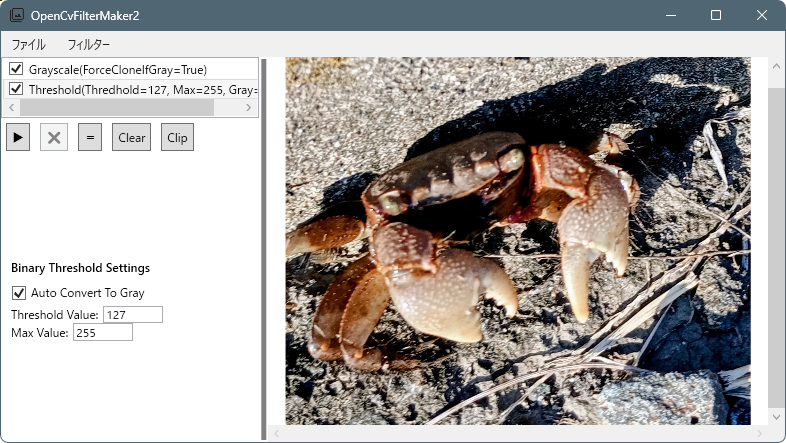
ガンマ補正は、ディスプレイの特性や人間の視覚に合わせて、画像の明るさを調整する処理です。
GammaCorrectionFilter.cs
using OpenCvSharp;
using Reactive.Bindings;
using Reactive.Bindings.Extensions;
using System.Reactive.Linq;
using Cv = OpenCvSharp;

namespace OpenCvFilterMaker2;

public class GammaCorrectionFilter : CvFilterBase
{
    public ReactivePropertySlim<double> Gamma { get; set; }
        = new ReactivePropertySlim<double>(0.8d);

    public GammaCorrectionFilter()
    {
        MenuHeader = "ガンマ補正";
        IsEnabled.Value = true;

        Gamma.Subscribe(value =>
        {
            value = value <= 0.0d ? 3.0d : value;
            Gamma.Value = value;

            UpdateName();
        })
        .AddTo(Disposable);

        UpdateName();
    }

    private void UpdateName()
    {
        Name.Value = $"Gamma({Gamma.Value:F2})";

    }
    protected override Cv.Mat Apply(Cv.Mat input)
    {
        if (input.Depth() != MatType.CV_8U)
            throw new InvalidOperationException("Gamma correction requires CV_8U image.");

        // LUT作成
        var lut = new Mat(1, 256, MatType.CV_8UC1);

        for (int i = 0; i < 256; i++)
        {
            double normalized = i / 255.0;
            double corrected = Math.Pow(normalized, Gamma.Value);
            byte value = (byte)(corrected * 255.0);
            lut.Set(0, i, value);
        }

        var dst = new Mat();
        Cv2.LUT(input, lut, dst);

        lut.Dispose();
        return dst;
    }
}
GammaCorrectionFilter.xaml
<ResourceDictionary
    xmlns="http://schemas.microsoft.com/winfx/2006/xaml/presentation"
    xmlns:x="http://schemas.microsoft.com/winfx/2006/xaml"
    xmlns:local="clr-namespace:OpenCvFilterMaker2">

    <!-- GammaCorrectionFilter用テンプレート -->
    <DataTemplate DataType="{x:Type local:GammaCorrectionFilter}">
        <StackPanel Margin="10">
            <TextBlock Text="GammaCorrectionFilter Settings"
                       FontWeight="Bold"
                       Margin="0,0,0,10"/>

            <StackPanel Orientation="Horizontal">
                <TextBlock Text="Gamma:"
                            VerticalAlignment="Center"
                            Margin="0,0,5,0"/>
                <TextBox Width="60"
                            Text="{Binding Gamma.Value}"/>
            </StackPanel>
        </StackPanel>
    </DataTemplate>

</ResourceDictionary>
MainWindow.xaml
<ResourceDictionary Source="/Resources/GammaCorrectionFilter.xaml"/>追加
コメント