   // 画像バッファ
    public readonly struct ImageBuffer
    {
        public int Width { get; }
        public int Height { get; }
        public int Stride { get; }
        public int Channels { get; }
        public byte[] Pixels { get; }

        public ImageBuffer(int width, int height, int stride, int channels, byte[] pixels)
        {
            Width = width;
            Height = height;
            Stride = stride;
            Channels = channels;
            Pixels = pixels;
        }
        public Span<byte> GetPixelSpan(int x, int y)
        {
            int idx = y * Stride + x * Channels;
            return Pixels.AsSpan(idx, Channels);
        }
        [MethodImpl(MethodImplOptions.AggressiveInlining)]
        private bool InBounds(int x, int y)
        {
            return (uint)x < (uint)Width && (uint)y < (uint)Height;
        }
        // 点・グレースケール
        public void SetPixel(int x, int y, byte v)
        {
            if (!InBounds(x, y)) return;

            int idx = y * Stride + x * Channels;
            Pixels[idx] = v;
        }
        // 点・カラー
        public void SetPixel(int x, int y, byte r, byte g, byte b)
        {
            if (!InBounds(x, y)) return;

            int idx = y * Stride + x * Channels;
            Pixels[idx + 0] = b;
            Pixels[idx + 1] = g;
            Pixels[idx + 2] = r;
        }
利用例
MainWindow.xaml.cs
using System.Windows;

using Maywork.WPF.Helpers;

namespace WpfSample01;

public partial class MainWindow : Window
{
    public MainWindow()
    {
        InitializeComponent();

        var buff = ImageBufferHelper.Create(256, 256, 1);

        for(int y = 0; y < 256; y++) // カラーの場合、第3引数を1→3
        {
            for(int x = 0; x < 256; x++)
            {
                int c = y + x;
                if (c > 255) c = c - 255;
                buff.SetPixel(x, y, (byte)c);
            }
        }

        Image1.Source = buff.ToBitmapSource();
    }
}
MainWindow.xaml
    <Grid>
        <Image x:Name="Image1" />
</Grid>実行例
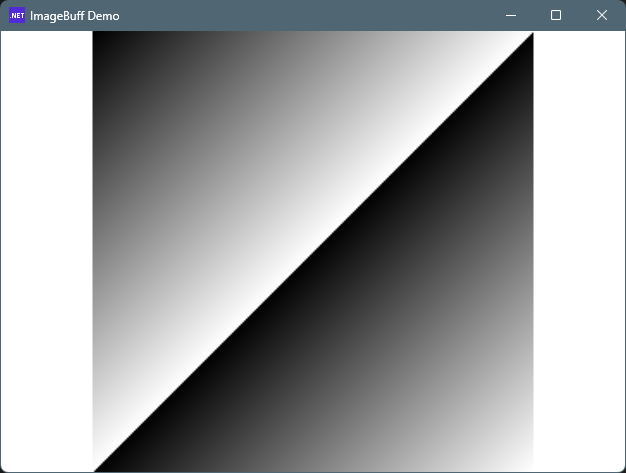
グレースケール
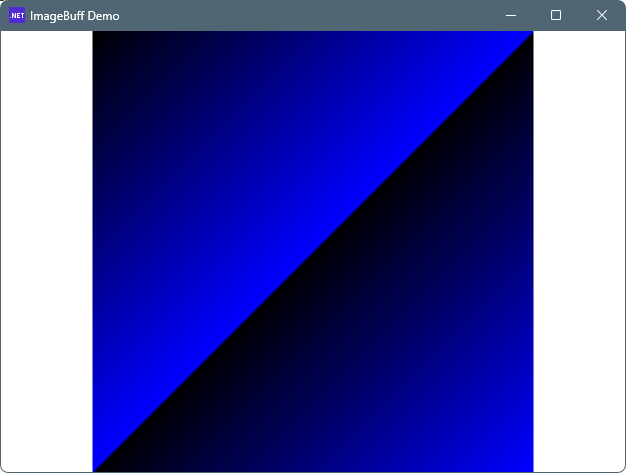
カラー
コメント