GIMPのPython-Fuから外部コマンドを呼び出す方法を知っているので、C#とOpenCVSharpで様々な画像処理を自作することが出来るようになりました。
Gimp3のPython-fuで外部コマンドをフィルターとして実行「適応的閾値による二値化処理 adaptiveThreshold」
GIMPには適応的閾値による二値化処理が無いようなので、OpenCVSharpのCv2.adaptiveThresholdで外部コマンド(ToLine.exe)を作り、GIMPのフィルターとして呼び出す実装になっています。外部コマンドをフィ...
maywork.net
2025.10.28
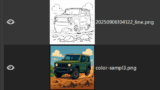
C#で作るイラストから線画抽出するコンソールアプリ
適応型しきい値による2値処理を、境界がしっかりしたイラストなどに施すと、境界部分が線画のように抽出されます。2値化された画像ですので、線画としてのディティールは情報量が足りない(ギザギザ)ですが、白と黒ではっきりとしていますので範囲選択用の...
maywork.net
2025.09.06
adaptiveThresholdを行う外部コマンドをGIMPから呼び出すフィルターを作成しました。
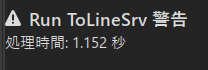
初回実行の処理時間が少し遅く3秒ほどかかります。
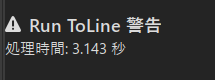
2回め以降は、少し速く1.5~1.7秒前後と、外部コマンドのプロセス起動に時間がかかっていると思われます。
できれば、2回目以降の速度か、もう少し時間短縮してくれると、利便性が向上します。
起動プロセスに時間がかかっていると仮定して、対策としては、あらかじめプロセスを起動しておき、TCPでリクエストで画像処理を行うワーカーを作成すれば、解決すると予想し試してみました。
C#のソースコード(ワーカー)
ファイル名:ImgProcSrv.csproj
<Project Sdk="Microsoft.NET.Sdk">

  <PropertyGroup>
    <OutputType>Exe</OutputType>
    <TargetFramework>net8.0</TargetFramework>
    <ImplicitUsings>enable</ImplicitUsings>
    <Nullable>enable</Nullable>
  </PropertyGroup>

  <ItemGroup>
    <PackageReference Include="OpenCvSharp4" Version="4.11.0.20250507" />
    <PackageReference Include="OpenCvSharp4.runtime.win" Version="4.11.0.20250507" />
  </ItemGroup>

</Project>
ファイル名:Program.cs
using System.Net;
using System.Net.Sockets;
using System.Text;
using OpenCvSharp;

var listener = new TcpListener(IPAddress.Loopback, 5001);
listener.Start();
Console.WriteLine("Image server ready.");

while (true)
{
    var client = listener.AcceptTcpClient();
    using var stream = client.GetStream();
    byte[] buffer = new byte[4096];
    int length = stream.Read(buffer, 0, buffer.Length);
    string message = Encoding.UTF8.GetString(buffer, 0, length);

    if (message == "quit")
        break;

    // Format: "IN|OUT"
    var paths = message.Split('|');
    string inputPath = paths[0];
    string outputPath = paths[1];

    using Mat im = Cv2.ImRead(inputPath, ImreadModes.Grayscale);
    using var work = new Mat();
    Cv2.AdaptiveThreshold(im, work, 255.0,
        AdaptiveThresholdTypes.GaussianC,
        ThresholdTypes.BinaryInv,
        51, 20);

    using var element = Cv2.GetStructuringElement(
        MorphShapes.Ellipse, new Size(3, 3));
    Cv2.Dilate(work, work, element);
    Cv2.Erode(work, work, element);
    using var dst = new Mat();
    Cv2.BitwiseNot(work, dst);

    Cv2.ImWrite(outputPath, dst);

    byte[] reply = Encoding.UTF8.GetBytes("ok");
    stream.Write(reply, 0, reply.Length);
}

listener.Stop();
Console.WriteLine("Server shutdown.");
Python-Fuスクリプト(クライアント)
ファイル名:my-tolinesrv/my-tolinesrv.py
#!/usr/bin/env python3
# GIMP 3 (Python-Fu) : TCPクライアント
import sys, gi
import datetime, os, time
import socket
#import subprocess
gi.require_version('Gimp', '3.0')
from gi.repository import Gimp, GObject, Gio
PROC = "python-fu-tolinesrv"
def run(proc, run_mode, image, drawables, config, data):
    start = time.time()
    now = datetime.datetime.now()
    filename = now.strftime('%Y%m%d%H%M%S') + ".bmp"
    filename2 = now.strftime('%Y%m%d%H%M%S') + "-out.bmp"
    temp_dir = 'j:/temp'
    temp_in_file = os.path.join(temp_dir, filename)
    temp_out_file = os.path.join(temp_dir, filename2)

    try:
        # 出力先の画像ファイルのパスオブジェクトの生成
        out = Gio.File.new_for_path(temp_in_file)
        # 画像の保存(エクスポート)
        Gimp.file_save(Gimp.RunMode.NONINTERACTIVE, image, out, None)
        #subprocess.run(["c:/Users/karet/bin/ToLine.exe", "-i", temp_in_file, "-o", temp_out_file])
        #subprocess.run(['C:\\Users\\karet\\scoop\\apps\\msys2\\current\\ucrt64\\bin\\adaptiveth.exe', temp_in_file, temp_out_file])
        message = f"{temp_in_file}|{temp_out_file}"

        sock = socket.socket(socket.AF_INET, socket.SOCK_STREAM)
        sock.connect(("127.0.0.1", 5001))
        sock.sendall(message.encode("utf-8"))
        result = sock.recv(4096)
        sock.close()

        if result.decode("utf-8") != "ok":
            Gimp.message("失敗")
            return 1
        # 読み込みたいファイル
        f = Gio.File.new_for_path(temp_out_file)
        # レイヤーのindexを取得
        layer = image.get_selected_layers()[0]
        layers = image.get_layers()
        layer_index = layers.index(layer)
        # レイヤーとして読み込む
        new_layer = Gimp.file_load_layer(Gimp.RunMode.NONINTERACTIVE, image, f)
        # レイヤー名を設定
        new_layer_name = layer.get_name() + "_toGray"
        new_layer.set_name(new_layer_name)
        # 画像に挿入
        #Gimp.message(f"位置: {layer_index}")
        image.insert_layer(new_layer, None, layer_index)
        os.remove(temp_in_file)
        os.remove(temp_out_file)
        end = time.time()
        Gimp.message(f"処理時間: {end - start:.3f} 秒")
        return proc.new_return_values(Gimp.PDBStatusType.SUCCESS, None)
    except Exception as e:
        Gimp.message(f"起動失敗: {e}")
        return proc.new_return_values(Gimp.PDBStatusType.EXECUTION_ERROR, None)
class RunApp(Gimp.PlugIn):
    def do_query_procedures(self):
        return [PROC]
    def do_create_procedure(self, name):
        if name != PROC:
            return None
        p = Gimp.ImageProcedure.new(self, name, Gimp.PDBProcType.PLUGIN, run, None)
        p.set_menu_label("Run ToLineSrv")
        p.add_menu_path("<Image>/Filters/My")   # 画像を開いている時に表示
        p.set_documentation(
            "Launch notepad.exe via subprocess",
            "TCP クライアント",
            "my-tolinesvr.py"
        )
        p.set_attribution("Your Name", "Public Domain", "2025")
        # 画像が必要なメニュー配下なので image types を指定
        p.set_image_types("*")
        # 描画対象が選べる状態で有効化(最低限の感度)
        p.set_sensitivity_mask(Gimp.ProcedureSensitivityMask.DRAWABLE)
        return p
Gimp.main(RunApp.__gtype__, sys.argv)
コメント