GIMPのPython-Fuから、外部のワーカープロセスで画像のフィルター処理を行う仕組みを試しました。
ワーカープロセスが起動している必要がありますが、
起動処理もクライアントコードに組み込むことが出来ないか検証してみました。
ソースコード
サーバー(WPF)
ファイル名:TcpWpfWorker.csproj
<Project Sdk="Microsoft.NET.Sdk">

  <PropertyGroup>
    <OutputType>WinExe</OutputType>
    <TargetFramework>net8.0-windows</TargetFramework>
    <Nullable>enable</Nullable>
    <ImplicitUsings>enable</ImplicitUsings>
    <UseWPF>true</UseWPF>
  </PropertyGroup>

</Project>
ファイル名:MainWindow.xaml.cs
using System.Windows;

namespace TcpWpfWorker;

public partial class MainWindow : Window
{
    private readonly TcpServer _tcpServer;

    public MainWindow()
    {
        InitializeComponent();

        _tcpServer = new TcpServer(5001); // 任意のポート
        _tcpServer.LogReceived += OnLogReceived;
        _tcpServer.Start();
    }

    private void OnLogReceived(string message)
    {
        Dispatcher.Invoke(() =>
        {
            LogTextBox.AppendText(message + "\r\n");
            LogTextBox.ScrollToEnd();
        });
    }

    protected override void OnClosed(EventArgs e)
    {
        base.OnClosed(e);
        _tcpServer.Stop();
    }
}
ファイル名:TcpServer.cs
using System.Net;
using System.Net.Sockets;
using System.Text;

namespace TcpWpfWorker;

public class TcpServer
{
    private readonly int _port;
    private TcpListener? _listener;
    private bool _isRunning;

    public event Action<string>? LogReceived;

    public TcpServer(int port)
    {
        _port = port;
    }

    public void Start()
    {
        _listener = new TcpListener(IPAddress.Any, _port);
        _listener.Start();
        _isRunning = true;

        Log($"Server started on port {_port}");

        Thread listenerThread = new Thread(ListenLoop);
        listenerThread.IsBackground = true;
        listenerThread.Start();
    }

    public void Stop()
    {
        _isRunning = false;
        _listener?.Stop();
        Log("Server stopped.");
    }

    private void ListenLoop()
    {
        try
        {
            while (_isRunning)
            {
                var client = _listener?.AcceptTcpClient();
                if (client == null) continue;

                Thread worker = new Thread(() => HandleClient(client));
                worker.IsBackground = true;
                worker.Start();
            }
        }
        catch (SocketException ex)
        {
            Log($"Socket exception: {ex.Message}");
        }
    }

    private void HandleClient(TcpClient client)
    {
        var endPoint = client.Client.RemoteEndPoint?.ToString();
        Log($"Connected: {endPoint}");

        using NetworkStream stream = client.GetStream();
        byte[] buffer = new byte[4096];
        int length;

        try
        {
            while ((length = stream.Read(buffer, 0, buffer.Length)) > 0)
            {
                string message = Encoding.UTF8.GetString(buffer, 0, length).Trim();
                Log($"Received: {message}");

                // 必要なら返信もできる
                byte[] replyBytes = Encoding.UTF8.GetBytes("ACK");
                stream.Write(replyBytes, 0, replyBytes.Length);
            }
        }
        catch (Exception ex)
        {
            Log($"Client error: {ex.Message}");
        }

        Log($"Disconnected: {endPoint}");
        client.Close();
    }

    private void Log(string msg)
    {
        LogReceived?.Invoke($"[{DateTime.Now:HH:mm:ss}] {msg}");
    }
}
ファイル名:MainWindow.xaml
<Window x:Class="TcpWpfWorker.MainWindow"
        xmlns="http://schemas.microsoft.com/winfx/2006/xaml/presentation"
        xmlns:x="http://schemas.microsoft.com/winfx/2006/xaml"
        Title="TCP Worker" Height="450" Width="800">
    <Grid>
        <TextBox Name="LogTextBox"
                 VerticalScrollBarVisibility="Auto"
                 HorizontalScrollBarVisibility="Auto"
                 TextWrapping="Wrap"
                 AcceptsReturn="True"
                 IsReadOnly="True"
                 FontFamily="Consolas"
                 FontSize="12"
                 Margin="10"/>
    </Grid>
</Window>
クライアント(python)
tcp_client.py
import socket
import sys

def main():
    if len(sys.argv) < 2:
        print("usage:")
        print("  python tcp_client.py \"send message\"")
        return

    message = sys.argv[1]

    HOST = "127.0.0.1"
    PORT = 5001   # WPF 側と合わせる

    try:
        with socket.socket(socket.AF_INET, socket.SOCK_STREAM) as sock:
            sock.connect((HOST, PORT))

            print(f"connected to {HOST}:{PORT}")
            print(f"sending: {message}")

            # 送信
            sock.sendall(message.encode("utf-8"))

            # 応答受信(任意)
            try:
                data = sock.recv(4096)
                if data:
                    print("reply:", data.decode("utf-8", errors="ignore"))
            except:
                pass

    except Exception as e:
        print("error:", e)


if __name__ == "__main__":
    main()
実行例
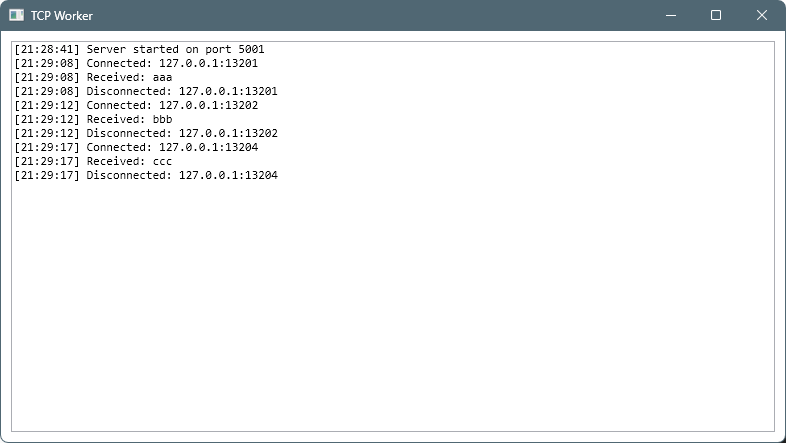
サーバー側のスクリーンショット
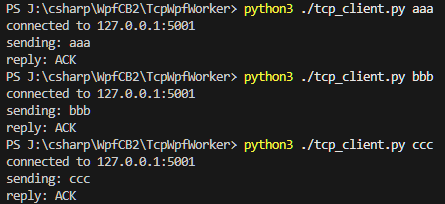
クライアント側スクリーンショット
ワーカープロセス起動機能付きクライアント
ワーカーからの応答がない場合、ワーカープロセスを起動する用にするコードを、
クラアンとスクリプトに組み込みました。
tcp_client_with_bootsvr.py
import time
import subprocess
import socket
import sys

HOST = "127.0.0.1"
PORT=5001
WORKER_EXE="J:/csharp/WpfCB2/TcpWpfWorker/bin/Release/net8.0-windows/TcpWpfWorker.exe"


def is_worker_alive(port, timeout=3.0):
    end = time.time() + timeout
    while time.time() < end:
        try:
            with socket.create_connection(("127.0.0.1", port), 0.2):
                return True
        except OSError:
            time.sleep(0.1)
    return False

def main():
    if len(sys.argv) < 2:
        print("usage:")
        print("  python tcp_client.py \"send message\"")
        return

    message = sys.argv[1]

    if not is_worker_alive(PORT):
        subprocess.Popen([WORKER_EXE])

    try:
        with socket.socket(socket.AF_INET, socket.SOCK_STREAM) as sock:
            sock.connect((HOST, PORT))

            print(f"connected to {HOST}:{PORT}")
            print(f"sending: {message}")

            # 送信
            sock.sendall(message.encode("utf-8"))

            # 応答受信(任意)
            try:
                data = sock.recv(4096)
                if data:
                    print("reply:", data.decode("utf-8", errors="ignore"))
            except:
                pass

    except Exception as e:
        print("error:", e)


if __name__ == "__main__":
    main()

コメント