前回から、時間が経過したので作り直します。
![]()
C#のWPFでファイルマネージャを作る:フォルダの作成、名前の変更対応
WPFでファイルマネージャを作成しています。今回はフォルダの作成、名前の変更機能を追加します。前回の記事GitHubリポジトリ(最新)ソースコード追加変更部分ファイル名RenameDialog.xaml.csusing System.Win...
maywork.net
2025.12.28
前回と比べて、コードビハインドからデータバインディングに変更しています。
コード量は多いですが、アプリケーション固有のコード(UseCase)はXAMLとViewModelだけで、
ファイルマネージャとしては少なめな感じまします。
ほかで使う可能性は低いですが、AttachedPropertyやインターフェイス部分はライブラリとして再利用できるように意識して作りました。
DirectoryItem.cs
using System.Collections.ObjectModel;
using System.ComponentModel;
using System.IO;
using System.Runtime.CompilerServices;

namespace FileListViewDemo;

public class DirectoryItem : INotifyPropertyChanged
{
    public event PropertyChangedEventHandler? PropertyChanged;
    protected void OnPropertyChanged([CallerMemberName] string? name = null)
        => PropertyChanged?.Invoke(this, new PropertyChangedEventArgs(name));

    public string Name { get; set; } = "";
    public string FullPath { get; set; } = "";
    public bool HasDummy { get; set; }
    public ObservableCollection<DirectoryItem> Children { get; } = [];

    private bool _isExpanded;
    public bool IsExpanded
    {
        get => _isExpanded;
        set
        {
            if (_isExpanded == value) return;
            _isExpanded = value;
            OnPropertyChanged();

            if (value)
            {
                LoadChildren();
            }
        }
    }

    private void LoadChildren()
    {
        if (!HasDummy) return;

        HasDummy = false;

        Children.Clear();

        try
        {
            foreach (var dir in Directory.GetDirectories(FullPath))
            {
                try
                {
                    var attr = File.GetAttributes(dir);
                    if ((attr & (FileAttributes.Hidden | FileAttributes.System)) != 0)
                        continue;

                    var child = new DirectoryItem
                    {
                        Name = Path.GetFileName(dir),
                        FullPath = dir,
                        HasDummy = true,
                    };
                    child.Children.Add(new DirectoryItem()); // ダミー
                    Children.Add(child);
                }
                catch { }
            }
        }
        catch { }
    }
}
FileItem.cs
using System.Windows.Media;

using Maywork.WPF.Helpers;

namespace FileListViewDemo;
public class FileItem : IFileItem
{
    public string Path { get; set; } = "";
    public string DisplayName { get; set; } = "";
    public ImageSource? Icon { get; set; }
    public bool IsDirectory { get; set; }
}
FileService.cs
using System.IO;
using Maywork.WPF.Helpers;

namespace FileListViewDemo;
public static class FileService
{
    public static IEnumerable<FileItem> GetFlieList(string path)
    {
        if (File.Exists(path))
            throw new ArgumentException($"{path} is file");
        if (!Directory.Exists(path))
            throw new ArgumentException($"{path} not exists");

        return Directory.EnumerateFileSystemEntries(path)
            .Select(file =>
            {
                try
                {
                    var attr = File.GetAttributes(file);
                    return (file, attr); // ← ValueTupleでOK
                }
                catch
                {
                    return ((string file, FileAttributes attr)?)null;
                }
            })
            .Where(x => x.HasValue &&
                (x.Value.attr & (FileAttributes.Hidden | FileAttributes.System)) == 0)
            .Select(x =>
            {
                var (file, attr) = x!.Value;

                return new FileItem()
                {
                    Path = file,
                    DisplayName = Path.GetFileName(file),
                    Icon = IconHelper.GetIconImageSource(file),

                    IsDirectory = (attr & FileAttributes.Directory) != 0
                };
            })
            .ToList();

    }
}
MainWindow.xaml
<Window x:Class="FileListViewDemo.MainWindow"
        xmlns="http://schemas.microsoft.com/winfx/2006/xaml/presentation"
        xmlns:x="http://schemas.microsoft.com/winfx/2006/xaml"
        xmlns:local="clr-namespace:FileListViewDemo"
        xmlns:h="clr-namespace:Maywork.WPF.Helpers"
        Title="FileListView Demo" Height="450" Width="800">
    <Window.DataContext>
        <local:MainWindowViewModel/>
    </Window.DataContext>
    <Grid>
        <Grid.RowDefinitions>
            <RowDefinition Height="Auto"/>
            <RowDefinition Height="*"/>
        </Grid.RowDefinitions>
        <Grid Grid.Row="0">
            <Grid.ColumnDefinitions>
                <ColumnDefinition Width="Auto"/>
                <ColumnDefinition Width="*"/>
                <ColumnDefinition Width="Auto"/>
            </Grid.ColumnDefinitions>
            <StackPanel
                Grid.Column="0"
                Orientation="Horizontal">
                <Button
                    Content="⇧"
                    FontSize="16"
                    Width="32"
                    ToolTip="親ディレクトリへ移動"
                    Margin="4"
                    Padding="2"
                    Command="{Binding MoveParentCommand}"/>
                </StackPanel>
            <TextBox
                Grid.Column="1"
                x:Name="AddressBar"
                Text="{Binding CurrentPath, Mode=OneWay}"
                VerticalAlignment="Center"
                FontSize="16"
                Margin="4"/>
            <StackPanel
                Grid.Column="2"
                Orientation="Horizontal">
                <Button
                    Content="↵"
                    FontSize="16"
                    Width="32"
                    ToolTip="アドレスバーのディレクトリへ移動"
                    Margin="4"
                    Padding="2"
                    Command="{Binding MoveFolderCommand}"
                    CommandParameter="{Binding Text, ElementName=AddressBar}"/>
            </StackPanel>
        </Grid>
        <Grid Grid.Row="1">
            <Grid.ColumnDefinitions>
                <ColumnDefinition Width="*"/>
                <ColumnDefinition Width="Auto"/>
                <ColumnDefinition Width="2*"/>
            </Grid.ColumnDefinitions>

            <TreeView
                ItemsSource="{Binding RootDirectories}"
                h:TreeViewSelectedItemBehavior.SelectedItemChangedCommand="{Binding NavigateCommand}"
                Margin="4">
                <TreeView.ItemContainerStyle>
                    <Style TargetType="TreeViewItem">
                        <Setter Property="FontSize" Value="16"/>
                    </Style>
                </TreeView.ItemContainerStyle>

                <TreeView.ItemTemplate>
                    <HierarchicalDataTemplate ItemsSource="{Binding Children}">
                        <TextBlock Text="{Binding Name}"/>
                    </HierarchicalDataTemplate>
                </TreeView.ItemTemplate>

            </TreeView>

            <!-- グリッドセパレータ -->
            <GridSplitter
                Grid.Column="1"
                Width="5"
                HorizontalAlignment="Center"
                VerticalAlignment="Stretch"
                Background="Gray"
                ShowsPreview="True"
                ResizeDirection="Columns"
                Margin="2"/>
            <ListView
                Grid.Column="2"
                ItemsSource="{Binding FileList}"
                SelectedItem="{Binding SelectedItem}"
                h:GridViewSort.Enable="True"
                h:ListViewItemDoubleClick.Enable="True"
                Margin="8">
                <ListView.ItemContainerStyle>
                    <Style TargetType="ListViewItem">
                        <Setter Property="FontSize" Value="14"/>
                        <Setter Property="Padding" Value="4"/>
                    </Style>
                </ListView.ItemContainerStyle>
                <ListView.ContextMenu>
                    <ContextMenu>

                        <MenuItem Header="開く"
                                Command="{Binding OpenCommand}"
                                CommandParameter="{Binding PlacementTarget.SelectedItem,
                                    RelativeSource={RelativeSource AncestorType=ContextMenu}}"/>

                        <MenuItem Header="フォルダを開く"
                                Command="{Binding OpenFolderCommand}"
                                CommandParameter="{Binding PlacementTarget.SelectedItem,
                                    RelativeSource={RelativeSource AncestorType=ContextMenu}}"/>

                    </ContextMenu>
                </ListView.ContextMenu>
                <ListView.View>
                    <GridView AllowsColumnReorder="False">
                        <GridViewColumn
                            Header="アイコン"
                            Width="48">
                            <GridViewColumn.CellTemplate>
                                <DataTemplate>
                                    <Image
                                        Source="{Binding Icon}"
                                        Width="24"
                                        Height="24"/>
                                </DataTemplate>
                            </GridViewColumn.CellTemplate>
                        </GridViewColumn>
                        <GridViewColumn
                            Header="名前"
                            Width="300"
                            DisplayMemberBinding="{Binding DisplayName}"/>
                    </GridView>
                </ListView.View>
            </ListView>
        </Grid>
    </Grid>
</Window>
MainWindowViewModel.cs
using System.Collections.ObjectModel;
using System.ComponentModel;
using System.Diagnostics;
using System.IO;
using System.Runtime.CompilerServices;
using System.Windows.Input;
using Maywork.WPF.Helpers;

namespace FileListViewDemo;
public class MainWindowViewModel : INotifyPropertyChanged, INavigationViewModel<IFileItem>
{
#region
    public event PropertyChangedEventHandler? PropertyChanged;
    protected void OnPropertyChanged([CallerMemberName] string? name = null)
        => PropertyChanged?.Invoke(this, new PropertyChangedEventArgs(name));
#endregion

    private ObservableCollection<FileItem> _FileList = [];
    public ObservableCollection<FileItem> FileList
    {
        get => _FileList;
        set
        {
            if (_FileList == value) return;
            _FileList = value;
            OnPropertyChanged();
        }
    }
    private FileItem? _SelectedItem;
    public FileItem? SelectedItem
    {
        get => _SelectedItem;
        set
        {
            if (_SelectedItem == value) return;
            _SelectedItem = value;
            OnPropertyChanged();
        }
    }
    private string _currentPath = "";
    public string CurrentPath
    {
        get => _currentPath;
        set
        {
            if (_currentPath == value) return;
            _currentPath = value;
            OnPropertyChanged();
        }
    }
    public ObservableCollection<DirectoryItem> RootDirectories { get; } = [];


    public ICommand OpenCommand { get; }
    public ICommand OpenFolderCommand { get; }
    public ICommand MoveFolderCommand { get; }
    public ICommand MoveParentCommand { get; }
    public ICommand NavigateCommand { get; }
    // コンストラクタ
    public MainWindowViewModel()
    {

        OpenCommand = new RelayCommand<IFileItem>(Open);
        OpenFolderCommand = new RelayCommand<IFileItem>(OpenFolder);
        MoveFolderCommand = new RelayCommand<string>(MoveFolder);
        MoveParentCommand = new RelayCommand(MoveParent);
        NavigateCommand = new RelayCommand<DirectoryItem>(OnTreeSelected);

        LoadDrives();

        // 初期フォルダー:ピクチャ
        string path = Environment.GetFolderPath(Environment.SpecialFolder.MyPictures);
        Navigate(new FileItem(){Path = path, IsDirectory=true});
    }
    public void Navigate(IFileItem item)
    {
        if (!item.IsDirectory) return;

        if (CurrentPath == item.Path) return;

        CurrentPath = item.Path;

        FileList.Clear();

        foreach (var x in FileService.GetFlieList(item.Path))
        {
            FileList.Add(x);
        }
    }
    private void Open(IFileItem? item)
    {
        if (item == null) return;

        if (item.IsDirectory)
        {
            Navigate(item);
        }
        else
        {
            Process.Start(new ProcessStartInfo
            {
                FileName = item.Path,
                UseShellExecute = true
            });
        }
    }

    private void OpenFolder(IFileItem? item)
    {
        if (item == null) return;

        var dir = item.IsDirectory
            ? item.Path
            : Path.GetDirectoryName(item.Path);

        if (dir != null)
        {
            Process.Start("explorer.exe", dir);
        }
    }
    private void MoveFolder(string path)
    {
        if (File.Exists(path))
            path = Path.GetDirectoryName(path) ?? path;
        if (!Directory.Exists(path)) return;

        Navigate(new FileItem(){Path = path, IsDirectory=true});
    }
    private void MoveParent()
    {
        string root = Path.GetPathRoot(this.CurrentPath) ?? "";
        if ( root.Equals(CurrentPath) ) return;

        var path = Path.GetDirectoryName(this.CurrentPath) ?? "";
        if (!Directory.Exists(path)) return;

        Navigate(new FileItem(){Path = path, IsDirectory=true});
    }
    private void LoadDrives()
    {
        RootDirectories.Clear();

        foreach (var drive in DriveInfo.GetDrives())
        {
            // リムーバブル無視
            if (drive.DriveType == DriveType.Removable)
                continue;

            // 未接続も除外
            if (!drive.IsReady)
                continue;


            var child = new DirectoryItem
            {
                Name = drive.Name,
                FullPath = drive.RootDirectory.FullName,
                HasDummy = true,
            };
            child.Children.Add(new DirectoryItem());
            RootDirectories.Add(child);

        }
    }
    private void OnTreeSelected(DirectoryItem? item)
    {
        if (item == null) return;

        if (!item.IsExpanded)
            item.IsExpanded = true;

        Navigate(new FileItem(){Path = item.FullPath, IsDirectory=true});
    }
}
FileListViewDemo.csproj
<Project Sdk="Microsoft.NET.Sdk">

  <PropertyGroup>
    <OutputType>WinExe</OutputType>
    <TargetFramework>net10.0-windows</TargetFramework>
    <Nullable>enable</Nullable>
    <ImplicitUsings>enable</ImplicitUsings>
    <UseWPF>true</UseWPF>
    <!-- <ApplicationIcon>Assets/App.ico</ApplicationIcon> -->
  </PropertyGroup>

  <ItemGroup>
    <PackageReference Include="ReactiveProperty.WPF" Version="9.8.0" />
  </ItemGroup>

	<ItemGroup>
		<Resource Include="Assets\**\*.*" />
	</ItemGroup>

</Project>
汎用ヘルパー類
BoolToVisibilityConverter.cs
ImageHelper.cs
RelayCommand.cs
IconHelper.cs
GridViewSort.cs
IFileItem.cs
INavigationViewModel.cs
ListViewItemDoubleClick.cs
TreeViewSelectedItemBehavior.cs
実行イメージ
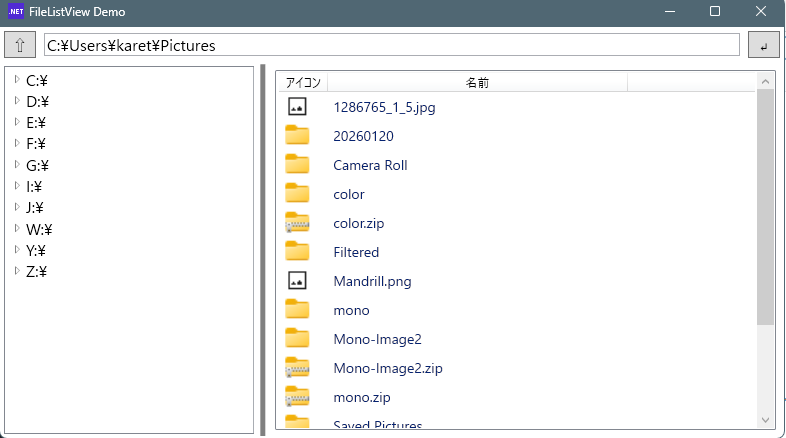
TreeViewの選択したフォルダがLitViewに連動しますが、逆は機能が無いです。

コメント