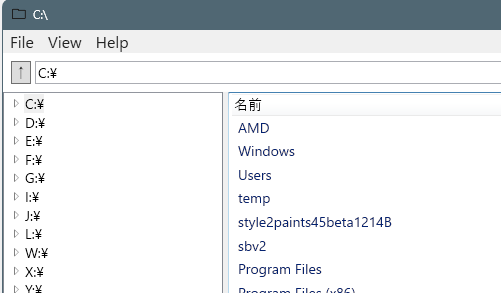
WPFでファイルマネージャを作成しています。
今回はフォルダの作成、名前の変更機能を追加します。
GitHubリポジトリ(最新)
https://github.com/kareteruhito/MyFileManager
ソースコード
追加変更部分
ファイル名RenameDialog.xaml.cs
using System.Windows;

namespace MyFileManager;

public partial class RenameDialog : Window
{
    public string ResultName => NameBox.Text;

    public RenameDialog(string currentName)
    {
        InitializeComponent();
        NameBox.Text = currentName;
        NameBox.SelectAll();
        Loaded += (_, _) => NameBox.Focus();
    }

    private void Ok_Click(object sender, RoutedEventArgs e)
    {
        if (string.IsNullOrWhiteSpace(NameBox.Text))
            return;

        DialogResult = true;
    }
}
ファイル名:RenameDialog.xaml
<Window x:Class="MyFileManager.RenameDialog"
        xmlns="http://schemas.microsoft.com/winfx/2006/xaml/presentation"
        xmlns:x="http://schemas.microsoft.com/winfx/2006/xaml"
        Title="名前の変更"
        Width="400"
        Height="130"
        WindowStartupLocation="CenterOwner"
        ResizeMode="NoResize">
    <Grid Margin="10">
        <Grid.RowDefinitions>
            <RowDefinition Height="Auto"/>
            <RowDefinition Height="Auto"/>
        </Grid.RowDefinitions>

        <TextBox x:Name="NameBox"
                 Margin="0,0,0,10"/>

        <StackPanel Grid.Row="1"
                    Orientation="Horizontal"
                    HorizontalAlignment="Right">
            <Button Width="80" Margin="0,0,10,0"
                    Content="OK"
                    IsDefault="True"
                    Click="Ok_Click"/>
            <Button Width="80"
                    Content="キャンセル"
                    IsCancel="True"/>
        </StackPanel>
    </Grid>
</Window>
ファイル名:MainWindow.xaml(追加部分のみ)
<MenuItem Header="新しいフォルダ"
        Click="NewFolder_Click"/>
<MenuItem Header="名前の変更"
        Click="Rename_Click"/>
ファイル名:MainWindow.FileListView.cs(追加部分のみ)
    /*
    * 新しいいフォルダ作成・名前変更
    */
    // 新しいフォルダ作成
    private void NewFolder_Click(object sender, RoutedEventArgs e)
    {
        CreateNewDirectory();
    }
    // 名前変更
    private void Rename_Click(object sender, RoutedEventArgs e)
    {
        if (FileListView.SelectedItem is FileItem item)
            RenameItem(item);
    }
    // 仮名ディレクトリ名生成
    private string CreateUniqueFolderName(string basePath, string baseName = "NewFolder")
    {
        string path = Path.Combine(basePath, baseName);
        int index = 1;

        while (Directory.Exists(path))
        {
            path = Path.Combine(basePath, $"{baseName} ({index})");
            index++;
        }
        return path;
    }
    // 名前変更ダイアログ表示
    private void CreateNewDirectory()
    {
        string parent = CurrentDirectory;
        string tempPath = CreateUniqueFolderName(parent);

        try
        {
            Directory.CreateDirectory(tempPath);

            var dlg = new RenameDialog(Path.GetFileName(tempPath))
            {
                Owner = this
            };

            if (dlg.ShowDialog() == true)
            {
                string newPath = Path.Combine(parent, dlg.ResultName);
                if (tempPath != newPath)
                    Directory.Move(tempPath, newPath);
            }
            else
            {
                // キャンセル時は削除
                Directory.Delete(tempPath);
            }

            SetFileListViewDirectory(_currentDirectory);
        }
        catch (Exception ex)
        {
            MessageBox.Show(ex.Message, "ディレクトリ作成エラー");
        }
    }
    // 名前変更処理
    private void RenameItem(FileItem item)
    {
        var dlg = new RenameDialog(item.Name)
        {
            Owner = this
        };

        if (dlg.ShowDialog() != true)
            return;

        string newPath = Path.Combine(
            Path.GetDirectoryName(item.FullPath)!,
            dlg.ResultName);

        try
        {
            if (Directory.Exists(item.FullPath))
                Directory.Move(item.FullPath, newPath);
            else if (File.Exists(item.FullPath))
                File.Move(item.FullPath, newPath);

            SetFileListViewDirectory(_currentDirectory);
        }
        catch (Exception ex)
        {
            MessageBox.Show(ex.Message, "名前の変更エラー");
        }
    }
説明
フォルダの作成は、仮のフォオルダ名で作成し、名前の変更のダイアログボックスを起動する流れになっています。

コメント