
メモ帳はなぜタブで開くのか
エクスプローラーでテキストファイルをダブルクリックすると、メモ帳が起動し、そのファイルが開かれます。
その状態のまま、エクスプローラーで別のテキストファイルをダブルクリックすると、新しいメモ帳は起動せず、既に起動しているメモ帳のタブとしてファイルが追加されます(Windows 11)。
一見すると、これは単純な「多重起動の禁止処理」のように見えます。
しかし、ここで重要なのは次の点です。
-
新しいメモ帳プロセスは起動していない
-
それでも 別のファイルが開かれている
-
つまり、エクスプローラーから渡された ファイルパスは失われていない
この挙動から分かるのは、
多重起動は抑止されているが、
起動要求(コマンドライン引数)は既存プロセスに渡されている
ということです。
二重起動禁止は「Mutex」という技術が定番です。
ファイルパスを渡す方法は、「Named Pipe」を試してみます。
サンプルコード
ファイル名:SingleInstanceIpcSample.csproj
<Project Sdk="Microsoft.NET.Sdk">

  <PropertyGroup>
    <OutputType>WinExe</OutputType>
    <TargetFramework>net8.0-windows</TargetFramework>
    <Nullable>enable</Nullable>
    <ImplicitUsings>enable</ImplicitUsings>
    <UseWPF>true</UseWPF>
  </PropertyGroup>

</Project>
ファイル名:App.xaml.cs
using System.Linq;
using System.Threading;
using System.Windows;

namespace SingleInstanceIpcSample;

public partial class App : Application
{
    private static Mutex? _mutex;
    private const string MutexName = "SingleInstanceIpcSample_Mutex";

    protected override void OnStartup(StartupEventArgs e)
    {
        bool createdNew;
        _mutex = new Mutex(true, MutexName, out createdNew);

        if (createdNew)
        {
            // ワーカーとして起動
            IpcServer.Start();
            base.OnStartup(e);

            var window = new MainWindow();
            window.Show();
            if (e.Args.Length > 0)
            {
                window.ShowMessage(e.Args[0]);
            }
        }
        else
        {
            // クライアントとして起動
            string message = e.Args.FirstOrDefault() ?? "(no argument)";
            IpcClient.Send(message);

            Shutdown();
        }
    }
}
ファイル名:IpcClient.cs
using System.IO;
using System.IO.Pipes;

namespace SingleInstanceIpcSample;

public static class IpcClient
{
    private const string PipeName = "SingleInstanceIpcSample_Pipe";

    public static void Send(string message)
    {
        try
        {
            using var client = new NamedPipeClientStream(
                ".",
                PipeName,
                PipeDirection.Out);

            client.Connect(500);

            using var writer = new StreamWriter(client)
            {
                AutoFlush = true
            };
            writer.WriteLine(message);
        }
        catch
        {
            // ワーカーがいなければ何もしない
        }
    }
}
ファイル名:IpcServer.cs
using System.IO;
using System.IO.Pipes;
using System.Threading.Tasks;

namespace SingleInstanceIpcSample;

public static class IpcServer
{
    private const string PipeName = "SingleInstanceIpcSample_Pipe";

    public static event Action<string>? MessageReceived;

    public static void Start()
    {
        Task.Run(async () =>
        {
            while (true)
            {
                using var server = new NamedPipeServerStream(
                    PipeName,
                    PipeDirection.In,
                    1,
                    PipeTransmissionMode.Message,
                    PipeOptions.Asynchronous);

                await server.WaitForConnectionAsync();

                using var reader = new StreamReader(server);
                string? message = await reader.ReadLineAsync();

                if (message != null)
                {
                    MessageReceived?.Invoke(message);
                }
            }
        });
    }
}
ファイル名:MainWindow.xaml.cs
using System.Windows;

namespace SingleInstanceIpcSample;

public partial class MainWindow : Window
{
    public MainWindow()
    {
        InitializeComponent();
        IpcServer.MessageReceived += ShowMessage;
    }

    public void ShowMessage(string message)
    {
        Dispatcher.Invoke(() =>
        {
            MessageText.Text = message;
        });
    }
}
ファイル名:App.xaml
<Application x:Class="SingleInstanceIpcSample.App"
             xmlns="http://schemas.microsoft.com/winfx/2006/xaml/presentation"
             xmlns:x="http://schemas.microsoft.com/winfx/2006/xaml">
</Application>
ファイル名:MainWindow.xaml
<Window x:Class="SingleInstanceIpcSample.MainWindow"
        xmlns="http://schemas.microsoft.com/winfx/2006/xaml/presentation"
        xmlns:x="http://schemas.microsoft.com/winfx/2006/xaml"
        Title="IPC Sample"
        Width="600" Height="200"
        WindowStartupLocation="CenterScreen">
    <Grid>
        <TextBlock
            x:Name="MessageText"
            FontSize="16"
            TextWrapping="Wrap"
            HorizontalAlignment="Center"
            VerticalAlignment="Center"
            Text="(waiting...)"/>
    </Grid>
</Window>
実行例
・初回実行 … 引数に”C:\sample1.txt”
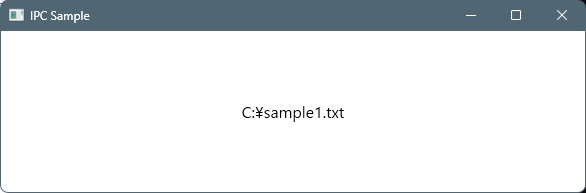
ウィンドウが起動し、”C:\sample1.txt”と表示される。
・2回目実行 … 引数に”C:\sample2.txt”
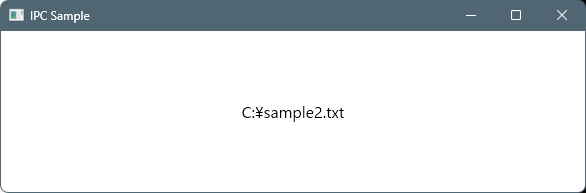
既存のウィンドウに、”C:\sample2.txt”と表示される。
何気ない処理ですが、
2回目実行ではMutexで起動しようとしているプロセスを強制終了しています。
終了する前に、既存プロセスにNamed Pipeで引数を通知することで、機能を実現しています。

コメント