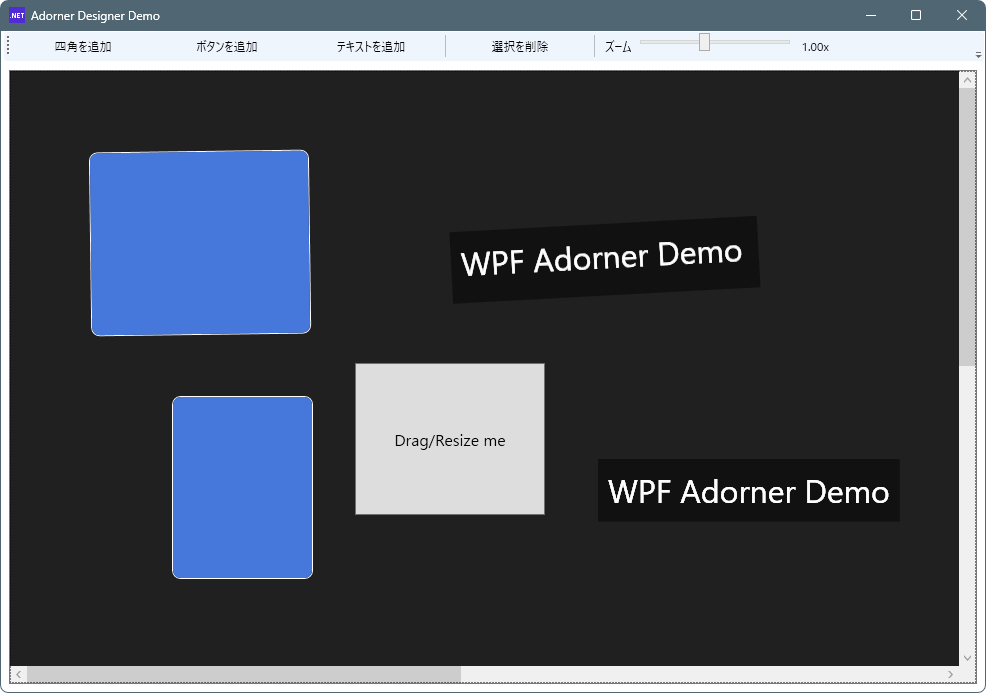
WPF における Adorner は、既存のコントロールの上に重ねて表示される特別な要素で、視覚的な装飾やインタラクティブな「操作ハンドル」を付与するために使われます。Adorner は通常の UI レイアウトとは別の AdornerLayer 上に描画され、その対象(アドーンされる要素)のサイズや位置に応じて動作します。これは単なる描画だけでなく、ユーザーが操作可能なハンドルや視覚フィードバックを追加するのに非常に便利な仕組みです。
本記事で紹介するデモプログラムでは、Adorner を使って Canvas 上の任意のコントロールに対して次のような編集操作を可能にしています:
-
選択時の枠表示とハンドル表示
-
移動(ドラッグ)
-
拡大・縮小(リサイズ)
-
回転操作
-
削除操作
これにより、WPF 上で簡易的な「デザイン編集 UI」や「配置・調整インターフェイス」を手軽に実装できます。
Adornerのデモプログラム
ソースコード
ファイル名:AdornerDesignerDemo.csproj
<Project Sdk="Microsoft.NET.Sdk">

  <PropertyGroup>
    <OutputType>WinExe</OutputType>
    <TargetFramework>net8.0-windows</TargetFramework>
    <Nullable>enable</Nullable>
    <ImplicitUsings>enable</ImplicitUsings>
    <UseWPF>true</UseWPF>
  </PropertyGroup>

</Project>
ファイル名:MainWindow.xaml.cs
using System.Windows;
using System.Windows.Controls;
using System.Windows.Documents;
using System.Windows.Input;
using System.Windows.Media;

namespace AdornerDesignerDemo;

public partial class MainWindow : Window
{
    private UIElement? _selected;
    private SelectionAdorner? _adorner;

    public MainWindow()
    {
        InitializeComponent();
        Loaded += (_, __) =>
        {
            DesignSurface.Focus();
            UpdateZoomText();
        };
    }

    // ----------------------------
    // Add controls
    // ----------------------------
    private void AddRectangle_Click(object sender, RoutedEventArgs e)
    {
        var rect = new Border
        {
            Width = 220,
            Height = 140,
            Background = new SolidColorBrush(Color.FromRgb(70, 120, 220)),
            BorderBrush = Brushes.White,
            BorderThickness = new Thickness(1),
            CornerRadius = new CornerRadius(8)
        };
        AddToSurface(rect, 80, 80);
    }

    private void AddButton_Click(object sender, RoutedEventArgs e)
    {
        var btn = new Button
        {
            Width = 180,
            Height = 60,
            Content = "Drag/Resize me",
            FontSize = 16
        };
        AddToSurface(btn, 120, 140);
    }

    private void AddText_Click(object sender, RoutedEventArgs e)
    {
        var tb = new TextBlock
        {
            Text = "WPF Adorner Demo",
            Foreground = Brushes.White,
            FontSize = 32,
            Background = new SolidColorBrush(Color.FromArgb(120, 0, 0, 0)),
            Padding = new Thickness(10)
        };

        // TextBlock は Width/Height が NaN になりがちなので、選択後のリサイズが効くように初期サイズを付与
        tb.Measure(new Size(double.PositiveInfinity, double.PositiveInfinity));
        tb.Width = tb.DesiredSize.Width;
        tb.Height = tb.DesiredSize.Height;

        AddToSurface(tb, 160, 220);
    }

    private void AddToSurface(FrameworkElement element, double left, double top)
    {
        element.Tag = "DesignItem";
        element.Cursor = Cursors.Arrow;

        // クリック選択
        element.MouseLeftButtonDown += Item_MouseLeftButtonDown;

        Canvas.SetLeft(element, left);
        Canvas.SetTop(element, top);
        DesignSurface.Children.Add(element);

        Select(element);
    }

    // ----------------------------
    // Selection handling
    // ----------------------------
    private void Item_MouseLeftButtonDown(object sender, MouseButtonEventArgs e)
    {
        if (sender is UIElement el)
        {
            Select(el);
            e.Handled = true;
        }
    }

    private void DesignSurface_MouseLeftButtonDown(object sender, MouseButtonEventArgs e)
    {
        // 余白クリックで選択解除
        if (e.OriginalSource == DesignSurface)
        {
            ClearSelection();
            DesignSurface.Focus();
        }
    }

    private void Select(UIElement el)
    {
        if (_selected == el) return;

        ClearSelection();
        _selected = el;

        var layer = AdornerLayer.GetAdornerLayer(el);
        if (layer == null) return;

        // 選択アドーナーを付与
        _adorner = new SelectionAdorner((FrameworkElement)el);
        _adorner.RequestDelete += () => DeleteSelected();
        layer.Add(_adorner);

        DesignSurface.Focus();
    }

    private void ClearSelection()
    {
        if (_selected is FrameworkElement fe && _adorner != null)
        {
            var layer = AdornerLayer.GetAdornerLayer(fe);
            layer?.Remove(_adorner);
        }
        _adorner = null;
        _selected = null;
    }

    // ----------------------------
    // Delete
    // ----------------------------
    private void DeleteSelected_Click(object sender, RoutedEventArgs e) => DeleteSelected();

    private void DesignSurface_KeyDown(object sender, KeyEventArgs e)
    {
        if (e.Key == Key.Delete)
        {
            DeleteSelected();
            e.Handled = true;
        }
        else if (e.Key == Key.Escape)
        {
            ClearSelection();
            e.Handled = true;
        }
    }

    private void DeleteSelected()
    {
        if (_selected == null) return;

        // 選択解除してから消す
        var toRemove = _selected;
        ClearSelection();
        DesignSurface.Children.Remove(toRemove);
    }

    // ----------------------------
    // Zoom (surface)
    // ----------------------------
    private void ZoomSlider_ValueChanged(object sender, RoutedPropertyChangedEventArgs<double> e)
    {
        if (SurfaceScale == null) return;
        SurfaceScale.ScaleX = ZoomSlider.Value;
        SurfaceScale.ScaleY = ZoomSlider.Value;
        UpdateZoomText();
    }

    private void UpdateZoomText()
    {
        ZoomText.Text = $"{ZoomSlider.Value:0.00}x";
    }
}
ファイル名:SelectionAdorner.cs
using System;
using System.Windows;
using System.Windows.Controls;
using System.Windows.Controls.Primitives;
using System.Windows.Documents;
using System.Windows.Input;
using System.Windows.Media;

namespace AdornerDesignerDemo;

public sealed class SelectionAdorner : Adorner
{
    public event Action? RequestDelete;

    private readonly VisualCollection _visuals;

    private readonly Thumb _move;
    private readonly Thumb _rotate;

    private readonly Thumb _tl, _tm, _tr, _ml, _mr, _bl, _bm, _br;

    private const double HandleSize = 10;
    private const double RotateHandleSize = 14;
    private const double RotateOffset = 28;
    private const double MinSize = 20;

    private Point _center;
    private double _startAngle;
    private double _startRotation;

    public SelectionAdorner(FrameworkElement adornedElement)
        : base(adornedElement)
    {
        _visuals = new VisualCollection(this);

        EnsureTransforms(adornedElement);

        // ===== ハンドル生成 =====
        _move = CreateThumb(Cursors.SizeAll, 0.0);
        _rotate = CreateRotateThumb();

        _tl = CreateThumb(Cursors.SizeNWSE);
        _tm = CreateThumb(Cursors.SizeNS);
        _tr = CreateThumb(Cursors.SizeNESW);
        _ml = CreateThumb(Cursors.SizeWE);
        _mr = CreateThumb(Cursors.SizeWE);
        _bl = CreateThumb(Cursors.SizeNESW);
        _bm = CreateThumb(Cursors.SizeNS);
        _br = CreateThumb(Cursors.SizeNWSE);

        _visuals.Add(_rotate);
        _visuals.Add(_move);

        _visuals.Add(_tl); _visuals.Add(_tm); _visuals.Add(_tr);
        _visuals.Add(_ml);                     _visuals.Add(_mr);
        _visuals.Add(_bl); _visuals.Add(_bm); _visuals.Add(_br);

        // ===== 移動 =====
        _move.DragDelta += Move_DragDelta;

        // ===== リサイズ =====
        _tl.DragDelta += (_, e) => ResizeFrom(e, left: true, top: true);
        _tm.DragDelta += (_, e) => ResizeFrom(e, top: true);
        _tr.DragDelta += (_, e) => ResizeFrom(e, right: true, top: true);

        _ml.DragDelta += (_, e) => ResizeFrom(e, left: true);
        _mr.DragDelta += (_, e) => ResizeFrom(e, right: true);

        _bl.DragDelta += (_, e) => ResizeFrom(e, left: true, bottom: true);
        _bm.DragDelta += (_, e) => ResizeFrom(e, bottom: true);
        _br.DragDelta += (_, e) => ResizeFrom(e, right: true, bottom: true);

        // ===== 回転 =====
        _rotate.DragStarted += Rotate_DragStarted;
        _rotate.DragDelta += Rotate_DragDelta;

        adornedElement.MouseRightButtonUp += (_, __) =>
            RequestDelete?.Invoke();
    }

    //==================================================
    // Transform
    //==================================================
    private static void EnsureTransforms(FrameworkElement fe)
    {
        if (fe.RenderTransform is TransformGroup) return;

        var group = new TransformGroup();
        group.Children.Add(new ScaleTransform(1, 1));
        group.Children.Add(new RotateTransform(0));
        group.Children.Add(new TranslateTransform());

        fe.RenderTransform = group;
        fe.RenderTransformOrigin = new Point(0.5, 0.5);
    }

    private RotateTransform? Rotate =>
        ((TransformGroup)AdornedElement.RenderTransform).Children[1] as RotateTransform;

    //==================================================
    // Adorner basics
    //==================================================
    protected override int VisualChildrenCount => _visuals.Count;
    protected override Visual GetVisualChild(int index) => _visuals[index];

    protected override void OnRender(DrawingContext dc)
    {
        var fe = (FrameworkElement)AdornedElement;
        var rect = new Rect(0, 0, fe.ActualWidth, fe.ActualHeight);

        var pen = new Pen(Brushes.Orange, 1.5)
        {
            DashStyle = DashStyles.Dash
        };

        dc.DrawRectangle(null, pen, rect);
    }

    protected override Size ArrangeOverride(Size finalSize)
    {
        var fe = (FrameworkElement)AdornedElement;

        double w = fe.ActualWidth;
        double h = fe.ActualHeight;

        // 移動バー
        _move.Arrange(new Rect(0, 0, w, 18));

        // 回転ハンドル
        _rotate.Arrange(new Rect(
            w / 2 - RotateHandleSize / 2,
            -RotateOffset,
            RotateHandleSize,
            RotateHandleSize));

        Arrange(_tl, 0, 0);
        Arrange(_tm, w / 2, 0);
        Arrange(_tr, w, 0);

        Arrange(_ml, 0, h / 2);
        Arrange(_mr, w, h / 2);

        Arrange(_bl, 0, h);
        Arrange(_bm, w / 2, h);
        Arrange(_br, w, h);

        return finalSize;
    }

    private void Arrange(Thumb t, double x, double y)
    {
        t.Arrange(new Rect(
            x - HandleSize / 2,
            y - HandleSize / 2,
            HandleSize,
            HandleSize));
    }

    //==================================================
    // Move
    //==================================================
    private void Move_DragDelta(object sender, DragDeltaEventArgs e)
    {
        var fe = (FrameworkElement)AdornedElement;

        double x = Canvas.GetLeft(fe);
        double y = Canvas.GetTop(fe);

        if (double.IsNaN(x)) x = 0;
        if (double.IsNaN(y)) y = 0;

        Canvas.SetLeft(fe, x + e.HorizontalChange);
        Canvas.SetTop(fe, y + e.VerticalChange);
    }

    //==================================================
    // Resize
    //==================================================
    private void ResizeFrom(
        DragDeltaEventArgs e,
        bool left = false,
        bool top = false,
        bool right = false,
        bool bottom = false)
    {
        var fe = (FrameworkElement)AdornedElement;

        double x = Canvas.GetLeft(fe);
        double y = Canvas.GetTop(fe);
        if (double.IsNaN(x)) x = 0;
        if (double.IsNaN(y)) y = 0;

        double w = fe.Width;
        double h = fe.Height;

        if (double.IsNaN(w)) w = fe.ActualWidth;
        if (double.IsNaN(h)) h = fe.ActualHeight;

        if (left)
        {
            double nw = Math.Max(MinSize, w - e.HorizontalChange);
            Canvas.SetLeft(fe, x + (w - nw));
            fe.Width = nw;
        }

        if (right)
            fe.Width = Math.Max(MinSize, w + e.HorizontalChange);

        if (top)
        {
            double nh = Math.Max(MinSize, h - e.VerticalChange);
            Canvas.SetTop(fe, y + (h - nh));
            fe.Height = nh;
        }

        if (bottom)
            fe.Height = Math.Max(MinSize, h + e.VerticalChange);

        InvalidateArrange();
    }

    //==================================================
    // Rotate
    //==================================================
    private void Rotate_DragStarted(object sender, DragStartedEventArgs e)
    {
        var fe = (FrameworkElement)AdornedElement;

        _center = fe.TranslatePoint(
            new Point(fe.ActualWidth / 2, fe.ActualHeight / 2),
            Application.Current.MainWindow);

        Point mouse = Mouse.GetPosition(Application.Current.MainWindow);

        _startAngle = Math.Atan2(
            mouse.Y - _center.Y,
            mouse.X - _center.X);

        _startRotation = Rotate!.Angle;
    }

    private void Rotate_DragDelta(object sender, DragDeltaEventArgs e)
    {
        Point mouse = Mouse.GetPosition(Application.Current.MainWindow);

        double angle = Math.Atan2(
            mouse.Y - _center.Y,
            mouse.X - _center.X);

        double delta = angle - _startAngle;

        Rotate!.Angle = _startRotation + delta * 180 / Math.PI;
    }

    //==================================================
    private Thumb CreateThumb(Cursor cursor, double opacity = 1.0)
    {
        return new Thumb
        {
            Width = HandleSize,
            Height = HandleSize,
            Cursor = cursor,
            Opacity = opacity,
            Template = BuildTemplate(Brushes.Orange)
        };
    }

    private Thumb CreateRotateThumb()
    {
        return new Thumb
        {
            Width = RotateHandleSize,
            Height = RotateHandleSize,
            Cursor = Cursors.Hand,
            Template = BuildTemplate(Brushes.DeepSkyBlue)
        };
    }

    private static ControlTemplate BuildTemplate(Brush color)
    {
        var t = new ControlTemplate(typeof(Thumb));
        var f = new FrameworkElementFactory(typeof(Border));

        f.SetValue(Border.BackgroundProperty, color);
        f.SetValue(Border.BorderBrushProperty, Brushes.White);
        f.SetValue(Border.BorderThicknessProperty, new Thickness(1));
        f.SetValue(Border.CornerRadiusProperty, new CornerRadius(2));

        t.VisualTree = f;
        return t;
    }
}
ファイル名:MainWindow.xaml
<Window x:Class="AdornerDesignerDemo.MainWindow"
        xmlns="http://schemas.microsoft.com/winfx/2006/xaml/presentation"
        xmlns:x="http://schemas.microsoft.com/winfx/2006/xaml"
        Title="Adorner Designer Demo" Width="1000" Height="700">
    <DockPanel>
        <!-- Toolbar -->
        <ToolBar DockPanel.Dock="Top">
            <Button Width="140" Margin="2" Click="AddRectangle_Click">四角を追加</Button>
            <Button Width="140" Margin="2" Click="AddButton_Click">ボタンを追加</Button>
            <Button Width="140" Margin="2" Click="AddText_Click">テキストを追加</Button>
            <Separator/>
            <Button Width="140" Margin="2" Click="DeleteSelected_Click">選択を削除</Button>
            <Separator/>
            <TextBlock Margin="8,0,4,0" VerticalAlignment="Center">ズーム</TextBlock>
            <Slider x:Name="ZoomSlider" Width="160" Minimum="0.25" Maximum="2.0" Value="1.0"
                    TickFrequency="0.25" IsSnapToTickEnabled="True"
                    ValueChanged="ZoomSlider_ValueChanged"/>
            <TextBlock x:Name="ZoomText" Margin="6,0,0,0" VerticalAlignment="Center"/>
        </ToolBar>

        <!-- Surface -->
        <Border BorderBrush="#777" BorderThickness="1" Margin="8" Background="#111">
            <ScrollViewer HorizontalScrollBarVisibility="Auto" VerticalScrollBarVisibility="Auto">
                <!-- AdornerLayer を確実に作るために、ScrollViewer配下に素直なCanvas -->
                <Canvas x:Name="DesignSurface"
                        Width="2000" Height="1200"
                        Background="#202020"
                        Focusable="True"
                        MouseLeftButtonDown="DesignSurface_MouseLeftButtonDown"
                        KeyDown="DesignSurface_KeyDown">
                    <Canvas.RenderTransform>
                        <ScaleTransform x:Name="SurfaceScale" ScaleX="1" ScaleY="1"/>
                    </Canvas.RenderTransform>
                </Canvas>
            </ScrollViewer>
        </Border>
    </DockPanel>
</Window>
実行例
使い方
- ツールバーの「四角を追加」「ボタンを追加」「テキストを追加」ボタンでコントロールが追加されます。
- コントロールをクリックするとガイド(SelectionAdorner)が表示され選択状態になります。
- ツールバーの「選択を削除」ボタンで選択中コントロールが削除されます。
- 各辺のオレンジ色四角をドラックすると選択中のコントロールが拡大・縮小されます。
- 上辺のオレンジ色四角は特別で、若干下にマウスカーソルをセットすると、十字矢印アイコンに変化しコントロールの移動することが出来ます。
- 水色の四角をドラックするとコントロールが回転します。
- コントロール外をクリックすると、コントロールの選択が解除されます。
※操作中コントロールが消えるバグあり

コメント