enum型をComboBoxにバインドすることが出来るそうなので試してみました。
ColorMode.cs
namespace WpfEnumCombobox;
public enum ColorMode
{
    Red,
    Green,
    Blue
}
MainWindowViewModel.cs
using System;
using System.ComponentModel;
using System.Runtime.CompilerServices;

namespace WpfEnumCombobox;
public class MainWindowViewModel : INotifyPropertyChanged
{
    public event PropertyChangedEventHandler? PropertyChanged;
    void OnPropertyChanged([CallerMemberName] string? name = null)
        => PropertyChanged?.Invoke(this, new PropertyChangedEventArgs(name));

    ColorMode _selectedMode = ColorMode.Red;
    public ColorMode SelectedMode
    {
        get => _selectedMode;
        set
        {
            if (_selectedMode == value) return;
            _selectedMode = value;
            OnPropertyChanged();
        }
    }

    public Array Modes => Enum.GetValues(typeof(ColorMode));
}
MainWindow.xaml
<Window x:Class="WpfEnumCombobox.MainWindow"
        xmlns="http://schemas.microsoft.com/winfx/2006/xaml/presentation"
        xmlns:x="http://schemas.microsoft.com/winfx/2006/xaml"
        xmlns:d="http://schemas.microsoft.com/expression/blend/2008"
        xmlns:mc="http://schemas.openxmlformats.org/markup-compatibility/2006"
        xmlns:local="clr-namespace:WpfEnumCombobox"
        mc:Ignorable="d"
        Title="MainWindow" Height="200" Width="300">
    <Window.DataContext>
        <local:MainWindowViewModel />
    </Window.DataContext>
    <StackPanel Margin="20">

        <ComboBox
            ItemsSource="{Binding Modes}"
            SelectedItem="{Binding SelectedMode}"
            Width="150"/>

        <TextBlock
            Margin="0,20,0,0"
            Text="{Binding SelectedMode}" />

    </StackPanel>
</Window>
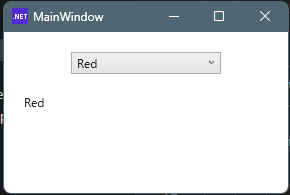
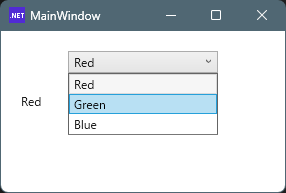
実行例

コメント