入力フォームからデータベースの更新をするアプリの雛形として、CRUD(Create,Read,Update,Delate)を行うサンプルコードを作成してみました。
データベースはLiteDBを使用しています。
ソースコード
ファイル名:CrudSample.csproj
<Project Sdk="Microsoft.NET.Sdk">

  <PropertyGroup>
    <OutputType>WinExe</OutputType>
    <TargetFramework>net8.0-windows</TargetFramework>
    <Nullable>enable</Nullable>
    <ImplicitUsings>enable</ImplicitUsings>
    <UseWPF>true</UseWPF>
  </PropertyGroup>

  <ItemGroup>
    <PackageReference Include="LiteDB" Version="5.0.21" />
  </ItemGroup>

</Project>
ファイル名:MainViewModel.cs
using LiteDB;
using System.Collections.ObjectModel;

using Helpers;

namespace CrudSample;

public class MainViewModel : Helpers.ViewModelBase
{
    private const string DbPath = "sample.db";

    public ObservableCollection<Person> Items { get; } = new();

    private Person? _selectedItem;
    public Person? SelectedItem
    {
        get => _selectedItem;
        set
        {
            _selectedItem = value;
            OnPropertyChanged();

            if (value != null)
            {
                Name = value.Name;
                Age = value.Age;
                IsNewMode = false; // 編集モード
            }
            else
            {
                UpdateFields();
            }

            DeleteCommand.RaiseCanExecuteChanged();
            UpdateCommand.RaiseCanExecuteChanged();
        }
    }
    private void UpdateFields()
    {
        UpdateCommand.RaiseCanExecuteChanged();
        DeleteCommand.RaiseCanExecuteChanged();
    }

    private string _name = "";
    public string Name
    {
        get => _name;
        set
        {
            if (_name == value) return;
            _name = value;
            OnPropertyChanged();

            // ★ 追加の条件が Name に依存するので再評価
            AddCommand.RaiseCanExecuteChanged();
        }
    }

    private int _age;
    public int Age
    {
        get => _age;
        set
        {
            if (_age == value) return;
            _age = value;
            OnPropertyChanged();
        }
    }

    private bool _isNewMode;
    public bool IsNewMode
    {
        get => _isNewMode;
        set
        {
            _isNewMode = value;
            OnPropertyChanged();

            NewCommand.RaiseCanExecuteChanged();
            AddCommand.RaiseCanExecuteChanged();
            UpdateCommand.RaiseCanExecuteChanged();
            DeleteCommand.RaiseCanExecuteChanged();
        }
    }
    public RelayCommand NewCommand { get; }
    public RelayCommand AddCommand { get; }
    public RelayCommand UpdateCommand { get; }
    public RelayCommand DeleteCommand { get; }

    public MainViewModel()
    {
        NewCommand = new RelayCommand(
            () =>
            {
                SelectedItem = null;
                Name = "";
                Age = 0;
                IsNewMode = true;
            },
            () => !IsNewMode
        );
        AddCommand = new RelayCommand(
            Add,
            () => IsNewMode && !string.IsNullOrWhiteSpace(Name)
        );

        UpdateCommand = new RelayCommand(
            Update,
            () => !IsNewMode && SelectedItem != null
        );

        DeleteCommand = new RelayCommand(
            Delete,
            () => !IsNewMode && SelectedItem != null
        );

        Load();

        IsNewMode = true;
    }

    private void Load()
    {
        Items.Clear();
        using var db = new LiteDatabase(DbPath);
        var col = db.GetCollection<Person>("persons");

        foreach (var p in col.FindAll())
            Items.Add(p);
    }

    private void Add()
    {
        var p = new Person { Name = Name, Age = Age };

        using var db = new LiteDatabase(DbPath);
        db.GetCollection<Person>("persons").Insert(p);

        Items.Add(p);
        SelectedItem = p;
    }

    private void Update()
    {
        if (SelectedItem == null) return;

        SelectedItem.Name = Name;
        SelectedItem.Age = Age;

        using var db = new LiteDatabase(DbPath);
        db.GetCollection<Person>("persons").Update(SelectedItem);

        OnPropertyChanged(nameof(Items));
    }

    private void Delete()
    {
        if (SelectedItem == null) return;

        using var db = new LiteDatabase(DbPath);
        db.GetCollection<Person>("persons").Delete(SelectedItem.Id);

        Items.Remove(SelectedItem);
        SelectedItem = null;
        Name = "";
        Age = 0;
    }
}
ファイル名:MainWindow.xaml.cs
using System.Windows;

namespace CrudSample;

public partial class MainWindow : Window
{
    public MainWindow()
    {
        InitializeComponent();
    }
}
ファイル名:Person.cs
using LiteDB;

public class Person
{
    [BsonId]
    public int Id { get; set; }

    public string Name { get; set; } = "";
    public int Age { get; set; }
}
ファイル名:RelayCommand.cs
using System.Windows.Input;

namespace Helpers;
public class RelayCommand : ICommand
{
    private readonly Action _execute;
    private readonly Func<bool>? _canExecute;

    public RelayCommand(Action execute, Func<bool>? canExecute = null)
    {
        _execute = execute;
        _canExecute = canExecute;
    }

    public bool CanExecute(object? parameter) => _canExecute?.Invoke() ?? true;

    public void Execute(object? parameter) => _execute();

    public event EventHandler? CanExecuteChanged;
    public void RaiseCanExecuteChanged()
        => CanExecuteChanged?.Invoke(this, EventArgs.Empty);
}
ファイル名:ViewModelBase.cs
using System.ComponentModel;
using System.Runtime.CompilerServices;

namespace Helpers;

public abstract class ViewModelBase : INotifyPropertyChanged
{
    public event PropertyChangedEventHandler? PropertyChanged;

    protected void OnPropertyChanged([CallerMemberName] string? name = null)
        => PropertyChanged?.Invoke(this, new PropertyChangedEventArgs(name));
}
ファイル名:App.xaml
<Application x:Class="CrudSample.App"
             xmlns="http://schemas.microsoft.com/winfx/2006/xaml/presentation"
             xmlns:x="http://schemas.microsoft.com/winfx/2006/xaml"
             xmlns:local="clr-namespace:CrudSample"
             StartupUri="MainWindow.xaml">
    <Application.Resources>

    </Application.Resources>
</Application>
ファイル名:MainWindow.xaml
<Window x:Class="CrudSample.MainWindow"
        xmlns="http://schemas.microsoft.com/winfx/2006/xaml/presentation"
        xmlns:x="http://schemas.microsoft.com/winfx/2006/xaml"
        xmlns:d="http://schemas.microsoft.com/expression/blend/2008"
        xmlns:mc="http://schemas.openxmlformats.org/markup-compatibility/2006"
        xmlns:local="clr-namespace:CrudSample"
        mc:Ignorable="d"
        FontSize="20"
        Title="LiteDB CRUD (ComboBox)" Width="400" Height="250">

    <Window.DataContext>
        <local:MainViewModel />
    </Window.DataContext>

    <StackPanel Margin="10" VerticalAlignment="Top">

        <ComboBox ItemsSource="{Binding Items}"
                  SelectedItem="{Binding SelectedItem}"
                  DisplayMemberPath="Name"
                  Margin="0,0,0,10"/>

        <StackPanel Orientation="Horizontal">
            <TextBlock Text="Name" Width="64"/>
            <TextBox
                Text="{Binding Name, UpdateSourceTrigger=PropertyChanged}"
                Width="200"/>
        </StackPanel>

        <StackPanel Orientation="Horizontal" Margin="0,5,0,10">
            <TextBlock Text="Age" Width="64"/>
            <TextBox Text="{Binding Age}" Width="200"/>
        </StackPanel>

        <StackPanel Orientation="Horizontal" HorizontalAlignment="Center">
            <Button Content="新規"
                    Width="70" Margin="5"
                    Command="{Binding NewCommand}"/>

            <Button Content="追加"
                    Width="70" Margin="5"
                    Command="{Binding AddCommand}"/>

            <Button Content="更新"
                    Width="70" Margin="5"
                    Command="{Binding UpdateCommand}"/>

            <Button Content="削除"
                    Width="70" Margin="5"
                    Command="{Binding DeleteCommand}"/>
        </StackPanel>

    </StackPanel>
</Window>
実行例
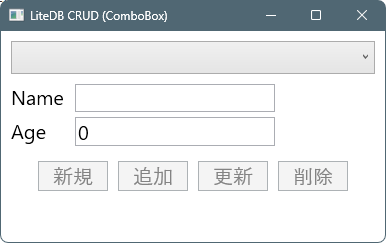
- 起動時はボタンが押せない状態。
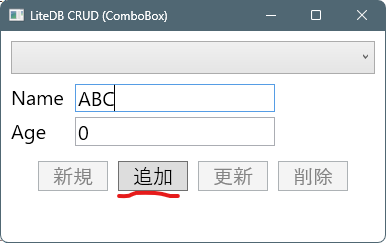
- Nameに何か入力すると、「追加」ボタンが有効化されます。
- 「追加」ボタンを押すと、コンボボックスに追加されます。(DBにも追加されています)
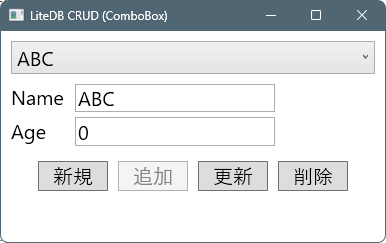
コンボボックスの項目が選択された状態の場合、「更新」「削除」ボタンが有効化されます。 - 「新規」ボタンをおすと、項目がクリアされコンボボックスの選択も解除(未選択)されます。
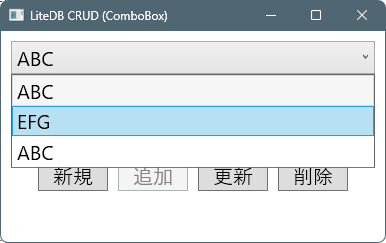
- コンボボックスのプルダウンで登録した項目の一覧が表示され選択することが出来ます。

コメント