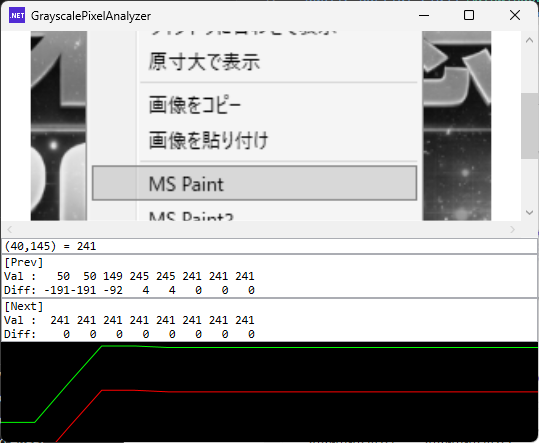
PNG画像をウィンドウにドロップすると、画像がそのまま表示されます。
シンプルなビューアのように見えますが、このツールの本質はそこではありません。
画像上をクリックすると、クリックした座標のピクセル情報を取得し、数値として確認することができます。
表示される情報は以下の通りです。
- クリック位置の座標(x, y)
- そのピクセルの輝度値(グレースケール)
- 左右8ピクセル分の値
- クリック位置を基準とした差分(前後差)
例えば、次のような情報が表示されます。
(120,50) = 127

[Prev]
Val :
120 122 125 126 127 127 126 125
Diff:
 -7  -5  -2  -1   0   0  -1  -2

[Next]
Val :
127 128 130 200 200 130 128 127
Diff:
  0   1   3  73  73   3   1   0
このように、単なるピクセル値だけでなく「周辺との変化」を見ることができます。
このツールで分かること
数値と差分を観察することで、画像の構造が見えてきます。
なだらかな変化 → グラデーション
大きな差分 → エッジ(輪郭)
一定のパターン → トーン(網点)
特に差分を見ることで、「どこで変化が起きているのか」が直感的に把握できます。
なぜグレースケールなのか
今回はグレースケール画像に変換して扱っています。
カラーのままだとRGB3チャンネル分の情報があり、解析が分かりにくくなるためです。
グレースケールにすることで、1ピクセル = 1値となり、変化の傾向がシンプルに見えるようになります。
ソースファイル
MainWindow.xaml
<Window x:Class="GrayscalePixelAnalyzer.MainWindow"
        xmlns="http://schemas.microsoft.com/winfx/2006/xaml/presentation"
        xmlns:x="http://schemas.microsoft.com/winfx/2006/xaml"
        xmlns:d="http://schemas.microsoft.com/expression/blend/2008"
        xmlns:mc="http://schemas.openxmlformats.org/markup-compatibility/2006"
        xmlns:local="clr-namespace:GrayscalePixelAnalyzer"
        xmlns:h="clr-namespace:Maywork.WPF.Helpers"
        mc:Ignorable="d"
        Title="GrayscalePixelAnalyzer" Height="450" Width="800">

<Grid
    x:Name="DropBase"
    h:FileDropHelper.Enable="True">
    <Grid.RowDefinitions>
        <RowDefinition Height="*" />
        <RowDefinition Height="Auto" />
    </Grid.RowDefinitions>

    <TextBlock
        Grid.Row="0"
        FontSize="16"
        Text="ここにファイルをドロップ"
        HorizontalAlignment="Center"
        VerticalAlignment="Center"/>

	<ScrollViewer
        Grid.Row="0"
        h:ImageScaleHelper.Enable="True">
		<Canvas>
			<Image
                x:Name="Image1"
                MouseLeftButtonDown="OnClick"/>
		</Canvas>
	</ScrollViewer>

    <!-- 解析表示 -->
    <StackPanel Grid.Row="1">
        <TextBox x:Name="CurrentBox" FontFamily="Consolas"/>
        <TextBox x:Name="PrevBox" FontFamily="Consolas"/>
        <TextBox x:Name="NextBox" FontFamily="Consolas"/>
        <Canvas x:Name="GraphCanvas" Height="100" Background="Black"/>
    </StackPanel>
</Grid>

</Window>
MainWindow.xaml.cs
using System.Windows;
using System.Windows.Input;

using Maywork.WPF.Helpers;
using ImageBuffer = Maywork.WPF.Helpers.ImageBufferHelper.ImageBuffer;
using System.Text;
using System.Windows.Shapes;
using System.Windows.Media;

namespace GrayscalePixelAnalyzer;

public partial class MainWindow : Window
{
    ICommand DropCommand;
    ImageBuffer _img;

    public MainWindow()
    {
        InitializeComponent();

        _img = ImageBufferHelper.Create(1, 1, 1);

        DropCommand = new RelayCommand<string[]>(
            files => DropFile(files));

        FileDropHelper.SetDropCommand(DropBase, DropCommand);
    }
    // ファイルドロップ
    void DropFile(string[] files)
    {
        var file = files.Where(
            x => System.IO.Path.GetExtension(x)
            .Equals(".png", StringComparison.CurrentCultureIgnoreCase))
            .FirstOrDefault();
        if (file is null) return;

        var buff = SimplePngDecoder.Load(file)
            .ToGray();

        _img = buff;

        Image1.Source = buff.ToBitmapSource();
    }
    // クリック処理
    private void OnClick(object sender, MouseButtonEventArgs e)
    {
        var pos = e.GetPosition(Image1);

        int x = (int)(pos.X * _img.Width / Image1.ActualWidth);
        int y = (int)(pos.Y * _img.Height / Image1.ActualHeight);

        if (x < 0 || y < 0 || x >= _img.Width || y >= _img.Height)
            return;

        DumpAround(x, y);
        DrawGraph(x, y);
        DrawDiffGraph(x, y);
    }
    // ダンプ処理
    private void DumpAround(int x, int y)
    {
        int w = _img.Width;
        byte center = _img.GetPixelSpan(x, y)[0];

        // =========================
        // Current
        // =========================
        CurrentBox.Text = $"({x},{y}) = {center}";

        // =========================
        // Prev(左)
        // =========================
        var prevVal = new StringBuilder();
        var prevDiff = new StringBuilder();

        for (int i = 8; i >= 1; i--)
        {
            int px = x - i;

            if (px < 0)
            {
                prevVal.Append(" ----");
                prevDiff.Append(" ----");
                continue;
            }

            byte v = _img.GetPixelSpan(px, y)[0];
            int d = v - center;

            prevVal.Append($"{v,4}");
            prevDiff.Append($"{d,4}");
        }

        PrevBox.Text = $"[Prev]\nVal : {prevVal}\nDiff: {prevDiff}";

        // =========================
        // Next(右)
        // =========================
        var nextVal = new StringBuilder();
        var nextDiff = new StringBuilder();

        for (int i = 1; i <= 8; i++)
        {
            int px = x + i;

            if (px >= w)
            {
                nextVal.Append(" ----");
                nextDiff.Append(" ----");
                continue;
            }

            byte v = _img.GetPixelSpan(px, y)[0];
            int d = v - center;

            nextVal.Append($"{v,4}");
            nextDiff.Append($"{d,4}");
        }

        NextBox.Text = $"[Next]\nVal : {nextVal}\nDiff: {nextDiff}";
    }

    private void DrawGraph(int x, int y)
    {
        GraphCanvas.Children.Clear();

        int w = _img.Width;
        var p = _img.Pixels;

        int baseIndex = y * w;

        double scaleX = GraphCanvas.ActualWidth / 16.0;
        double scaleY = GraphCanvas.ActualHeight / 255.0;

        var line = new Polyline
        {
            Stroke = Brushes.Lime,
            StrokeThickness = 1
        };

        // 前後8ピクセル
        for (int i = -8; i <= 8; i++)
        {
            int px = x + i;

            if (px < 0 || px >= w) continue;

            byte v = p[baseIndex + px];

            double gx = (i + 8) * scaleX;
            double gy = GraphCanvas.ActualHeight - v * scaleY;

            line.Points.Add(new Point(gx, gy));
        }

        GraphCanvas.Children.Add(line);
    }
    private void DrawDiffGraph(int x, int y)
    {
        //GraphCanvas.Children.Clear();

        int w = _img.Width;
        var p = _img.Pixels;

        int baseIndex = y * w;

        double scaleX = GraphCanvas.ActualWidth / 16.0;
        double scaleY = GraphCanvas.ActualHeight / 255.0;

        byte center = p[baseIndex + x];

        var line = new Polyline
        {
            Stroke = Brushes.Red,
            StrokeThickness = 1
        };

        for (int i = -8; i <= 8; i++)
        {
            int px = x + i;

            if (px < 0 || px >= w) continue;

            int diff = p[baseIndex + px] - center;

            // -128〜+128 → 0〜255に変換
            int v = diff + 128;

            double gx = (i + 8) * scaleX;
            double gy = GraphCanvas.ActualHeight - v * scaleY;

            line.Points.Add(new Point(gx, gy));
        }

        GraphCanvas.Children.Add(line);
    }
}

コメント