// ヒストグラム
using System.Windows.Media;
using System.Windows.Media.Imaging;
using Maywork.WPF.Helpers;

namespace Maywork.WPF.Converters;
public static class ImageHistogramHelper
{
    public static int[][] CalculateHistogram(ImageBufferHelper.ImageBuffer src)
    {
        int channels = src.Channels;

        int[][] hist = new int[channels][];
        for (int c = 0; c < channels; c++)
            hist[c] = new int[256];

        byte[] p = src.Pixels;
        int stride = src.Stride;
        int w = src.Width;
        int h = src.Height;

        for (int y = 0; y < h; y++)
        {
            int row = y * stride;

            for (int x = 0; x < w; x++)
            {
                int pos = row + x * channels;

                for (int c = 0; c < channels; c++)
                {
                    hist[c][p[pos + c]]++;
                }
            }
        }

        return hist;
    }
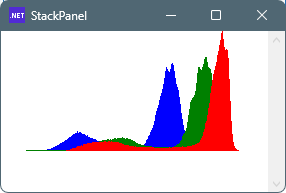
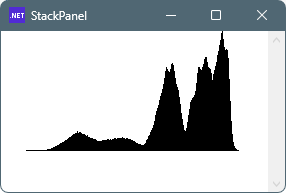
    public static BitmapSource CreateHistogramImage(
        int[][] hist,
        int width = 256,
        int height = 120,
        params Color[] colors)
    {
        int stride = width * 4;
        byte[] pixels = new byte[stride * height];

        int max = hist.SelectMany(x => x).Max();

        for (int c = 0; c < hist.Length; c++)
        {
            var color = colors.Length > c ? colors[c] : Colors.Black;

            for (int x = 0; x < 256; x++)
            {
                int v = hist[c][x];
                int bar = v * height / max;

                for (int y = 0; y < bar; y++)
                {
                    int py = height - 1 - y;
                    int pos = py * stride + x * 4;

                    pixels[pos + 0] = color.B;
                    pixels[pos + 1] = color.G;
                    pixels[pos + 2] = color.R;
                    pixels[pos + 3] = 255;
                }
            }
        }

        return BitmapSource.Create(
            width,
            height,
            96,
            96,
            PixelFormats.Bgra32,
            null,
            pixels,
            stride);
    }
}
/*
ImageBufferHelper.csが必要

// 使用例

string imgFile = @"C:\Users\karet\Pictures\1286765_1_5.jpg";

BitmapSource im = ImageHelper.Load(imgFile);
ImageBufferHelper.ImageBuffer src = ImageBufferHelper.FromBitmapSource(im);
int[][] hist = ImageHistogramHelper.CalculateHistogram(src);
Image1.Source = ImageHistogramHelper.CreateHistogramImage(hist);
*/


コメント