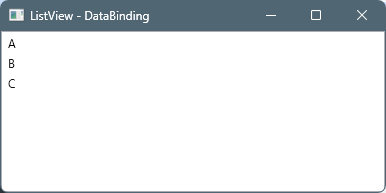
データバインディング
ファイル名:MainWindow.xaml.cs
using System.Collections.ObjectModel;
using System.Windows;

namespace WpfListView;

public partial class MainWindow : Window
{
    public ObservableCollection<string> Items {get; set;}
    public MainWindow()
    {
        InitializeComponent();

        Items = [ "A", "B", "C", ];

        this.DataContext = this;
    }
}
ファイル名:MainWindow.xaml
<Window x:Class="WpfListView.MainWindow"
        xmlns="http://schemas.microsoft.com/winfx/2006/xaml/presentation"
        xmlns:x="http://schemas.microsoft.com/winfx/2006/xaml"
        Title="ListView - DataBinding" Height="200" Width="400">
    <Grid>
        <ListView ItemsSource="{Binding Items}" />
    </Grid>
</Window>
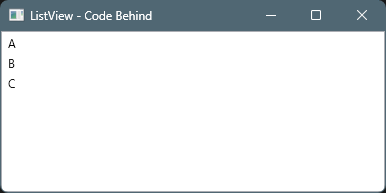
コードビハインド
ファイル名:MainWindow.xaml.cs
using System.Collections.ObjectModel;
using System.Windows;

namespace WpfListView;

public partial class MainWindow : Window
{
    public MainWindow()
    {
        InitializeComponent();

        string[] items = ["A", "B", "C"];
        foreach(var s in items)
        {
            ListView1.Items.Add(s);
        }
    }
}
ファイル名:MainWindow.xaml
<Window x:Class="WpfListView.MainWindow"
        xmlns="http://schemas.microsoft.com/winfx/2006/xaml/presentation"
        xmlns:x="http://schemas.microsoft.com/winfx/2006/xaml"
        Title="ListView - Code Behind" Height="200" Width="400">
    <Grid>
        <ListView x:Name="ListView1" />
    </Grid>
</Window>
要素の追加・クリア時間の計測 – データバインディング
using System.Collections.ObjectModel;
using System.Windows;
using System.Diagnostics;

namespace WpfListView;

public partial class MainWindow : Window
{
    const int MAX = 999_999;
    public ObservableCollection<string> Items {get; set;} = [];
    public MainWindow()
    {
        InitializeComponent();

        this.DataContext = this;

        this.Loaded += (_, __) =>
        {
            var sw = Stopwatch.StartNew();
            for(int i=0; i < MAX; i++)
            {
                this.Items.Add(i.ToString());
            }
            sw.Stop();
            this.Title = $"DataBiding {MAX} Add: {sw.ElapsedMilliseconds}ms";
            // DataBiding 999999 Add: 1626ms
        };

        this.MouseDoubleClick += (_, __) =>
        {
            var sw = Stopwatch.StartNew();
            this.Items.Clear();
            sw.Stop();
            this.Title = $"DataBiding {MAX} Clear: {sw.ElapsedMilliseconds}ms";
            // DataBiding 999999 Clear: 3ms

        };
    }
}
DataBiding 999999 Add: 1626ms
DataBiding 999999 Clear: 3ms
要素の追加・クリア時間の計測(高速版) – データバインディング
using System.Collections.ObjectModel;
using System.Windows;
using System.Diagnostics;
using System.ComponentModel;

namespace WpfListView;

public partial class MainWindow : Window, INotifyPropertyChanged
{
    public event PropertyChangedEventHandler? PropertyChanged;

    void OnPropertyChanged(string name)
        => PropertyChanged?.Invoke(this, new PropertyChangedEventArgs(name));

    const int MAX = 999_999;
    ObservableCollection<string> _items = [];
    public ObservableCollection<string> Items
    {
        get => _items;
        set
        {
            if (_items == value) return;
            _items = value;
            OnPropertyChanged(nameof(Items));
        }
    }
    public MainWindow()
    {
        InitializeComponent();

        this.DataContext = this;

        this.Loaded += (_, __) =>
        {
            var sw = Stopwatch.StartNew();
            var list = new List<string>(MAX);
            for (int i = 0; i < MAX; i++)
            {
                list.Add(i.ToString());
            }
            this.Items = new ObservableCollection<string>(list);
            sw.Stop();
            this.Title = $"DataBiding {MAX} Add: {sw.ElapsedMilliseconds}ms";
            // DataBiding 999999 Add: 84ms
        };

        this.MouseDoubleClick += (_, __) =>
        {
            var sw = Stopwatch.StartNew();
            this.Items = [];
            sw.Stop();
            this.Title = $"DataBiding {MAX} Clear: {sw.ElapsedMilliseconds}ms";
            // DataBiding 999999 Clear: 3ms

        };
    }
}
DataBiding 999999 Add: 84ms
DataBiding 999999 Clear: 3ms
要素の追加・クリア時間の計測 – コードビハインド
using System.Windows;
using System.Diagnostics;

namespace WpfListView;

public partial class MainWindow : Window
{
    const int MAX = 999_999;
    public MainWindow()
    {
        InitializeComponent();

        this.Loaded += (_, __) =>
        {
            var sw = Stopwatch.StartNew();
            for(int i=0; i < MAX; i++)
            {
                ListView1.Items.Add(i.ToString());
            }
            sw.Stop();
            this.Title = $"DataBiding {MAX} Add: {sw.ElapsedMilliseconds}ms";
            // DataBiding 999999 Add: 1630ms
        };

        this.MouseDoubleClick += (_, __) =>
        {
            var sw = Stopwatch.StartNew();
            this.ListView1.Items.Clear();
            sw.Stop();
            this.Title = $"DataBiding {MAX} Clear: {sw.ElapsedMilliseconds}ms";
            // DataBiding 999999 Clear: 22ms

        };
    }
}
DataBiding 999999 Add: 1630ms
DataBiding 999999 Clear: 22ms
要素の追加・クリア時間の計測(高速版) – コードビハインド
using System.Windows;
using System.Diagnostics;

namespace WpfListView;

public partial class MainWindow : Window
{
    const int MAX = 999_999;
    public MainWindow()
    {
        InitializeComponent();

        this.Loaded += (_, __) =>
        {
            var sw = Stopwatch.StartNew();
            var list = new List<string>(MAX);
            for(int i=0; i < MAX; i++)
            {
                list.Add(i.ToString());
            }
            ListView1.ItemsSource = list;
            sw.Stop();
            this.Title = $"DataBiding {MAX} Add: {sw.ElapsedMilliseconds}ms";
            // DataBiding 999999 Add: 95ms
        };

        this.MouseDoubleClick += (_, __) =>
        {
            var sw = Stopwatch.StartNew();
            this.ListView1.ItemsSource = null;
            sw.Stop();
            this.Title = $"DataBiding {MAX} Clear: {sw.ElapsedMilliseconds}ms";
            // DataBiding 999999 Clear: 3ms

        };
    }
}
DataBiding 999999 Add: 95ms
DataBiding 999999 Clear: 3ms
ソート機能 – データバインディング
ファイル名:Item.cs
namespace WpfListView;

public class Item
{
    public string Index { get; set; } = "";
    public string Value { get; set; } = "";
}
ファイル名:MainViewModel.cs
using System.Collections.ObjectModel;
using System.ComponentModel;
using System.Windows.Data;

namespace WpfListView;
public class MainViewModel : INotifyPropertyChanged
{
    public event PropertyChangedEventHandler? PropertyChanged;

    ObservableCollection<Item> _items = new();
    public ObservableCollection<Item> Items
    {
        get => _items;
        set
        {
            _items = value;
            PropertyChanged?.Invoke(this,
                new PropertyChangedEventArgs(nameof(Items)));
        }
    }

    public void LoadData(int count)
    {
        var list = new List<Item>(count);
        for (int i = 0; i < count; i++)
        {
            list.Add(new Item { Index = i.ToString(), Value = $"Value {i}" });
        }
        // Items を丸ごと入れ替え
        Items = new ObservableCollection<Item>(list);
    }
    public void ClearData()
    {
        Items = new ObservableCollection<Item>();
    }

    public void Sort(string property, ListSortDirection direction)
    {
        var view = CollectionViewSource.GetDefaultView(Items);
        view.SortDescriptions.Clear();
        view.SortDescriptions.Add(new SortDescription(property, direction));
        view.Refresh();
    }
}
ファイル名:MainWindow.xaml.cs
using System.ComponentModel;
using System.Diagnostics;
using System.Windows;
using System.Windows.Controls;
using System.Windows.Data;

namespace WpfListView;

public partial class MainWindow : Window
{
    const int MAX = 999_999;
    readonly MainViewModel _vm = new();
    public MainWindow()
    {
        InitializeComponent();

        this.DataContext = _vm;


        this.Loaded += (_, __) =>
        {
            var sw = Stopwatch.StartNew();

            _vm.LoadData(MAX);

            sw.Stop();
            this.Title = $"DataBiding {MAX} Add: {sw.ElapsedMilliseconds}ms";
            // DataBiding 999999 Add: 255ms
        };
        this.MouseDoubleClick += (_, __)=>
        {
            var sw = Stopwatch.StartNew();

            _vm.ClearData();

            sw.Stop();
            this.Title = $"DataBiding {MAX} Clear: {sw.ElapsedMilliseconds}ms";
            // DataBiding 999999 Clear: 5ms
        };
    }
    private GridViewColumnHeader? _lastHeader;
    private ListSortDirection _lastDirection;

    private void GridViewColumnHeader_Click(object sender, RoutedEventArgs e)
    {
        var sw = Stopwatch.StartNew();

        var header = (GridViewColumnHeader)sender;

        // Header の文字列をそのままプロパティ名として使う
        string property = header.Column.Header.ToString()!;

        ListSortDirection direction =
            (_lastHeader == header && _lastDirection == ListSortDirection.Ascending)
            ? ListSortDirection.Descending
            : ListSortDirection.Ascending;

        _lastHeader = header;
        _lastDirection = direction;

        var view = CollectionViewSource.GetDefaultView(ListView1.ItemsSource);
        view.SortDescriptions.Clear();
        view.SortDescriptions.Add(new SortDescription(property, direction));

        sw.Stop();
        this.Title = $"DataBiding {MAX} Sort: {sw.ElapsedMilliseconds}ms";
        // DataBiding 999999 Sort: 3185ms
    }
}
ファイル名:MainWindow.xaml
<Window x:Class="WpfListView.MainWindow"
        xmlns="http://schemas.microsoft.com/winfx/2006/xaml/presentation"
        xmlns:x="http://schemas.microsoft.com/winfx/2006/xaml"
        xmlns:d="http://schemas.microsoft.com/expression/blend/2008"
        xmlns:mc="http://schemas.openxmlformats.org/markup-compatibility/2006"
        mc:Ignorable="d"
        Title="ListView + Sort" Height="450" Width="800">
    <Window.Resources>
        <Style x:Key="SortableHeader" TargetType="GridViewColumnHeader">
            <EventSetter Event="Click" Handler="GridViewColumnHeader_Click"/>
        </Style>
    </Window.Resources>
    <Grid>
        <ListView ItemsSource="{Binding Items}" x:Name="ListView1">
            <ListView.View>
                <GridView>
                    <GridViewColumn Header="Index"
                                    DisplayMemberBinding="{Binding Index}"
                                    HeaderContainerStyle="{StaticResource SortableHeader}" />
                    <GridViewColumn Header="Value"
                                    DisplayMemberBinding="{Binding Value}" />
                </GridView>
            </ListView.View>
        </ListView>
    </Grid>
</Window>
DataBiding 999999 Add: 255ms
DataBiding 999999 Clear: 5ms
DataBiding 999999 Sort: 3185ms
ソート機能 – コードビハインド
ファイル名:Item.cs
namespace WpfListView;

public class Item
{
    public string Index { get; set; } = "";
    public string Value { get; set; } = "";
}
ファイル名:MainWindow.xaml.cs
using System.ComponentModel;
using System.Diagnostics;
using System.Windows;
using System.Windows.Controls;
using System.Windows.Input;

namespace WpfListView;

public partial class MainWindow : Window, INotifyPropertyChanged
{
    public event PropertyChangedEventHandler? PropertyChanged;

    // 表示用(Binding 対象)
    IReadOnlyList<Item> _items = Array.Empty<Item>();
    public IReadOnlyList<Item> Items
    {
        get => _items;
        set
        {
            _items = value;
            PropertyChanged?.Invoke(
                this, new PropertyChangedEventArgs(nameof(Items)));
        }
    }

    // 元データ(常に未ソートの基準)
    List<Item> _source = new();

    string? _lastKey;
    bool _ascending = true;

    const int MAX = 999_999;

    public MainWindow()
    {
        InitializeComponent();
        DataContext = this;

        Loaded += (_, __) => LoadData();
        MouseDoubleClick +=(_, __) =>
        {
            var sw = Stopwatch.StartNew();

            _source = [];
            Items = _source;

            sw.Stop();
            Title = $"Clear {MAX}: {sw.ElapsedMilliseconds} ms";
            // Clear 999999: 5ms
        };
    }

    void LoadData()
    {
        var sw = Stopwatch.StartNew();

        _source = Enumerable.Range(0, MAX)
            .Select(i => new Item
            {
                Index = i.ToString(),
                Value = $"Value {i}"
            })
            .ToList();

        Items = _source;   // ← DataBinding で一括反映

        sw.Stop();
        Title = $"Load {MAX}: {sw.ElapsedMilliseconds} ms";
        // Load 999999: 267ms
    }


    void GridViewColumnHeader_Click(object sender, RoutedEventArgs e)
    {
        var header = (GridViewColumnHeader)sender;
        string key = (string)header.Tag;

        bool asc = _lastKey == key ? !_ascending : true;
        _lastKey = key;
        _ascending = asc;

        var sw = Stopwatch.StartNew();

        IEnumerable<Item> sorted = key switch
        {
            "Index" => asc
                ? _source.OrderBy(x => x.Index)
                : _source.OrderByDescending(x => x.Index),

            "Value" => asc
                ? _source.OrderBy(x => x.Value)
                : _source.OrderByDescending(x => x.Value),

            _ => _source
        };

        // ★ 高速ポイント:丸ごと差し替え(通知1回)
        Items = sorted.ToList();

        sw.Stop();
        Title = $"Sort {key} {(asc ? "ASC" : "DESC")}: {sw.ElapsedMilliseconds} ms";
        // Sort Index ASC: 1215ms
        // Sort Index DESC: 1087ms
    }
}
ファイル名:MainWindow.xaml
<Window x:Class="WpfListView.MainWindow"
        xmlns="http://schemas.microsoft.com/winfx/2006/xaml/presentation"
        xmlns:x="http://schemas.microsoft.com/winfx/2006/xaml"
        Title="WpfListView" Height="450" Width="800">

    <Window.Resources>
        <Style TargetType="GridViewColumnHeader">
            <EventSetter Event="Click"
                         Handler="GridViewColumnHeader_Click"/>
        </Style>
    </Window.Resources>

    <Grid>
        <ListView ItemsSource="{Binding Items}">
            <ListView.View>
                <GridView>

                    <GridViewColumn>
                        <GridViewColumn.Header>
                            <GridViewColumnHeader Tag="Index">
                                Index
                            </GridViewColumnHeader>
                        </GridViewColumn.Header>
                        <GridViewColumn.DisplayMemberBinding>
                            <Binding Path="Index"/>
                        </GridViewColumn.DisplayMemberBinding>
                    </GridViewColumn>

                    <GridViewColumn>
                        <GridViewColumn.Header>
                            <GridViewColumnHeader Tag="Value">
                                Value
                            </GridViewColumnHeader>
                        </GridViewColumn.Header>
                        <GridViewColumn.DisplayMemberBinding>
                            <Binding Path="Value"/>
                        </GridViewColumn.DisplayMemberBinding>
                    </GridViewColumn>

                </GridView>
            </ListView.View>
        </ListView>
    </Grid>
</Window>
Load 999999: 267ms
Clear 999999: 5ms
Sort Index ASC: 1215ms
Sort Index DESC: 1087ms
感想
速度面だけみると、データバインディングもコードビハインドも同じぐらいでした。
ただ、ソートがコードビハインドが速いのは以外な結果でした。
コメント