WPFのコードビハインドでアプリを作る基本形としてシンプルなメモ帳を作成しました。
構成として、WindowにTextBoxを貼り付けただけです。
メニューの処理は、
System.Windows.Input.ApplicationCommandsを使い、定番コマンド(Save / Open / SaveAs / Exit など)に関する“お約束コード”を省略しています。
XAMLのメニューのCommandに相当する部分が、ApplicationCommandsのコマンドにひも付き、
HotKeysで、ショートカットキーと呼び出す処理を紐づけを行っています。
ドラック&ドロップは、
対応していますが、TextBoxは受け入れてくれないようで、
メニュー項目にテキストファイルをドロップスとファイルが開きます。
ソースコード
ファイル名:MiniPad.csproj
<Project Sdk="Microsoft.NET.Sdk">

  <PropertyGroup>
    <OutputType>WinExe</OutputType>
    <TargetFramework>net8.0-windows</TargetFramework>
    <Nullable>enable</Nullable>
    <ImplicitUsings>enable</ImplicitUsings>
    <UseWPF>true</UseWPF>
    <ApplicationIcon>Assets/App.ico</ApplicationIcon>
  </PropertyGroup>
  <ItemGroup>
    <Resource Include="Assets\**\*.*" />
  </ItemGroup>
</Project>
ファイル名:App.xaml.cs
using System.Windows;

namespace MiniPad;

public partial class App : Application
{
    protected override void OnStartup(StartupEventArgs e)
    {
        base.OnStartup(e);

        string path = (e.Args.Length > 0) ? e.Args[0] : "";

        var w = new MainWindow();
        MainWindow = w;

        // 起動時にパス指定があれば開く
        if (!string.IsNullOrWhiteSpace(path))
            w.OpenFromPath(path);

        w.Show();
    }
}
ファイル名:Dialog.cs
using Microsoft.Win32;

static class Dialogs
{
    public static string? Open(string filter = "Text|*.txt;*.log;*.md|All|*.*")
    {
        var d = new OpenFileDialog { Filter = filter };
        return d.ShowDialog() == true ? d.FileName : null;
    }

    public static string? SaveAs(string suggest = "untitled.txt", string filter = "Text|*.txt|All|*.*")
    {
        var d = new SaveFileDialog { FileName = suggest, Filter = filter };
        return d.ShowDialog() == true ? d.FileName : null;
    }
}
ファイル名:DnD.cs
using System.Windows;

static class DnD
{
    public static void AcceptFiles(UIElement target, Action<string[]> onFiles, string[]? exts = null)
    {
        if (target is FrameworkElement fe) fe.AllowDrop = true;
        target.Drop += (_, e) =>
        {
            if (!e.Data.GetDataPresent(DataFormats.FileDrop)) return;
            var files = (string[])e.Data.GetData(DataFormats.FileDrop)!;
            if (exts is null) { onFiles(files); return; }
            onFiles(Array.FindAll(files, f
                => Array.Exists(exts, x => f.EndsWith(x, StringComparison.OrdinalIgnoreCase))));
        };
    }
}
ファイル名:Hotkeys.cs
using System.Windows;
using System.Windows.Input;
static class Hotkeys
{
    public static void Add(Window w, ICommand cmd, Key key, ModifierKeys mods,
        ExecutedRoutedEventHandler exec, CanExecuteRoutedEventHandler? can = null)
    {
        w.CommandBindings.Add(
            new CommandBinding(cmd, exec, can ?? ((_, e) => e.CanExecute = true)));
        w.InputBindings.Add(
            new KeyBinding(cmd, key, mods));
    }
}
ファイル名:MainWindow.xaml.cs
using System.IO;
using System.Windows;
using System.Windows.Input;

namespace MiniPad;

public partial class MainWindow : Window
{
    private string? _path;
    private static readonly string[] _exts
        = [".txt", ".log", ".md", ".cs", ".json", ".xml" ];

    public MainWindow()
    {
        InitializeComponent();

        // D&Dで開く
        DnD.AcceptFiles(this, files =>
        {
            if (files.Length > 0) OpenFromPath(files[0]);
        },
        _exts);

        // ホットキー
        Hotkeys.Add(this, ApplicationCommands.Open,  Key.O, ModifierKeys.Control,
            (_, __) => OpenByDialog());

        Hotkeys.Add(this, ApplicationCommands.Save,  Key.S, ModifierKeys.Control,
            (_, __) => Save(asNew: false));

        Hotkeys.Add(this, ApplicationCommands.SaveAs, Key.S, ModifierKeys.Control | ModifierKeys.Shift,
            (_, __) => Save(asNew: true));

        Hotkeys.Add(this, ApplicationCommands.Close, Key.F4, ModifierKeys.Alt,
            (_, __) => Close());
    }

    public void OpenFromPath(string path)
    {
        Editor.Text = File.ReadAllText(path);
        _path = path;
        UpdateTitle();
    }

    private void OpenByDialog()
    {
        var p = Dialogs.Open();
        if (p is not null) OpenFromPath(p);
    }

    private void Save(bool asNew)
    {
        var p = _path;

        if (asNew || string.IsNullOrEmpty(p))
        {
            var suggest = string.IsNullOrEmpty(_path)
                ? "untitled.txt"
                : Path.GetFileName(_path);

            p = Dialogs.SaveAs(suggest);
        }

        if (p is null) return;

        File.WriteAllText(p, Editor.Text);
        _path = p;
        UpdateTitle();
    }

    private void UpdateTitle()
    {
        Title = string.IsNullOrEmpty(_path)
            ? "MiniPad"
            : $"MiniPad - {Path.GetFileName(_path)}";
    }
}
ファイル名:App.xaml
<Application x:Class="MiniPad.App"
             xmlns="http://schemas.microsoft.com/winfx/2006/xaml/presentation"
             xmlns:x="http://schemas.microsoft.com/winfx/2006/xaml"
             ShutdownMode="OnMainWindowClose">

</Application>
ファイル名:MainWindow.xaml
<Window x:Class="MiniPad.MainWindow"
        xmlns="http://schemas.microsoft.com/winfx/2006/xaml/presentation"
        xmlns:x="http://schemas.microsoft.com/winfx/2006/xaml"
        xmlns:d="http://schemas.microsoft.com/expression/blend/2008"
        xmlns:mc="http://schemas.openxmlformats.org/markup-compatibility/2006"
        xmlns:local="clr-namespace:MiniPad"
        mc:Ignorable="d"
        Title="MiniPad"
        Width="900" Height="600"
        WindowStartupLocation="CenterScreen">

    <DockPanel>
        <!-- メニュー -->
        <Menu DockPanel.Dock="Top">
            <Menu.Resources>
                <Style TargetType="MenuItem">
                    <Setter Property="FontSize" Value="14"/>
                    <Setter Property="Margin" Value="2"/>
                    <Setter Property="VerticalContentAlignment" Value="Center"/>
                </Style>
            </Menu.Resources>

            <MenuItem Header="ファイル">
                <MenuItem Header="開く"
                          Command="Open"
                          InputGestureText="Ctrl+O"/>
                <MenuItem Header="上書き保存"
                          Command="Save"
                          InputGestureText="Ctrl+S"/>
                <MenuItem Header="保存"
                          Command="SaveAs"
                          InputGestureText="Ctrl+Shift+S"/>
                <Separator/>
                <MenuItem Header="終了"
                          Command="Close"
                          InputGestureText="Alt+F4"/>
            </MenuItem>
        </Menu>

        <!-- エディタ本体 -->
        <TextBox
            x:Name="Editor"
            Padding="16,16"
            AcceptsReturn="True"
            AcceptsTab="True"
            VerticalScrollBarVisibility="Auto"
            HorizontalScrollBarVisibility="Auto"
            TextWrapping="NoWrap"
            FontFamily="Consolas"
            FontSize="18"/>
    </DockPanel>
</Window>
実行例
スクリーンショット
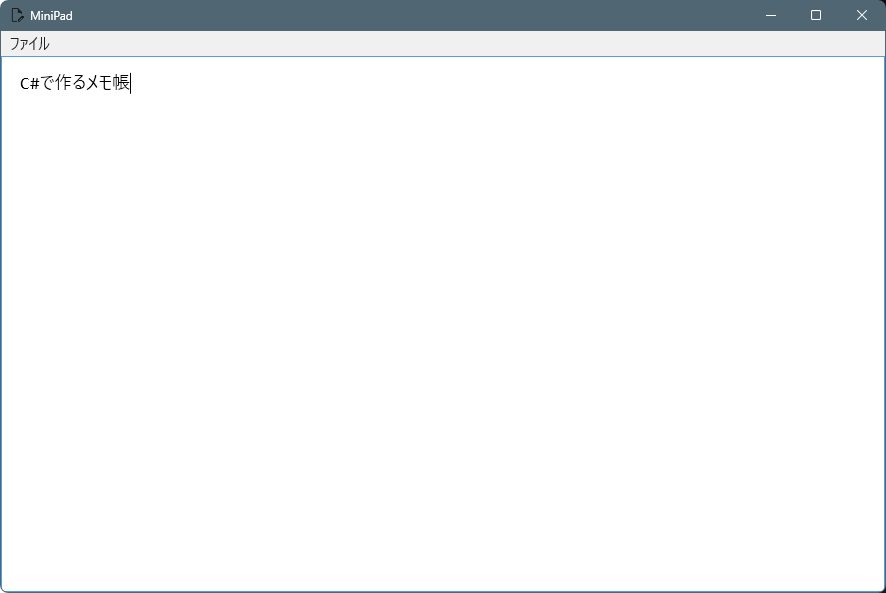
メニュー項目は
- 開く
- 上書き保存
- 保存
- 終了
※ 本サンプルでは「未保存変更の検知」は行っていません。
実運用では TextChanged をフラグ化し、
保存前に確認ダイアログを出すなどの対応が考えられます。
※ 文字コードは UTF-8(BOMなし)が使用されます。


コメント