電卓アプリを作るため、数値入力専用のTextBoxを試作してみました。
staticメソッドで作成しましたので、他のアプリでも使いやすいかと思います。
ソースコード
ファイル名:App.xaml
<Application x:Class="NumberTextBoxDemo.App"
             xmlns="http://schemas.microsoft.com/winfx/2006/xaml/presentation"
             xmlns:x="http://schemas.microsoft.com/winfx/2006/xaml"
             xmlns:local="clr-namespace:NumberTextBoxDemo"
             StartupUri="MainWindow.xaml">
    <Application.Resources>

    </Application.Resources>
</Application>
ファイル名:App.xaml.cs
using System.Configuration;
using System.Data;
using System.Windows;

namespace NumberTextBoxDemo;

/// <summary>
/// Interaction logic for App.xaml
/// </summary>
public partial class App : Application
{
}
ファイル名:Helpers\NumberTextBoxHelper.cs
using System.Text.RegularExpressions;
using System.Windows;
using System.Windows.Controls;
using System.Windows.Input;

namespace Maywork.WPF.Helpers;

public static class NumberTextBoxHelper
{
    static readonly Regex _intRegex =
        new(@"^[+-]?\d*$", RegexOptions.Compiled);

    static readonly Regex _decimalRegex =
        new(@"^[+-]?\d*(\.\d*)?$", RegexOptions.Compiled);

    // ============================
    // 整数専用
    // ============================
    public static void AttachInteger(TextBox tb)
    {
        Attach(tb, _intRegex);
    }

    // ============================
    // 小数OK
    // ============================
    public static void AttachDecimal(TextBox tb)
    {
        Attach(tb, _decimalRegex);
    }

    // ============================
    // 共通処理
    // ============================
    static void Attach(TextBox tb, Regex regex)
    {
        tb.TextAlignment = TextAlignment.Right;
        tb.PreviewTextInput += (s, e) =>
        {
            if (s is not TextBox box) return;
            e.Handled = !IsValid(box, e.Text, regex);
        };

        tb.PreviewKeyDown += (s, e) =>
        {
            // スペース禁止
            if (e.Key == Key.Space)
                e.Handled = true;
        };

        DataObject.AddPastingHandler(tb, (s, e) =>
        {
            if (!e.SourceDataObject.GetDataPresent(DataFormats.UnicodeText))
            {
                e.CancelCommand();
                return;
            }

            var paste = e.SourceDataObject.GetData(DataFormats.UnicodeText) as string ?? "";

            if (s is not TextBox box) return;

            if (!IsValid(box, paste, regex))
                e.CancelCommand();
        });
    }

    static bool IsValid(TextBox tb, string input, Regex regex)
    {
        var text = tb.Text ?? "";
        var start = tb.SelectionStart;
        var length = tb.SelectionLength;

        var newText = text.Remove(start, length)
                          .Insert(start, input);

        return regex.IsMatch(newText);
    }
}
ファイル名:MainWindow.xaml
<Window x:Class="NumberTextBoxDemo.MainWindow"
        xmlns="http://schemas.microsoft.com/winfx/2006/xaml/presentation"
        xmlns:x="http://schemas.microsoft.com/winfx/2006/xaml"
        xmlns:d="http://schemas.microsoft.com/expression/blend/2008"
        xmlns:mc="http://schemas.openxmlformats.org/markup-compatibility/2006"
        xmlns:local="clr-namespace:NumberTextBoxDemo"
        mc:Ignorable="d"
        Title="MainWindow" Height="200" Width="400">
    <Grid>
        <TextBox x:Name="NumberBox" Width="120" Height="30" FontSize="18" />
    </Grid>
</Window>
ファイル名:MainWindow.xaml.cs
using System.Text;
using System.Windows;
using System.Windows.Controls;
using System.Windows.Data;
using System.Windows.Documents;
using System.Windows.Input;
using System.Windows.Media;
using System.Windows.Media.Imaging;
using System.Windows.Navigation;
using System.Windows.Shapes;

using Maywork.WPF.Helpers;

namespace NumberTextBoxDemo;

public partial class MainWindow : Window
{
    public MainWindow()
    {
        InitializeComponent();

        NumberTextBoxHelper.AttachInteger(NumberBox);
    }
}
ファイル名:NumberTextBoxDemo.csproj
<Project Sdk="Microsoft.NET.Sdk">

  <PropertyGroup>
    <OutputType>WinExe</OutputType>
    <TargetFramework>net10.0-windows</TargetFramework>
    <Nullable>enable</Nullable>
    <ImplicitUsings>enable</ImplicitUsings>
    <UseWPF>true</UseWPF>
  </PropertyGroup>

</Project>
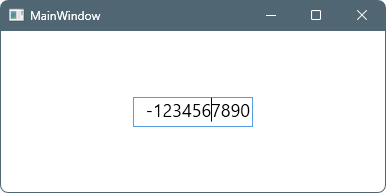
実行イメージ
コメント