標準コントロールでありそうなスピンボックスですが、WPFには存在しないようなので自作します。
まずは簡単にコードビハインドで作ります。
XAML
<Grid>
    <StackPanel
        HorizontalAlignment="Center"
        VerticalAlignment="Center"
        Orientation="Horizontal">
        <TextBox x:Name="ValueBox"
            FontSize="16"
            Width="60"
            Text="0"
            VerticalContentAlignment="Center"
            HorizontalContentAlignment="Right"/>

        <RepeatButton Content="▲" Click="Up_Click"/>
        <RepeatButton Content="▼" Click="Down_Click"/>
    </StackPanel>
</Grid>
コードビハインド
public partial class MainWindow : Window
{
    private int _value = 0;
    public MainWindow()
    {
        InitializeComponent();
    }
    private void Up_Click(object sender, RoutedEventArgs e)
    {
        _value++;
        ValueBox.Text = _value.ToString();
    }

    private void Down_Click(object sender, RoutedEventArgs e)
    {
        _value--;
        ValueBox.Text = _value.ToString();
    }
}
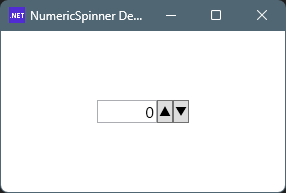
実行例
起動すると初期値は0
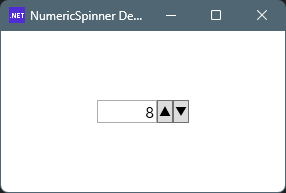
ボタンをおすと数値がカウントアップ(ダウン)します。
AttachedProperty化し、再利用しやすくします。
NumericSpinner.cs
using System.Windows;
using System.Windows.Controls;
using System.Windows.Controls.Primitives;
using System.Windows.Input;

namespace Maywork.WPF.Helpers;

public static class NumericSpinner
{
    // =========================
    // Enable
    // =========================
    public static readonly DependencyProperty EnableProperty =
        DependencyProperty.RegisterAttached(
            "Enable",
            typeof(bool),
            typeof(NumericSpinner),
            new PropertyMetadata(false, OnEnableChanged));

    public static void SetEnable(DependencyObject obj, bool value)
        => obj.SetValue(EnableProperty, value);

    public static bool GetEnable(DependencyObject obj)
        => (bool)obj.GetValue(EnableProperty);

    private static void OnEnableChanged(DependencyObject d, DependencyPropertyChangedEventArgs e)
    {
        if (d is not TextBox tb) return;

        if ((bool)e.NewValue)
        {
            tb.PreviewKeyDown += OnKeyDown;
            tb.PreviewMouseWheel += OnMouseWheel;
        }
        else
        {
            tb.PreviewKeyDown -= OnKeyDown;
            tb.PreviewMouseWheel -= OnMouseWheel;
        }
    }

    // =========================
    // ボタン連携
    // =========================
    public static readonly DependencyProperty TargetProperty =
        DependencyProperty.RegisterAttached(
            "Target",
            typeof(TextBox),
            typeof(NumericSpinner),
            new PropertyMetadata(null, OnTargetChanged));

    public static void SetTarget(DependencyObject obj, TextBox value)
        => obj.SetValue(TargetProperty, value);

    public static TextBox GetTarget(DependencyObject obj)
        => (TextBox)obj.GetValue(TargetProperty);

    private static void OnTargetChanged(DependencyObject d, DependencyPropertyChangedEventArgs e)
    {
        if (d is not ButtonBase btn) return;

        btn.Click -= OnButtonClick;

        if (e.NewValue is TextBox)
        {
            btn.Click += OnButtonClick;
        }
    }

    private static void OnButtonClick(object sender, RoutedEventArgs e)
    {
        if (sender is not ButtonBase btn) return;

        var tb = GetTarget(btn);
        if (tb == null) return;

        int delta = btn.Content?.ToString()?.Contains("▼") == true ? -1 : +1;

        ChangeValue(tb, delta);
    }

    // =========================
    // 入力処理
    // =========================
    private static void OnKeyDown(object sender, KeyEventArgs e)
    {
        if (sender is not TextBox tb) return;

        if (e.Key == Key.Up)
        {
            ChangeValue(tb, +1);
            e.Handled = true;
        }
        else if (e.Key == Key.Down)
        {
            ChangeValue(tb, -1);
            e.Handled = true;
        }
    }

    private static void OnMouseWheel(object sender, MouseWheelEventArgs e)
    {
        if (sender is not TextBox tb) return;

        int delta = e.Delta > 0 ? +1 : -1;
        ChangeValue(tb, delta);
        e.Handled = true;
    }

    // =========================
    // コア
    // =========================
    private static void ChangeValue(TextBox tb, int delta)
    {
        if (!int.TryParse(tb.Text, out int value))
            value = 0;

        value += delta;

        tb.Text = value.ToString();
    }
}
スピンのボタンの文字が「▼」固定なのは御愛嬌。
コンテンツに画像などを使いたい場合は、
簡易的にTagプロパティを使う方法や
本格的にConditionalWeakTableで拡張する方法が
考えられます。
XAML
<Grid>
    <StackPanel
        HorizontalAlignment="Center"
        VerticalAlignment="Center"
        Orientation="Horizontal">
        <TextBox
            x:Name="ValueBox"
            FontSize="16"
            Width="60"
            Text="0"
            VerticalContentAlignment="Center"
            HorizontalContentAlignment="Right"
            h:NumericSpinner.Enable="True"/>

        <RepeatButton
            Content="▲"
            h:NumericSpinner.Target="{Binding ElementName=ValueBox}"/>
        <RepeatButton
            Content="▼"
            h:NumericSpinner.Target="{Binding ElementName=ValueBox}"/>
    </StackPanel>
</Grid>
利用側です。
NumericSpinner.csは結構コード量が多いですが、
ライブラリとして使い回せますので、
ユーザープログラムでは無いもとすると、
XAMLのみでスピンボックスが完結しています。
サンプルコードなので、Step、Min、Maxなど、あったほうが良さそうなプロパティが省かれています。
コメント