GIMPで画像加工をしていてOpenCVのインペイントを併用したい場面があります。
過去にWinFormsでインペイントツールを作成したことがありますが、WPFで作り直してみます。
今回はOpenCV部分には手を付けず、UI部分のみになります。
ソースコード
ImageScaleHelper.csズーム&パン
ClipboardImageHelper.csクリップボード
MainWindow.xaml.cs
using System.Windows;
using System.Windows.Media.Imaging;

using Maywork.WPF.Helpers;

namespace InpaintGuiTool;

public partial class MainWindow : Window
{
public MainWindow()
{
    InitializeComponent();
}
private void CopyButton_Click(object sender, RoutedEventArgs e)
{
    if (Image1.Source is null) return;

    var bmp = (BitmapSource)Image1.Source;
    ClipboardImageHelper.SetImage(bmp);

    StatusBar1.Text = "画像をクリップボードへコピーしました。";

}
private void PasteButton_Click(object sender, RoutedEventArgs e)
{
    var bmp = ClipboardImageHelper.GetImage();
    if (bmp is null) return;

    Image1.Source = bmp;

    StatusBar1.Text = $"画像を貼り付けました。{bmp.Format}";
}
private void ApplyButton_Click(object sender, RoutedEventArgs e)
{
    if (Image1.Source is null) return;

    // フィルター処理の呼び出しを、ここに書く

    StatusBar1.Text = $"画像フィルター処理を実行しました。";
}

}
MainWindow.xaml
<Window x:Class="InpaintGuiTool.MainWindow"
        xmlns="http://schemas.microsoft.com/winfx/2006/xaml/presentation"
        xmlns:x="http://schemas.microsoft.com/winfx/2006/xaml"
        xmlns:d="http://schemas.microsoft.com/expression/blend/2008"
        xmlns:mc="http://schemas.openxmlformats.org/markup-compatibility/2006"
        xmlns:local="clr-namespace:InpaintGuiTool"
        mc:Ignorable="d"
        xmlns:h="clr-namespace:Maywork.WPF.Helpers"
        Title="Inpaint Gui Tool" Height="450" Width="800">
<DockPanel>

    <!-- ステータスバー -->
    <StatusBar DockPanel.Dock="Bottom">
        <StatusBarItem>
            <TextBlock x:Name="StatusBar1" Text="Ready"/>
        </StatusBarItem>
    </StatusBar>

    <!-- メイン領域 -->
    <Grid>
        <Grid.RowDefinitions>
            <RowDefinition Height="*"/>
            <RowDefinition Height="Auto"/>
        </Grid.RowDefinitions>
        <ScrollViewer
            Grid.Row="0"
            h:ImageScaleHelper.Enable="True">
            <Canvas>
                <Image
                    x:Name="Image1"
                    RenderOptions.BitmapScalingMode="NearestNeighbor" />
            </Canvas>
        </ScrollViewer>
        <StackPanel
            Grid.Row="1">
            <StackPanel  Orientation="Horizontal">
                <Button Content="Copy" Margin="4" Padding="2" Click="CopyButton_Click"/>
                <Button Content="Paste" Margin="4" Padding="2" Click="PasteButton_Click" />
                <Button Content="Apply" Margin="4" Padding="2" Click="ApplyButton_Click" />
            </StackPanel>
        </StackPanel>
    </Grid>

</DockPanel>
</Window>
実行例
貼り付け(Paste)ボタンを押した状態のスクリーンショット
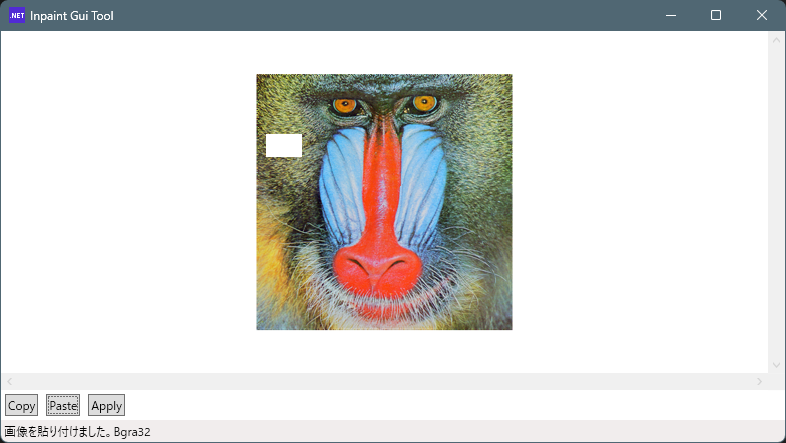
アルファチャンネルで透明部分は白抜き状態で表示されます。(画像の左側の白色矩形)
コードビハインドでシンプルなUIが出来ましたので、次回OpenCVSharpでフィルター部分を作りたいと思います。
コメント