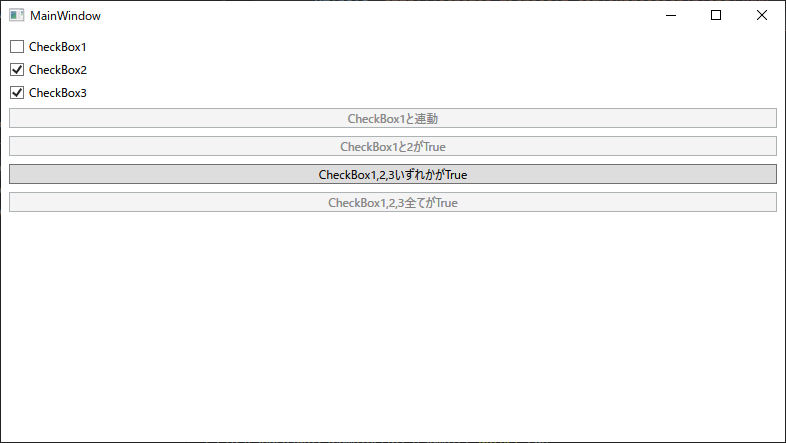
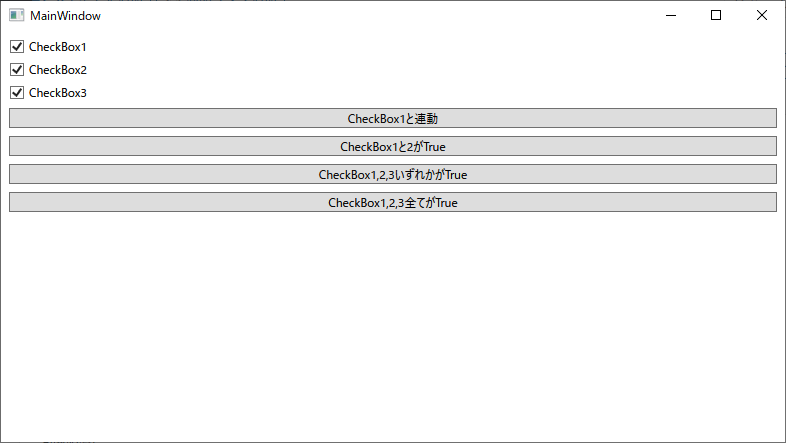
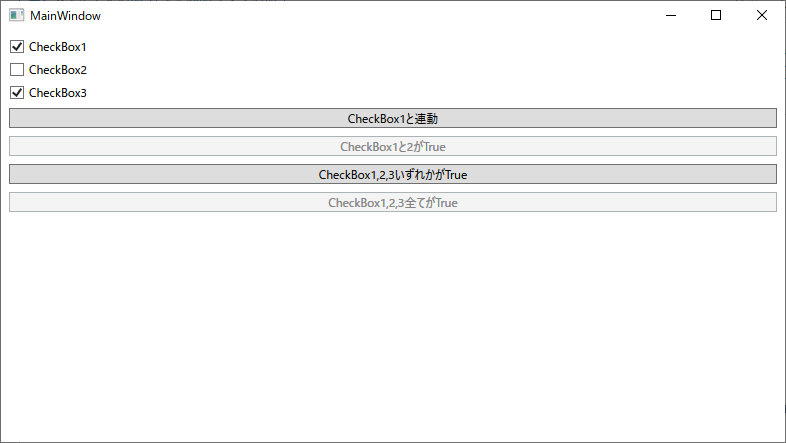
複数のチェックボックスのON/OFFの組み合わせで、ボタンの有効無効が切り替わるデモプログラムです。
MainWindowViewModel.cs
using System.ComponentModel;
using System.Reactive.Linq;
using System.Runtime.CompilerServices;
using System.Windows;
using System.Windows.Controls;
using Reactive.Bindings;
using Reactive.Bindings.Extensions;

namespace CombineLatestSample;

public class MainWindowViewModel: INotifyPropertyChanged
{
    public event PropertyChangedEventHandler? PropertyChanged;
    protected void OnPropertyChanged([CallerMemberName] string? name = null)
        => PropertyChanged?.Invoke(this, new PropertyChangedEventArgs(name));

    public ReactivePropertySlim<bool> CheckBox1 {get; set;} = new (false);
    public ReactivePropertySlim<bool> CheckBox2 {get; set;} = new (true);
    public ReactivePropertySlim<bool> CheckBox3 {get; set;} = new (true);
    public ReactiveCommandSlim Button1Command {get;}
    public ReactiveCommandSlim Button2Command {get;}
    public ReactiveCommandSlim Button3Command {get;}
    public ReactiveCommandSlim Button4Command {get;}

    public MainWindowViewModel()
    {
        // CheckBox1と連動
        Button1Command = CheckBox1
            .ToReactiveCommandSlim()
            .WithSubscribe(()=>MessageBox.Show("Button1"));

        // CheckBox1と2がtrue
        Button2Command = CheckBox1
            .CombineLatest(CheckBox2, (a, b)=> a && b)
            .ToReactiveCommandSlim()
            .WithSubscribe(()=>MessageBox.Show("Button2"));

        // CheckBox1,2,3のいずれかがtrue
        Button3Command = new[]{CheckBox1, CheckBox2, CheckBox3}
            .CombineLatest(a => a.Any(b => b)) // Any() は「要素の中に条件を満たすものが1つでもあれば true」
            .ToReactiveCommandSlim()
            .WithSubscribe(()=>MessageBox.Show("Button3"));

        // CheckBox1,2,3の全てがtrue
        Button4Command = new[]{CheckBox1, CheckBox2, CheckBox3}
            .CombineLatestValuesAreAllTrue() // CombineLatestValuesAreAllFalseだと全てfalse
            .ToReactiveCommandSlim()
            .WithSubscribe(()=>MessageBox.Show("Button4"));

    }
}

/*
# プロジェクトの作成
dotnet new wpf
dotnet add package ReactiveProperty.WPF
*/
MainWindow.xaml
<Window x:Class="CombineLatestSample.MainWindow"
        xmlns="http://schemas.microsoft.com/winfx/2006/xaml/presentation"
        xmlns:x="http://schemas.microsoft.com/winfx/2006/xaml"
        xmlns:d="http://schemas.microsoft.com/expression/blend/2008"
        xmlns:mc="http://schemas.openxmlformats.org/markup-compatibility/2006"
        xmlns:local="clr-namespace:CombineLatestSample"
        mc:Ignorable="d"
        Title="MainWindow" Height="450" Width="800">
        <Window.DataContext>
            <local:MainWindowViewModel />
        </Window.DataContext>
        <Window.Resources>
            <Style TargetType="Button">
                <Setter Property="Margin" Value="4"/>
            </Style>
            <Style TargetType="CheckBox">
                <Setter Property="Margin" Value="4"/>
            </Style>
        </Window.Resources>
    <StackPanel Margin="4">
        <CheckBox
            Content="CheckBox1"
            IsChecked="{Binding CheckBox1.Value}" />
        <CheckBox
            Content="CheckBox2"
            IsChecked="{Binding CheckBox2.Value}" />
        <CheckBox
            Content="CheckBox3"
            IsChecked="{Binding CheckBox3.Value}" />
        <Button
            Content="CheckBox1と連動"
            Command="{Binding Button1Command}" />
        <Button
            Content="CheckBox1と2がTrue"
            Command="{Binding Button2Command}" />
        <Button
            Content="CheckBox1,2,3いずれかがTrue"
            Command="{Binding Button3Command}" />
        <Button
            Content="CheckBox1,2,3全てがTrue"
            Command="{Binding Button4Command}" />
    </StackPanel>
</Window>
実行例
・初期状態
・CheckBox1をON
・CheckBox2をOFF

コメント