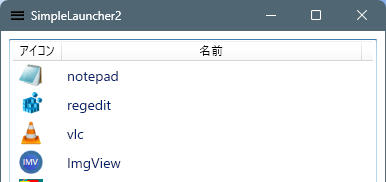
.NET 10 SDKで作り直し。
プロジェクトの作成
cd (mkdir SimpleLauncher2)
dotnet new wpf -f net10.0
ソースコード
ファイル名:SimpleLauncher2.csproj
<Project Sdk="Microsoft.NET.Sdk">

  <PropertyGroup>
    <OutputType>WinExe</OutputType>
    <TargetFramework>net10.0-windows</TargetFramework>
    <Nullable>enable</Nullable>
    <ImplicitUsings>enable</ImplicitUsings>
    <UseWPF>true</UseWPF>
    <ApplicationIcon>Assets/App.ico</ApplicationIcon>
  </PropertyGroup>
  <ItemGroup>
    <Resource Include="Assets\**\*.*" />
  </ItemGroup>
</Project>
ファイル名:App.xaml.cs
using System.Windows;

using SimpleLauncher2.Utilities;

namespace SimpleLauncher2;

public partial class App : Application
{
    public static string DataDir => AppPathUtil.Roaming;
    public static string PathsFile => System.IO.Path.Combine(DataDir, "apps.txt");
}
ファイル名:AppItem.cs
using System.Windows.Media;

using SimpleLauncher2.Utilities;

namespace SimpleLauncher2;
public class AppItem
{
    public string Path { get; }
    public string DisplayName { get; }
    public ImageSource Icon { get; }

    public AppItem(string path, string displayName, ImageSource icon)
    {
        Path = path;
        DisplayName = displayName;
        Icon = icon;
    }

    public static AppItem FromPath(string path)
    {
        var name = System.IO.Path.GetFileNameWithoutExtension(path);
        var icon = IconUtil.GetIconImageSource(path);
        return new AppItem(path, name, icon);
    }
}
ファイル名:Helpers\Wiring.cs
// イベントなどの配線関連のヘルパー群
using System.Windows;
using System.Windows.Input;

namespace SimpleLauncher2.Helpers;
public static class Wiring
{
    /*
     * コントロールにファイルのドラッグアンドドロップするヘルパー(Preview版)
     * 受け入れ拡張子をオプション指定する機能あり。
     */
    public static void AcceptFilesPreview(
        FrameworkElement el,
        Action<string[]> onFiles,
        params string[] exts)
    {
        el.AllowDrop = true;

        DragEventHandler? over = null;
        DragEventHandler? drop = null;

        over = (_, e) =>
        {
            if (e.Data.GetDataPresent(DataFormats.FileDrop))
                e.Effects = DragDropEffects.Copy;
            else
                e.Effects = DragDropEffects.None;

            // このイベントはここで処理済みであることを通知する
            // (以降のコントロールへイベントを伝播させない)
            e.Handled = true;
        };

        drop = (_, e) =>
        {
            if (!e.Data.GetDataPresent(DataFormats.FileDrop))
                return; // ファイルドロップ以外は処理せず、次の要素へイベントを流す

            var files = (string[])e.Data.GetData(DataFormats.FileDrop)!;

            if (exts?.Length > 0)
            {
                files = files
                    .Where(f => exts.Any(x =>
                        f.EndsWith(x, StringComparison.OrdinalIgnoreCase)))
                    .ToArray();
            }

            if (files.Length > 0)
                onFiles(files);

            // 外部ファイルのドロップはここで責任を持って処理したことを示す
            // (以降の RoutedEvent の伝播を終了させる)
            e.Handled = true;
        };

        el.PreviewDragOver += over; // Preview(Tunnel)段階で受信
        el.PreviewDrop += drop;     // Preview(Tunnel)段階で受信
    }

    public static void Hotkey(Window w, Key key, ModifierKeys mods, Action action, Func<bool>? canExecute = null)
    {
        var cmd = new RoutedUICommand();
        ExecutedRoutedEventHandler exec = (_, __) => action();
        CanExecuteRoutedEventHandler can = (_, e) => e.CanExecute = canExecute?.Invoke() ?? true;

        var cb = new CommandBinding(cmd, exec, can);
        var kb = new KeyBinding(cmd, key, mods);

        w.CommandBindings.Add(cb);
        w.InputBindings.Add(kb);
    }
}
ファイル名:MainViewState.cs
using System.Collections.ObjectModel;

using SimpleLauncher2.Utilities;
using SimpleLauncher2.Mvvm;

namespace SimpleLauncher2;

public class MainViewState : ViewModelBase
{
    public ObservableCollection<AppItem> Apps { get; private set; } = [];
    public AppItem? SelectedApp { get; set; }
    public MainViewState()
    {
        // 起動時復元
        foreach (var p in TextFileUtil.Load(App.PathsFile)) SetFile(p);

        // 終了時保存
        System.Windows.Application.Current.Exit += (_, __) =>
        {
            var paths = Apps.Select(a => a.Path).ToArray();
            TextFileUtil.Save(App.PathsFile, paths);
        };
    }
    public void SetFile(string file)
    {
        Apps.Add(AppItem.FromPath(file));
    }

    public void DeleteSelected()
    {
        if (SelectedApp is null) return;
        var idx = Apps.IndexOf(SelectedApp);
        if (idx < 0) return;
        Apps.RemoveAt(idx);
        if (Apps.Count > 0)
        {
            var newIdx = Math.Min(idx, Apps.Count - 1);
            SelectedApp = Apps[newIdx];
        }
    }

    public void MoveSelectedUp()
    {
        MoveSelected(-1);
    }

    public void MoveSelectedDown()
    {
        MoveSelected(+1);
    }

    private void MoveSelected(int delta)
    {
        var item = SelectedApp;
        if (item is null) return;

        var oldIndex = Apps.IndexOf(item);
        var newIndex = oldIndex + delta;
        if (newIndex < 0 || newIndex >= Apps.Count) return;

        Apps.Move(oldIndex, newIndex);
    }
    public void LaunchApp()
    {
        if (SelectedApp is null) return;
        SubProcUtil.Launch(SelectedApp.Path);
    }
}
ファイル名:MainWindow.xaml.cs
using System.Windows;
using System.Windows.Controls;
using System.Windows.Input;

using SimpleLauncher2.Helpers;

namespace SimpleLauncher2;

public partial class MainWindow : Window
{
    public MainViewState State { get; } = new ();
    public MainWindow()
    {
        InitializeComponent();
        this.DataContext = this;

        Wiring.AcceptFilesPreview(List, files =>
        {
            State.SetFile(files[0]);
        }, "exe");

        Wiring.Hotkey(this, Key.Delete, ModifierKeys.None,
        () =>
        {
            State.DeleteSelected();
        });

        Wiring.Hotkey(this, Key.Up, ModifierKeys.Alt,
        () =>
        {
            State.MoveSelectedUp();
        });

        Wiring.Hotkey(this, Key.Down, ModifierKeys.Alt,
        () =>
        {
            State.MoveSelectedDown();
        });

        List.MouseDoubleClick += ListViewItem_DoubleClick;
    }
    private void ListViewItem_DoubleClick(object sender, MouseButtonEventArgs e)
    {
        State.LaunchApp();
    }
}
// mkdir C:\Users\karet\Tools\SimpleLauncher2
// dotnet build .\SimpleLauncher2.csproj -c Release -o "C:\Users\karet\Tools\SimpleLauncher2"
ファイル名:Mvvm\ViewModelBase.cs
// 汎用的な ViewModel 基底クラス実装。
using System.ComponentModel;
using System.Runtime.CompilerServices;

namespace SimpleLauncher2.Mvvm;

public abstract class ViewModelBase : INotifyPropertyChanged
{
    public event PropertyChangedEventHandler? PropertyChanged;

    protected void OnPropertyChanged([CallerMemberName] string? name = null)
        => PropertyChanged?.Invoke(this, new PropertyChangedEventArgs(name));
}
ファイル名:Utilities\AppPathUtil.cs
// アプリケーション固有の保存パスを一元管理する Utility。
using System.Reflection;

namespace SimpleLauncher2.Utilities;

public static class AppPathUtil
{
    /// アプリケーション名。
    public static string AppName { get; } = GetDefaultAppName();

    // ------------------------------------------------------------
    // static ctor
    // ------------------------------------------------------------

    static AppPathUtil()
    {
        EnsureDirectories();
    }

    // ------------------------------------------------------------
    // public paths
    // ------------------------------------------------------------

    /// 設定ファイル・ユーザー設定用(APPDATA)
    public static string Roaming =>
        System.IO.Path.Combine(
            Environment.GetFolderPath(
                Environment.SpecialFolder.ApplicationData),
            AppName);

    /// キャッシュ・ログ・一時データ用(LOCALAPPDATA)
    public static string Local =>
        System.IO.Path.Combine(
            Environment.GetFolderPath(
                Environment.SpecialFolder.LocalApplicationData),
            AppName);

    public static string SettingsFile =>
        System.IO.Path.Combine(Roaming, "settings.json");

    public static string CacheDir =>
        System.IO.Path.Combine(Local, "cache");

    public static string LogDir =>
        System.IO.Path.Combine(Local, "log");

    public static string TempDir =>
        System.IO.Path.Combine(Local, "temp");

    // ------------------------------------------------------------
    // helpers
    // ------------------------------------------------------------

    private static string GetDefaultAppName()
    {
        var asm = Assembly.GetEntryAssembly();
        return asm?.GetName().Name ?? "Application";
    }

    /// <summary>
    /// 必要なディレクトリをすべて作成する。
    /// </summary>
    public static void EnsureDirectories()
    {
        System.IO.Directory.CreateDirectory(Roaming);
        System.IO.Directory.CreateDirectory(Local);
        System.IO.Directory.CreateDirectory(CacheDir);
        System.IO.Directory.CreateDirectory(LogDir);
        System.IO.Directory.CreateDirectory(TempDir);
    }
}

/*

 【APPDATA (Roaming)】
 ・ユーザー設定ファイル
 ・UIレイアウト
 ・履歴情報
 ・ユーザー辞書など

 ※PC移行・ドメイン環境ではローミング対象。


 【LOCALAPPDATA (Local)】
 ・キャッシュデータ
 ・ログファイル
 ・一時ファイル
 ・画像サムネイル

 ※削除されても再生成可能なデータを保存する。
*/
ファイル名:Utilities\IconUtil.cs
using System.Runtime.InteropServices;
using System.Windows;
using System.Windows.Interop;
using System.Windows.Media;
using System.Windows.Media.Imaging;

namespace SimpleLauncher2.Utilities;
public static class IconUtil
{
    // SHGetFileInfoでHICONを取得してWPFのImageSourceへ変換
    [DllImport("Shell32.dll", CharSet = CharSet.Unicode)]
    private static extern IntPtr SHGetFileInfo(string pszPath, uint dwFileAttributes,
        out SHFILEINFO psfi, uint cbFileInfo, uint uFlags);

    [StructLayout(LayoutKind.Sequential, CharSet = CharSet.Unicode)]
    private struct SHFILEINFO
    {
        public IntPtr hIcon;
        public int iIcon;
        public uint dwAttributes;
        [MarshalAs(UnmanagedType.ByValTStr, SizeConst = 260)]
        public string szDisplayName;
        [MarshalAs(UnmanagedType.ByValTStr, SizeConst = 80)]
        public string szTypeName;
    }

    private const uint SHGFI_ICON = 0x000000100;
    private const uint SHGFI_LARGEICON = 0x000000000; // 32x32
    private const uint SHGFI_SHELLICONSIZE = 0x000000004;

    [DllImport("User32.dll", SetLastError = true)]
    private static extern bool DestroyIcon(IntPtr hIcon);

    public static ImageSource GetIconImageSource(string path)
    {
        var info = new SHFILEINFO();
        IntPtr result = SHGetFileInfo(path, 0, out info, (uint)Marshal.SizeOf(info),
            SHGFI_ICON | SHGFI_LARGEICON | SHGFI_SHELLICONSIZE);

        if (result != IntPtr.Zero && info.hIcon != IntPtr.Zero)
        {
            var img = Imaging.CreateBitmapSourceFromHIcon(
                info.hIcon, Int32Rect.Empty, BitmapSizeOptions.FromEmptyOptions());
            DestroyIcon(info.hIcon);
            img.Freeze();
            return img;
        }

        // 何も取れなければ透明1x1
        var wb = new WriteableBitmap(1, 1, 96, 96, PixelFormats.Bgra32, null);
        wb.Freeze();
        return wb;
    }
}
ファイル名:Utilities\SubProcUtil.cs
using System.Diagnostics;

namespace SimpleLauncher2.Utilities;

public static class SubProcUtil
{
    public static bool Launch(string path)
    {
        bool result = true;
        try
        {
            Process.Start(new ProcessStartInfo(path) { UseShellExecute = true });
        }
        catch
        {
            result = false;
        }

        return result;
    }
}
ファイル名:Utilities\TextFileUtil.cs
using System.IO;
using System.Text;

namespace SimpleLauncher2.Utilities;

public static class TextFileUtil
{
    private static readonly Encoding Utf8NoBom = new UTF8Encoding(encoderShouldEmitUTF8Identifier: false);

    public static string[] Load(string path)
    {
        try
        {
            if (!File.Exists(path)) return Array.Empty<string>();
            // 空行・空白を除去、重複は大文字小文字無視で除去
            return File.ReadLines(path)
                       .Select(s => s.Trim())
                       .Where(s => !string.IsNullOrWhiteSpace(s))
                       .Distinct(StringComparer.OrdinalIgnoreCase)
                       .ToArray();
        }
        catch
        {
            return Array.Empty<string>();
        }
    }

    public static void Save(string path, IEnumerable<string> rows)
    {
        File.WriteAllLines(
            path,
            rows.Where(p => !string.IsNullOrWhiteSpace(p)).Select(p => p.Trim()),
            Utf8NoBom
        );
    }
}
ファイル名:App.xaml
<Application x:Class="SimpleLauncher2.App"
             xmlns="http://schemas.microsoft.com/winfx/2006/xaml/presentation"
             xmlns:x="http://schemas.microsoft.com/winfx/2006/xaml"
             xmlns:local="clr-namespace:SimpleLauncher2"
             StartupUri="MainWindow.xaml">
    <Application.Resources>

    </Application.Resources>
</Application>
ファイル名:MainWindow.xaml
<Window x:Class="SimpleLauncher2.MainWindow"
        xmlns="http://schemas.microsoft.com/winfx/2006/xaml/presentation"
        xmlns:x="http://schemas.microsoft.com/winfx/2006/xaml"
        xmlns:d="http://schemas.microsoft.com/expression/blend/2008"
        xmlns:mc="http://schemas.openxmlformats.org/markup-compatibility/2006"
        xmlns:local="clr-namespace:SimpleLauncher2"
        mc:Ignorable="d"
        Title="SimpleLauncher2" Height="800" Width="400">
    <Grid>
        <ListView
            x:Name="List"
            Margin="8"
            ItemsSource="{Binding State.Apps}"
            SelectedItem="{Binding State.SelectedApp, Mode=TwoWay}"
            AllowDrop="True"
            SelectionMode="Single">
            <ListView.ItemContainerStyle>
                <Style TargetType="ListViewItem">
                    <Setter
                        Property="FontSize"
                        Value="14"/>
                    <Setter
                        Property="Padding"
                        Value="4"/>
                    <!-- <EventSetter
                        Event="MouseDoubleClick"
                        Handler="ListViewItem_DoubleClick"/> -->
                </Style>
            </ListView.ItemContainerStyle>
            <ListView.View>
                <GridView AllowsColumnReorder="False">
                    <GridViewColumn
                        Header="アイコン"
                        Width="48">
                        <GridViewColumn.CellTemplate>
                            <DataTemplate>
                                <Image
                                    Source="{Binding Icon}"
                                    Width="24" Height="24"/>
                            </DataTemplate>
                        </GridViewColumn.CellTemplate>
                    </GridViewColumn>
                    <GridViewColumn
                        Header="名前"
                        Width="300"
                        DisplayMemberBinding="{Binding DisplayName}"/>
                </GridView>
            </ListView.View>
        </ListView>
    </Grid>
</Window>
ビルド
dotnet build .\SimpleLauncher2.csproj -c Release -o "C:\Users\karet\Tools\SimpleLauncher2"使い方
- exeファイルをドラッグ&ドロップでアプリケーションを登録
- Deleteキーでアプリの削除
- Alt+↑キーでアプリを一段上へ移動
- Alt+↓キーでアプリを一段下へ移動
- ダブルクリックでアプリケーションを起動
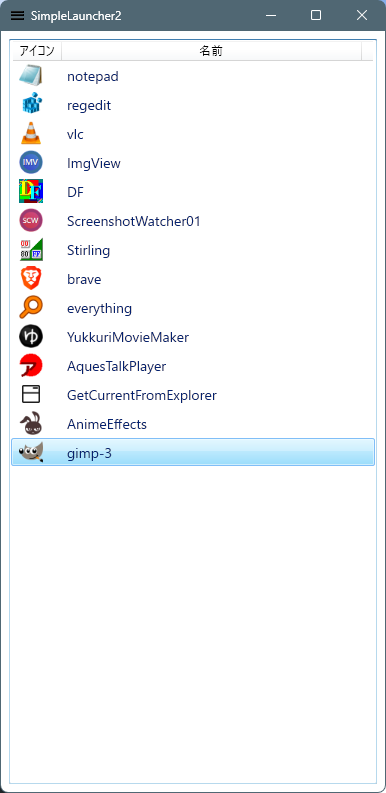
実行イメージ
起動時のスクリーンショット
コメント