組み込んで見ました。
ソースコード
ファイル名:SimpleLauncherEx.csproj
<Project Sdk="Microsoft.NET.Sdk">

  <PropertyGroup>
    <OutputType>WinExe</OutputType>
    <TargetFramework>net10.0-windows</TargetFramework>
    <Nullable>enable</Nullable>
    <ImplicitUsings>enable</ImplicitUsings>
    <UseWPF>true</UseWPF>
    <ApplicationIcon>Assets/App.ico</ApplicationIcon>
  </PropertyGroup>

  <ItemGroup>
    <Resource Include="Assets\**\*.*" />
  </ItemGroup>
</Project>
ファイル名:App.xaml.cs
using System.Windows;

using SimpleLauncherEx.Workers;
using SimpleLauncherEx.Helpers;

namespace SimpleLauncherEx;

public partial class App : Application
{
    public static string DataDir => AppPathHelper.Roaming;
    public static string PathsFile => System.IO.Path.Combine(DataDir, "apps.txt");

    public static ChannelWorker Worker { get; } = new();
}
ファイル名:Helpers\AppPathHelper.cs
// アプリケーション固有の保存パスを一元管理する Helper。
using System.Reflection;

namespace SimpleLauncherEx.Helpers;

public static class AppPathHelper
{
    /// アプリケーション名。
    public static string AppName { get; } = GetDefaultAppName();

    // ------------------------------------------------------------
    // static ctor
    // ------------------------------------------------------------

    static AppPathHelper()
    {
        EnsureDirectories();
    }

    // ------------------------------------------------------------
    // public paths
    // ------------------------------------------------------------

    /// 設定ファイル・ユーザー設定用(APPDATA)
    public static string Roaming =>
        System.IO.Path.Combine(
            Environment.GetFolderPath(
                Environment.SpecialFolder.ApplicationData),
            AppName);

    /// キャッシュ・ログ・一時データ用(LOCALAPPDATA)
    public static string Local =>
        System.IO.Path.Combine(
            Environment.GetFolderPath(
                Environment.SpecialFolder.LocalApplicationData),
            AppName);

    public static string SettingsFile =>
        System.IO.Path.Combine(Roaming, "settings.json");

    public static string CacheDir =>
        System.IO.Path.Combine(Local, "cache");

    public static string LogDir =>
        System.IO.Path.Combine(Local, "log");

    public static string TempDir =>
        System.IO.Path.Combine(Local, "temp");

    // ------------------------------------------------------------
    // helpers
    // ------------------------------------------------------------

    private static string GetDefaultAppName()
    {
        var asm = Assembly.GetEntryAssembly();
        return asm?.GetName().Name ?? "Application";
    }

    /// <summary>
    /// 必要なディレクトリをすべて作成する。
    /// </summary>
    public static void EnsureDirectories()
    {
        System.IO.Directory.CreateDirectory(Roaming);
        System.IO.Directory.CreateDirectory(Local);
        System.IO.Directory.CreateDirectory(CacheDir);
        System.IO.Directory.CreateDirectory(LogDir);
        System.IO.Directory.CreateDirectory(TempDir);
    }
}

/*

 【APPDATA (Roaming)】
 ・ユーザー設定ファイル
 ・UIレイアウト
 ・履歴情報
 ・ユーザー辞書など

 ※PC移行・ドメイン環境ではローミング対象。


 【LOCALAPPDATA (Local)】
 ・キャッシュデータ
 ・ログファイル
 ・一時ファイル
 ・画像サムネイル

 ※削除されても再生成可能なデータを保存する。
*/
ファイル名:Helpers\IconHelper.cs
using System.Runtime.InteropServices;
using System.Windows;
using System.Windows.Interop;
using System.Windows.Media;
using System.Windows.Media.Imaging;

namespace SimpleLauncherEx.Helpers;
public static class IconHelper
{
    // SHGetFileInfoでHICONを取得してWPFのImageSourceへ変換
    [DllImport("Shell32.dll", CharSet = CharSet.Unicode)]
    private static extern IntPtr SHGetFileInfo(string pszPath, uint dwFileAttributes,
        out SHFILEINFO psfi, uint cbFileInfo, uint uFlags);

    [StructLayout(LayoutKind.Sequential, CharSet = CharSet.Unicode)]
    private struct SHFILEINFO
    {
        public IntPtr hIcon;
        public int iIcon;
        public uint dwAttributes;
        [MarshalAs(UnmanagedType.ByValTStr, SizeConst = 260)]
        public string szDisplayName;
        [MarshalAs(UnmanagedType.ByValTStr, SizeConst = 80)]
        public string szTypeName;
    }

    private const uint SHGFI_ICON = 0x000000100;
    private const uint SHGFI_LARGEICON = 0x000000000; // 32x32
    private const uint SHGFI_SHELLICONSIZE = 0x000000004;

    [DllImport("User32.dll", SetLastError = true)]
    private static extern bool DestroyIcon(IntPtr hIcon);

    public static ImageSource GetIconImageSource(string path)
    {
        var info = new SHFILEINFO();
        IntPtr result = SHGetFileInfo(path, 0, out info, (uint)Marshal.SizeOf(info),
            SHGFI_ICON | SHGFI_LARGEICON | SHGFI_SHELLICONSIZE);

        if (result != IntPtr.Zero && info.hIcon != IntPtr.Zero)
        {
            var img = Imaging.CreateBitmapSourceFromHIcon(
                info.hIcon, Int32Rect.Empty, BitmapSizeOptions.FromEmptyOptions());
            DestroyIcon(info.hIcon);
            img.Freeze();
            return img;
        }

        // 何も取れなければ透明1x1
        var wb = new WriteableBitmap(1, 1, 96, 96, PixelFormats.Bgra32, null);
        wb.Freeze();
        return wb;
    }
}
ファイル名:Helpers\ViewModelBase.cs
// 汎用的な ViewModel 基底クラス実装。
using System.ComponentModel;
using System.Runtime.CompilerServices;

namespace SimpleLauncherEx.Helpers;

public abstract class ViewModelBase : INotifyPropertyChanged
{
    public event PropertyChangedEventHandler? PropertyChanged;

    protected void OnPropertyChanged([CallerMemberName] string? name = null)
        => PropertyChanged?.Invoke(this, new PropertyChangedEventArgs(name));
}
ファイル名:Helpers\Wiring.cs
// イベントなどの配線関連のヘルパー群
using System.Windows;
using System.Windows.Input;

namespace SimpleLauncherEx.Helpers;
public static class Wiring
{
    /*
     * コントロールにファイルのドラッグアンドドロップするヘルパー(Preview版)
     * 受け入れ拡張子をオプション指定する機能あり。
     */
    public static void AcceptFilesPreview(
        FrameworkElement el,
        Action<string[]> onFiles,
        params string[] exts)
    {
        el.AllowDrop = true;

        DragEventHandler? over = null;
        DragEventHandler? drop = null;

        over = (_, e) =>
        {
            if (e.Data.GetDataPresent(DataFormats.FileDrop))
                e.Effects = DragDropEffects.Copy;
            else
                e.Effects = DragDropEffects.None;

            // このイベントはここで処理済みであることを通知する
            // (以降のコントロールへイベントを伝播させない)
            e.Handled = true;
        };

        drop = (_, e) =>
        {
            if (!e.Data.GetDataPresent(DataFormats.FileDrop))
                return; // ファイルドロップ以外は処理せず、次の要素へイベントを流す

            var files = (string[])e.Data.GetData(DataFormats.FileDrop)!;

            if (exts?.Length > 0)
            {
                files = files
                    .Where(f => exts.Any(x =>
                        f.EndsWith(x, StringComparison.OrdinalIgnoreCase)))
                    .ToArray();
            }

            if (files.Length > 0)
                onFiles(files);

            // 外部ファイルのドロップはここで責任を持って処理したことを示す
            // (以降の RoutedEvent の伝播を終了させる)
            e.Handled = true;
        };

        el.PreviewDragOver += over; // Preview(Tunnel)段階で受信
        el.PreviewDrop += drop;     // Preview(Tunnel)段階で受信
    }

    public static void Hotkey(
        UIElement element,
        Key key,
        ModifierKeys mods,
        Action action,
        Func<bool>? canExecute = null)
    {
        var cmd = new RoutedUICommand();
        ExecutedRoutedEventHandler exec = (_, __) => action();
        CanExecuteRoutedEventHandler can = (_, e) => e.CanExecute = canExecute?.Invoke() ?? true;

        var cb = new CommandBinding(cmd, exec, can);
        var kb = new KeyBinding(cmd, key, mods);

        element.CommandBindings.Add(cb);
        element.InputBindings.Add(kb);
    }
}
ファイル名:MainWindow.xaml.cs
using System.Windows;
using System.Windows.Controls;

namespace SimpleLauncherEx;

public partial class MainWindow : Window
{
    public MainWindow()
    {
        InitializeComponent();

        // タブのアイテムを動的に追加するループ
        TabItem? firstTab = null;
        foreach (var factory in TabViewRegistry.Tabs)
        {
            var tabview = factory();

            var tab = new TabItem
            {
                Header = tabview.Title,
                Content = tabview   // ← UserControl
            };
            if (firstTab is null)
            {
                firstTab = tab;
            }
            TabHost.Items.Add(tab);
        }
        TabHost.SelectedItem = firstTab;
    }
}
// mkdir C:\Users\karet\Tools\SimpleLauncherEx
// dotnet build .\SimpleLauncherEx.csproj -c Release -o "C:\Users\karet\Tools\SimpleLauncherEx"
ファイル名:TabViewRegistry.cs
using SimpleLauncherEx.TabViews;

namespace SimpleLauncherEx;

public static class TabViewRegistry
{
    public static IReadOnlyList<Func<ITabView>> Tabs { get; } =
        [
            () => new AppLancherTabView(),
            () => new MemoPadTabView(),
        ];
}
ファイル名:TabViews\AppLancherTabView.xaml.cs
using System.Windows;
using System.Windows.Controls;
using System.Windows.Input;

using SimpleLauncherEx.Helpers;

namespace SimpleLauncherEx.TabViews;

public partial class AppLancherTabView : UserControl, ITabView
{
    public string Title => "アプリランチャ";

    public AppLancherTabViewState State { get; } = new ();

    public AppLancherTabView()
    {
        InitializeComponent();
        this.DataContext = this;

        Wiring.AcceptFilesPreview(List, files =>
        {
            State.SetFile(files[0]);
        }, "exe");

        Wiring.Hotkey(this, Key.Delete, ModifierKeys.None,
        () =>
        {
            State.DeleteSelected();
        });

        Wiring.Hotkey(this, Key.Up, ModifierKeys.Alt,
        () =>
        {
            State.MoveSelectedUp();
        });

        Wiring.Hotkey(this, Key.Down, ModifierKeys.Alt,
        () =>
        {
            State.MoveSelectedDown();
        });

        List.MouseDoubleClick += ListViewItem_DoubleClick;
    }
    private void ListViewItem_DoubleClick(object sender, MouseButtonEventArgs e)
    {
        State.LaunchApp();
    }
}
// mkdir C:\Users\karet\Tools\SimpleLauncher2
// dotnet build .\SimpleLauncher2.csproj -c Release -o "C:\Users\karet\Tools\SimpleLauncher2"
ファイル名:TabViews\AppLancherTabViewAppItem.cs
using System.Windows.Media;

using SimpleLauncherEx.Helpers;

namespace SimpleLauncherEx.TabViews;
public class AppLancherTabViewAppItem
{
    public string Path { get; }
    public string DisplayName { get; }
    public ImageSource Icon { get; }

    public AppLancherTabViewAppItem(string path, string displayName, ImageSource icon)
    {
        Path = path;
        DisplayName = displayName;
        Icon = icon;
    }

    public static AppLancherTabViewAppItem FromPath(string path)
    {
        var name = System.IO.Path.GetFileNameWithoutExtension(path);
        var icon = IconHelper.GetIconImageSource(path);
        return new AppLancherTabViewAppItem(path, name, icon);
    }
}
ファイル名:TabViews\AppLancherTabViewState.cs
using System.Collections.ObjectModel;

using SimpleLauncherEx.Helpers;
using SimpleLauncherEx.Utilities;
using SimpleLauncherEx.Workers;

namespace SimpleLauncherEx.TabViews;

public class AppLancherTabViewState : ViewModelBase
{
    public ObservableCollection<AppLancherTabViewAppItem> Apps { get; private set; } = [];
    public AppLancherTabViewAppItem? SelectedApp { get; set; }
    public AppLancherTabViewState()
    {
        // 起動時復元
        foreach (var p in TextFileUtil.Load(App.PathsFile)) SetFile(p);

        // 終了時保存
        System.Windows.Application.Current.Exit += (_, __) =>
        {
            var paths = Apps.Select(a => a.Path).ToArray();
            TextFileUtil.Save(App.PathsFile, paths);
        };
    }
    public void SetFile(string file)
    {
        Apps.Add(AppLancherTabViewAppItem.FromPath(file));
    }

    public void DeleteSelected()
    {
        if (SelectedApp is null) return;
        var idx = Apps.IndexOf(SelectedApp);
        if (idx < 0) return;
        Apps.RemoveAt(idx);
        if (Apps.Count > 0)
        {
            var newIdx = Math.Min(idx, Apps.Count - 1);
            SelectedApp = Apps[newIdx];
        }
    }

    public void MoveSelectedUp()
    {
        MoveSelected(-1);
    }

    public void MoveSelectedDown()
    {
        MoveSelected(+1);
    }

    private void MoveSelected(int delta)
    {
        var item = SelectedApp;
        if (item is null) return;

        var oldIndex = Apps.IndexOf(item);
        var newIndex = oldIndex + delta;
        if (newIndex < 0 || newIndex >= Apps.Count) return;

        Apps.Move(oldIndex, newIndex);
    }
    public async void LaunchApp()
    {
        if (SelectedApp is null) return;
        //SubProcUtil.Launch(SelectedApp.Path);

        // ワーカーに処理を投げる
        await App.Worker.Enqueue(async () =>
        {
            SubProcUtil.Launch(SelectedApp.Path);
        });
    }
}
ファイル名:TabViews\ITabView.cs
namespace SimpleLauncherEx.TabViews;

public interface ITabView
{
    string Title { get; }
}
ファイル名:TabViews\MemoPadTabView.xaml.cs
using System.Windows.Controls;
using System.Windows.Input;
using SimpleLauncherEx.Helpers;

namespace SimpleLauncherEx.TabViews;

public partial class MemoPadTabView : UserControl, ITabView
{
    public string Title => "メモパッド";

    private readonly string _filePath =
        System.IO.Path.Combine(App.DataDir, "memo.txt");

    public MemoPadTabView()
    {
        InitializeComponent();

        // 起動時復元
        if (System.IO.File.Exists(_filePath))
            Editor.Text = System.IO.File.ReadAllText(_filePath);

        // 保存
        Wiring.Hotkey(Editor, Key.S, ModifierKeys.Control,
            async () =>
            {
                string text = Editor.Text;
                await App.Worker.Enqueue(async () =>
                {
                    System.IO.File.WriteAllText(_filePath, text);
                });
            });

        // クリア
        Wiring.Hotkey(Editor, Key.N, ModifierKeys.Control,
            () => Editor.Clear());

        App.Current.Exit += (_, __) =>
        {
            System.IO.File.WriteAllText(_filePath, Editor.Text);
        };
    }
}
ファイル名:Utilities\SubProcUtil.cs
using System.Diagnostics;

namespace SimpleLauncherEx.Utilities;

public static class SubProcUtil
{
    public static bool Launch(string path)
    {
        bool result = true;
        try
        {
            Process.Start(new ProcessStartInfo(path) { UseShellExecute = true });
        }
        catch
        {
            result = false;
        }

        return result;
    }
}
ファイル名:Utilities\TextFileUtil.cs
using System.IO;
using System.Text;

namespace SimpleLauncherEx.Utilities;

public static class TextFileUtil
{
    private static readonly Encoding Utf8NoBom = new UTF8Encoding(encoderShouldEmitUTF8Identifier: false);

    public static string[] Load(string path)
    {
        try
        {
            if (!File.Exists(path)) return Array.Empty<string>();
            // 空行・空白を除去、重複は大文字小文字無視で除去
            return File.ReadLines(path)
                       .Select(s => s.Trim())
                       .Where(s => !string.IsNullOrWhiteSpace(s))
                       .Distinct(StringComparer.OrdinalIgnoreCase)
                       .ToArray();
        }
        catch
        {
            return Array.Empty<string>();
        }
    }

    public static void Save(string path, IEnumerable<string> rows)
    {
        File.WriteAllLines(
            path,
            rows.Where(p => !string.IsNullOrWhiteSpace(p)).Select(p => p.Trim()),
            Utf8NoBom
        );
    }
}
ファイル名:Workers\ChannelWorker.cs
using System.Threading.Channels;

namespace SimpleLauncherEx.Workers;

// このコードはライブラリなので基本変更しない

/// <summary>
/// Channel + Func による直列ワーカー
///
/// - 処理は Enqueue によりキューイングされる
/// - ワーカーは単一スレッドで順次実行される
///
/// 想定用途:
/// - GUI アプリのアプリケーションロジック
/// - ツールアプリのバックグラウンド処理
/// - 状態を持つ非同期ワーカー
///
/// 非想定:
/// - 高並列 CPU 処理
/// - 並列実行が必要な処理
/// </summary>
public sealed class ChannelWorker
{
    // ワーカーで処理するactionの引数。

    // ワーカーに対するリクエストのキュー
    private readonly Channel<Func<Task>> _channel =
        Channel.CreateUnbounded<Func<Task>>(
            new UnboundedChannelOptions
            {
                SingleReader = true,
                SingleWriter = false
            });
    /*
        Channel
        Queue<T> を、マルチスレッドや async/await で使いやすく進化させた『上位互換の非同期キュー』
    */
    /*
        Func<Task>
        Func ... デリゲート(関数ポインタみたいなもの)
        Task ... 戻り値、タスクを返す。
    */
    /*
        UnboundedChannelOptions (Channelの設定オプション)
        オプション内容
        SingleReader読み取る側が常に 1 つだけなのでtrue。trueの場合、読み取り処理が最適化されます。
        SingleWriter書き込む側が複数なので false。trueの場合、内部のロックが簡略化され高速になります。
    */

    // コンストラクタ
    public ChannelWorker()
    {
        // ワーカーループの開始
        _ = Task.Run(WorkerLoop);
    }

    // ワーカー(メッセージループみたいなもの)
    private async Task WorkerLoop()
    {
        // _channelにactionが溜まっていたら一つとりだし
        await foreach (var action in _channel.Reader.ReadAllAsync())
        {
            try
            {
                // actionを実行する。
                await action();
            }
            catch (Exception ex)
            {
                // TODO:
                // - ILogger 連携
                // - イベント通知
                // - 統一エラーハンドラ
                System.Diagnostics.Debug.WriteLine(ex);
            }
        }
    }

    /// <summary>
    /// 戻り値なし処理をキューに追加
    /// </summary>
    public Task Enqueue(Func<Task> action)
    {
        var tcs = new TaskCompletionSource(
            TaskCreationOptions.RunContinuationsAsynchronously);
        /*
          TaskCompletionSource
          SetResult()やSetException()でタスクの終了を元スレッドに伝えることが出来ます。

          TaskCreationOptions.RunContinuationsAsynchronously(オプション)
          結果を元スレッドに通知するだけで、すぐ制御を戻す。
        */

        // _channelに処理を積む
        _channel.Writer.TryWrite(async () =>
        {
            // ラムダ式の内容がワーカーで処理する内容になる。
            try
            {
                // ctx ... コンテキストを引数にactionを実行する。
                await action();
                // 終了を元スレッドへ伝える。
                tcs.SetResult();
            }
            catch (Exception ex)
            {
                // 例外を元スレッドへ伝える。
                tcs.SetException(ex);
            }
        });

        // タスクを返す。
        return tcs.Task;
    }

    /// <summary>
    /// 戻り値あり処理をキューに追加
    /// </summary>
    public Task<TResult> Enqueue<TResult>(
        Func<Task<TResult>> action)
    {
        var tcs = new TaskCompletionSource<TResult>(
            TaskCreationOptions.RunContinuationsAsynchronously);

        _channel.Writer.TryWrite(async () =>
        {
            try
            {
                // actionからの結果をresultで受け取り
                var result = await action();
                // 結果を元スレッドへ伝える。
                tcs.SetResult(result);
            }
            catch (Exception ex)
            {
                tcs.SetException(ex);
            }
        });

        // タスクを返す。
        return tcs.Task;
    }
}
ファイル名:Workers\WorkerResult.cs
namespace SimpleLauncherEx.Workers;

// このコードはライブラリなので基本変更しない

/// <summary>
/// ワーカー処理結果を表す汎用結果クラス
///
/// UI層とワーカー層の責務分離のため、
/// 単純な値ではなく Result オブジェクトで返却する。
///
/// 将来的に情報を追加しても API 破壊が起きにくい。
/// </summary>
public sealed class WorkerResult<T>
{
    /// <summary>
    /// 実行結果の値
    /// </summary>
    public required T Value { get; init; }

    /// <summary>
    /// 成功フラグ(未使用でも将来拡張用)
    /// </summary>
    public bool Success { get; init; } = true;

    /// <summary>
    /// UI 表示用メッセージ等
    /// </summary>
    public string? Message { get; init; }

    // 拡張候補:
    // public Exception? Error { get; init; }
    // public object? Tag { get; init; }
}
ファイル名:App.xaml
<Application x:Class="SimpleLauncherEx.App"
             xmlns="http://schemas.microsoft.com/winfx/2006/xaml/presentation"
             xmlns:x="http://schemas.microsoft.com/winfx/2006/xaml"
             xmlns:local="clr-namespace:SimpleLauncherEx"
             StartupUri="MainWindow.xaml">
    <Application.Resources>

    </Application.Resources>
</Application>
ファイル名:MainWindow.xaml
<Window x:Class="SimpleLauncherEx.MainWindow"
        xmlns="http://schemas.microsoft.com/winfx/2006/xaml/presentation"
        xmlns:x="http://schemas.microsoft.com/winfx/2006/xaml"
        xmlns:d="http://schemas.microsoft.com/expression/blend/2008"
        xmlns:mc="http://schemas.openxmlformats.org/markup-compatibility/2006"
        xmlns:local="clr-namespace:SimpleLauncherEx"
        mc:Ignorable="d"
        Title="SimpleLauncherEx" Height="800" Width="400">
        <TabControl
                x:Name="TabHost"
                TabStripPlacement="Bottom"/>
</Window>
ファイル名:TabViews\AppLancherTabView.xaml
<UserControl x:Class="SimpleLauncherEx.TabViews.AppLancherTabView"
             xmlns="http://schemas.microsoft.com/winfx/2006/xaml/presentation"
             xmlns:x="http://schemas.microsoft.com/winfx/2006/xaml">

    <Grid>
        <ListView
            x:Name="List"
            Margin="8"
            ItemsSource="{Binding State.Apps}"
            SelectedItem="{Binding State.SelectedApp, Mode=TwoWay}"
            AllowDrop="True"
            SelectionMode="Single">
            <ListView.ItemContainerStyle>
                <Style TargetType="ListViewItem">
                    <Setter
                        Property="FontSize"
                        Value="14"/>
                    <Setter
                        Property="Padding"
                        Value="4"/>
                </Style>
            </ListView.ItemContainerStyle>
            <ListView.View>
                <GridView AllowsColumnReorder="False">
                    <GridViewColumn
                        Header="アイコン"
                        Width="48">
                        <GridViewColumn.CellTemplate>
                            <DataTemplate>
                                <Image
                                    Source="{Binding Icon}"
                                    Width="24" Height="24"/>
                            </DataTemplate>
                        </GridViewColumn.CellTemplate>
                    </GridViewColumn>
                    <GridViewColumn
                        Header="名前"
                        Width="300"
                        DisplayMemberBinding="{Binding DisplayName}"/>
                </GridView>
            </ListView.View>
        </ListView>
    </Grid>
</UserControl>
ファイル名:TabViews\MemoPadTabView.xaml
<UserControl x:Class="SimpleLauncherEx.TabViews.MemoPadTabView"
             xmlns="http://schemas.microsoft.com/winfx/2006/xaml/presentation"
             xmlns:x="http://schemas.microsoft.com/winfx/2006/xaml">

    <Grid>
        <TextBox
            x:Name="Editor"
            AcceptsReturn="True"
            AcceptsTab="True"
            VerticalScrollBarVisibility="Auto"
            HorizontalScrollBarVisibility="Auto"
            FontFamily="Consolas"
            FontSize="14"
            TextWrapping="NoWrap"
            Margin="8"/>
    </Grid>

</UserControl>
実行例
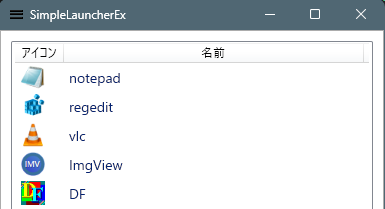
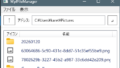
基本となるタブは、アプリランチャです。
追加タブの機能を確認するため、テキストボックスを配置し、単純なメモパッドを実装してみました。
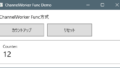
アプリランチャのアプリの起動部分と、メモパッドのファイルの上書き保存機能は、ワーカーとしてUIスレッドとは
別スレッドで実行するようにしてあります。
今後、メモパッドの要領でタブを追加することで、様々な機能を拡張することが出来ると思います。
コメント