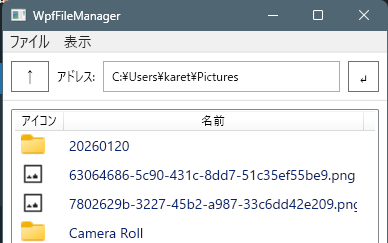
ファイルマネージャで一覧表示とサムネイル表示を切り替える試作プログラムを作成しました。
ソースコード
ファイル名:WpfFileManager.csproj
<Project Sdk="Microsoft.NET.Sdk">

  <PropertyGroup>
    <OutputType>WinExe</OutputType>
    <TargetFramework>net10.0-windows</TargetFramework>
    <Nullable>enable</Nullable>
    <ImplicitUsings>enable</ImplicitUsings>
    <UseWPF>true</UseWPF>
  </PropertyGroup>

</Project>
ファイル名:App.xaml.cs
using System.Configuration;
using System.Data;
using System.Windows;

namespace WpfFileManager;

/// <summary>
/// Interaction logic for App.xaml
/// </summary>
public partial class App : Application
{
}
ファイル名:FileItem.cs
using System.IO;
using System.Collections.Concurrent;
using System.Windows.Media;
using System.Windows.Media.Imaging;
using WpfFileManager.Helpers;

namespace WpfFileManager;
public class FileItem
{
    public string Path { get; }
    public string DisplayName { get; }
    public ImageSource Icon { get; }
    public BitmapSource? Thumb { get; set; }

    public FileItem(string path, string displayName, ImageSource icon, BitmapSource? thumb)
    {
        Path = path;
        DisplayName = displayName;
        Icon = icon;
        Thumb = thumb;
    }
    // ------------------------------
    // icon cache
    // ------------------------------

    private static readonly ConcurrentDictionary<string, ImageSource> _iconCache
        = new(StringComparer.OrdinalIgnoreCase);
    private static readonly ConcurrentDictionary<string, ImageSource> _jumboIconCache
        = new(StringComparer.OrdinalIgnoreCase);


    // ------------------------------
    // factory
    // ------------------------------

    public static FileItem FromPath(string path)
    {
        var name = System.IO.Path.GetFileName(path);
        var icon = GetIconCached(path);
        var thumb = LoadImage(path);
        if (thumb is null)
        {
            thumb = GetJumboIconCached(path) as BitmapSource;
        }

        return new FileItem(path, name, icon, thumb);
    }

    // ------------------------------
    // icon logic
    // ------------------------------

    private static ImageSource GetIconCached(string path)
    {
        // フォルダ
        if (Directory.Exists(path))
        {
            return _iconCache.GetOrAdd(
                "<DIR>",
                _ => IconHelper.GetIconImageSource(path));
        }

        var ext = System.IO.Path.GetExtension(path);

        // 拡張子なし
        if (string.IsNullOrEmpty(ext))
            ext = "<NOEXT>";

        // exe は個別アイコン
        if (ext.Equals(".exe", StringComparison.OrdinalIgnoreCase))
        {
            return IconHelper.GetIconImageSource(path);
        }

        // 拡張子単位でキャッシュ
        return _iconCache.GetOrAdd(ext, _ =>
        {
            return IconHelper.GetIconImageSource(path);
        });
    }
    private static ImageSource GetJumboIconCached(string path)
    {
        // フォルダ
        if (Directory.Exists(path))
        {
            return _jumboIconCache.GetOrAdd(
                "<DIR>",
                _ => IconHelper.GetIconImageSource(path, 256));
        }

        var ext = System.IO.Path.GetExtension(path);

        // 拡張子なし
        if (string.IsNullOrEmpty(ext))
            ext = "<NOEXT>";

        // exe は個別アイコン
        if (ext.Equals(".exe", StringComparison.OrdinalIgnoreCase))
        {
            return IconHelper.GetIconImageSource(path, 256);
        }

        // 拡張子単位でキャッシュ
        return _jumboIconCache.GetOrAdd(ext, _ =>
        {
            return IconHelper.GetIconImageSource(path, 256);
        });
    }
    static private BitmapSource? LoadImage(string file)
    {

        string[] extensions = [ ".jpg", ".jpeg", ".png", ".bmp", ".gif" ];
        if (!Array.Exists(extensions, ext => file.EndsWith(ext, StringComparison.OrdinalIgnoreCase)))
        {
            return null;
        }

        try
        {
            BitmapImage thumb = new ();
            thumb.BeginInit();
            thumb.UriSource = new Uri(file);
            thumb.DecodePixelWidth = 256; // サムネイルサイズ
            thumb.CacheOption = BitmapCacheOption.OnLoad;
            thumb.EndInit();
            thumb.Freeze(); // UIスレッド外でも使用可

            return thumb;
        }
        catch
        {
            // 壊れた画像などは無視
            return null;
        }
    }
}
ファイル名:Helpers\Dialog.cs
using Microsoft.Win32;

namespace WpfFileManager.Helpers;

static class Dialogs
{
    public static string? OpenDir(string dir)
    {
        var dialog = new OpenFolderDialog
        {
            Title = "フォルダを選択してください",
            InitialDirectory = dir,
            Multiselect = false
        };
        return dialog.ShowDialog() == true ? dialog.FolderName : null;
    }
}
ファイル名:Helpers\IconHelper.cs
using System;
using System.Runtime.InteropServices;
using System.Windows;
using System.Windows.Interop;
using System.Windows.Media;
using System.Windows.Media.Imaging;

namespace WpfFileManager.Helpers;

public static class IconHelper
{
    // ------------------------------------------------------------
    // Win32 API
    // ------------------------------------------------------------

    [DllImport("Shell32.dll", CharSet = CharSet.Unicode)]
    private static extern IntPtr SHGetFileInfo(
        string pszPath,
        uint dwFileAttributes,
        out SHFILEINFO psfi,
        uint cbFileInfo,
        uint uFlags);

    [DllImport("Shell32.dll", EntryPoint = "#727")]
    private static extern int SHGetImageList(
        int iImageList,
        ref Guid riid,
        out IImageList ppv);

    [DllImport("User32.dll", SetLastError = true)]
    private static extern bool DestroyIcon(IntPtr hIcon);

    // ------------------------------------------------------------
    // Structs & Constants
    // ------------------------------------------------------------

    [StructLayout(LayoutKind.Sequential, CharSet = CharSet.Unicode)]
    private struct SHFILEINFO
    {
        public IntPtr hIcon;
        public int iIcon;
        public uint dwAttributes;
        [MarshalAs(UnmanagedType.ByValTStr, SizeConst = 260)]
        public string szDisplayName;
        [MarshalAs(UnmanagedType.ByValTStr, SizeConst = 80)]
        public string szTypeName;
    }

    private const uint SHGFI_SYSICONINDEX = 0x00004000;
    private const uint SHGFI_USEFILEATTRIBUTES = 0x000000010;
    private const uint FILE_ATTRIBUTE_DIRECTORY = 0x00000010;
    private const uint FILE_ATTRIBUTE_NORMAL = 0x00000080;

    private const int SHIL_SMALL = 0;       // 16x16
    private const int SHIL_LARGE = 1;       // 32x32
    private const int SHIL_EXTRALARGE = 2;  // 48x48
    private const int SHIL_JUMBO = 4;       // 256x256

    // ------------------------------------------------------------
    // COM Interface (Order is critical!)
    // ------------------------------------------------------------

    [ComImport]
    [Guid("46EB5926-582E-4017-9FDF-E8998DAA0950")]
    [InterfaceType(ComInterfaceType.InterfaceIsIUnknown)]
    private interface IImageList
    {
        int Add(IntPtr hbmImage, IntPtr hbmMask, ref int pi);
        int ReplaceIcon(int i, IntPtr hicon, ref int pi);
        int SetOverlayImage(int iImage, int iOverlay);
        int Replace(int i, IntPtr hbmImage, IntPtr hbmMask);
        int AddMasked(IntPtr hbmImage, uint crMask, ref int pi);
        int Draw(IntPtr pimldp); // 引数は簡易化
        int Remove(int i);
        int GetIcon(int i, int flags, out IntPtr picon); // 8番目のメソッド
        // 以降のメソッドは今回使用しないため省略可能
    }

    // ------------------------------------------------------------
    // Public API
    // ------------------------------------------------------------

    public static ImageSource GetIconImageSource(string path, int size = 32)
    {
        var info = new SHFILEINFO();

        bool isDirectory = System.IO.Directory.Exists(path);

        uint attr = isDirectory ? (uint)0x10 : (uint)0x80; // 0x10: Directory, 0x80: Normal File

        uint flags = SHGFI_SYSICONINDEX | SHGFI_USEFILEATTRIBUTES;

        // 第一引数に path を渡しても、USEFILEATTRIBUTES があれば属性優先になります。
        SHGetFileInfo(path, attr, out info, (uint)Marshal.SizeOf(info), flags);

        // 2. サイズに応じたイメージリストの種類を選択
        int listType = size switch
        {
            <= 16 => SHIL_SMALL,
            <= 32 => SHIL_LARGE,
            <= 48 => SHIL_EXTRALARGE,
            _ => SHIL_JUMBO
        };

        // 3. IImageList 取得
        Guid guid = typeof(IImageList).GUID;
        int hr = SHGetImageList(listType, ref guid, out var imageList);


        if (hr == 0 && imageList != null)
        {
            hr = imageList.GetIcon(info.iIcon, 0x00000001, out IntPtr hIcon);
            if (hr == 0 && hIcon != IntPtr.Zero)
            {
                try
                {
                // BitmapSizeOptions を指定せず、元のサイズを維持して作成
                    var bmp = Imaging.CreateBitmapSourceFromHIcon(
                        hIcon,
                        Int32Rect.Empty,
                        BitmapSizeOptions.FromEmptyOptions());

                    bmp.Freeze();
                    return bmp;
                }
                finally
                {
                    DestroyIcon(hIcon); // ハンドル漏れ防止
                }
            }
        }


        // 何も取れなければ透明1x1
        var wb = new WriteableBitmap(1, 1, 96, 96, PixelFormats.Bgra32, null);
        wb.Freeze();
        return wb;
    }

}
ファイル名:Helpers\RoutedCommandHelper.cs
using System.Windows;
using System.Windows.Input;

namespace WpfFileManager.Helpers;

public static class RoutedCommandHelper
{
    public static RoutedUICommand Create(
        Window window,
        string? name,
        Action execute,
        Func<bool>? canExecute = null,
        Key? key = null,
        ModifierKeys modifiers = ModifierKeys.None)
    {
        var cmd = name == null
            ? new RoutedUICommand()
            : new RoutedUICommand(name, name, window.GetType());

        ExecutedRoutedEventHandler exec = (_, __) =>
            execute();

        CanExecuteRoutedEventHandler can = (_, e) =>
            e.CanExecute = canExecute?.Invoke() ?? true;

        window.CommandBindings.Add(
            new CommandBinding(cmd, exec, can));

        if (key != null)
        {
            window.InputBindings.Add(
                new KeyBinding(cmd, key.Value, modifiers));
        }

        return cmd;
    }
}
ファイル名:Helpers\ViewModelBase.cs
// 汎用的な ViewModel 基底クラス実装。
using System.ComponentModel;
using System.Runtime.CompilerServices;

namespace WpfFileManager.Helpers;

public abstract class ViewModelBase : INotifyPropertyChanged
{
    public event PropertyChangedEventHandler? PropertyChanged;

    protected void OnPropertyChanged([CallerMemberName] string? name = null)
        => PropertyChanged?.Invoke(this, new PropertyChangedEventArgs(name));
}
ファイル名:MainWindow.xaml.cs
using System.IO;
using System.Windows;
using System.Windows.Controls;
using System.Windows.Input;

using WpfFileManager.Helpers;

namespace WpfFileManager;

public partial class MainWindow : Window
{
    // ドラッグ開始を判定するための開始位置
    private Point _startPoint;

    public RoutedUICommand OpenCommand { get; private set; } = null!;
    public RoutedUICommand ListModeCommand { get; private set; } = null!;
    public RoutedUICommand ThumModeCommand { get; private set; } = null!;
    public MainWindowState State {get; set;}= new();
    public MainWindow()
    {
        InitializeComponent();

        OpenCommand = RoutedCommandHelper.Create(
            window: this,
            name: "Open",
            execute: OpenFile,
            canExecute: () => true,
            key: Key.O,
            modifiers: ModifierKeys.Control);

        ThumModeCommand = RoutedCommandHelper.Create(
            window: this,
            name: "ThumMode",
            execute: ChangeThumMode,
            canExecute: () => true,
            key: Key.T,
            modifiers: ModifierKeys.Control);

        ListModeCommand = RoutedCommandHelper.Create(
            window: this,
            name: "ListMode",
            execute: ChangeListMode,
            canExecute: () => true,
            key: Key.L,
            modifiers: ModifierKeys.Control);

        State.CurrentDir = @"C:\Users\karet\Pictures";

        DataContext = this;

        List.MouseDoubleClick += ListViewItem_DoubleClick;
        Thum.MouseDoubleClick += ListViewItem_DoubleClick;
        UpButton.Click += UpButton_Click;
        UpdateButton.Click += UpdateButton_Click;

        List.PreviewMouseLeftButtonDown += ListView_PreviewMouseLeftButtonDown;
        List.PreviewMouseMove += ListView_PreviewMouseMove;
        Thum.PreviewMouseLeftButtonDown += ListView_PreviewMouseLeftButtonDown;
        Thum.PreviewMouseMove += ListView_PreviewMouseMove;


        ChangeCurenntDir();
    }
    private void ListView_PreviewMouseLeftButtonDown(object sender, MouseButtonEventArgs e)
    {
        // マウスを押した位置を記録
        _startPoint = e.GetPosition(null);
    }

    private void ListView_PreviewMouseMove(object sender, MouseEventArgs e)
    {
        // 左ボタンが押されており、かつ一定以上の距離を移動したらドラッグ開始
        if (e.LeftButton == MouseButtonState.Pressed)
        {
            Point mousePos = e.GetPosition(null);
            Vector diff = _startPoint - mousePos;

            if (Math.Abs(diff.X) > SystemParameters.MinimumHorizontalDragDistance ||
                Math.Abs(diff.Y) > SystemParameters.MinimumVerticalDragDistance)
            {
                // ドラッグ対象のアイテムを取得
                var listView = sender as ListView;
                var selectedItem = listView?.SelectedItem as FileItem; // あなたのデータモデルクラス

                if (selectedItem != null && !string.IsNullOrEmpty(selectedItem.Path))
                {
                    // 1. DataObjectを作成
                    DataObject data = new DataObject();

                    // 2. FileDrop形式でパスを設定(配列形式にするのがWindowsの標準ルール)
                    string[] filePaths = { selectedItem.Path };
                    data.SetData(DataFormats.FileDrop, filePaths);

                    // 3. ドラッグ&ドロップ開始
                    // DragDropEffects.Copy | DragDropEffects.Move を指定
                    DragDrop.DoDragDrop(listView, data, DragDropEffects.Copy);
                }
            }
        }
    }
    private void ListViewItem_DoubleClick(object sender, MouseButtonEventArgs e)
    {
        if (State.SelectedFile is null) return;

        FileItem f = State.SelectedFile;
        string path = f.Path;

        if (File.Exists(path))
        {
            var startInfo = new System.Diagnostics.ProcessStartInfo
            {
                FileName = path,
                // 重要: シェル機能を使用して関連付けられたアプリを起動する
                UseShellExecute = true
            };
            System.Diagnostics.Process.Start(startInfo);
            return;
        }

        State.CurrentDir = path;
        ChangeCurenntDir();
    }
    private void UpButton_Click(object sender, RoutedEventArgs e)
    {
        MoveParentDir();
    }
    private void UpdateButton_Click(object sender, RoutedEventArgs e)
    {
        var path = CurrentDirTextBox.Text;

        if (!Directory.Exists(path))
        {
            MessageBox.Show($"{path}は存在しない。");
            return;
        }

        State.CurrentDir = path;
        ChangeCurenntDir();
    }
    void ChangeCurenntDir()
    {
        State.Files.Clear();

        // var sw = System.Diagnostics.Stopwatch.StartNew();

        var path = State.CurrentDir;
        try
        {
            var entries = Directory.EnumerateFileSystemEntries(path);
            foreach(var file in entries)
            {
                    var attr = File.GetAttributes(file);

                    // 非表示・システムを除外
                    if ((attr & FileAttributes.Hidden) != 0) continue;
                    if ((attr & FileAttributes.System) != 0) continue;

                    State.Files.Add(
                        FileItem.FromPath(file)
                    );
            }
        }
        catch
        {
            // アクセス拒否・消失ファイル等は無視
        }
        // sw.Stop();
        // System.Diagnostics.Debug.WriteLine($"ChangeCurrentDir: {sw.ElapsedMilliseconds} ms");
        // NoCache: 74 ms
        // OnCache: 48 ms
    }
    void MoveParentDir()
    {
        var path = State.CurrentDir;
        var parent = Path.GetDirectoryName(path);
        if (parent is null) return;

        if (parent == "") return;

        State.CurrentDir = parent;
        ChangeCurenntDir();
    }
    void OpenFile()
    {
        //MessageBox.Show("Open executed");
        string path = State.CurrentDir;
        string? newPath = Dialogs.OpenDir(path);
        if (newPath is null) return;

        State.CurrentDir = newPath;
        ChangeCurenntDir();
    }
    void ChangeThumMode()
    {
        //MessageBox.Show("ChangeThumMode");
        if (Thum.Visibility == Visibility.Visible) return;
        Thum.Visibility = Visibility.Visible;
        List.Visibility = Visibility.Hidden;

    }
    void ChangeListMode()
    {
        //MessageBox.Show("ChangeListMode");
        if (List.Visibility == Visibility.Visible) return;
        Thum.Visibility = Visibility.Hidden;
        List.Visibility = Visibility.Visible;

    }
}
ファイル名:MainWindowState.cs
using System.Collections.ObjectModel;

using WpfFileManager.Helpers;

namespace WpfFileManager;
public class MainWindowState : ViewModelBase
{
    public ObservableCollection<FileItem> Files {get; set;}= [];
    public FileItem? SelectedFile { get; set; }
    string _currentDir = "";
    public string CurrentDir
    {
        get => _currentDir;
        set
        {
            if (_currentDir == value) return;
            _currentDir = value;
            OnPropertyChanged();
        }
    }
}
ファイル名:App.xaml
<Application x:Class="WpfFileManager.App"
             xmlns="http://schemas.microsoft.com/winfx/2006/xaml/presentation"
             xmlns:x="http://schemas.microsoft.com/winfx/2006/xaml"
             xmlns:local="clr-namespace:WpfFileManager"
             StartupUri="MainWindow.xaml">
    <Application.Resources>

    </Application.Resources>
</Application>
ファイル名:MainWindow.xaml
<Window x:Class="WpfFileManager.MainWindow"
        xmlns="http://schemas.microsoft.com/winfx/2006/xaml/presentation"
        xmlns:x="http://schemas.microsoft.com/winfx/2006/xaml"
        xmlns:d="http://schemas.microsoft.com/expression/blend/2008"
        xmlns:mc="http://schemas.openxmlformats.org/markup-compatibility/2006"
        xmlns:local="clr-namespace:WpfFileManager"
        mc:Ignorable="d"
        Title="WpfFileManager" Height="800" Width="400">
    <Grid>
        <Grid.RowDefinitions>
            <!-- メニューバー -->
            <RowDefinition Height="Auto"/>
            <!-- アドレスバー -->
            <RowDefinition Height="Auto"/>
            <!-- メイン: -->
            <RowDefinition Height="*"/>
        </Grid.RowDefinitions>

        <!-- メニューバー -->
        <Menu Grid.Row="0">
            <Menu.FontSize>14</Menu.FontSize>
            <MenuItem Header="_ファイル">
                <MenuItem Header="開く...Ctrl+O"
                    Command="{Binding OpenCommand}"/>
            </MenuItem>
            <MenuItem Header="_表示">
                <MenuItem Header="一覧 ... Ctrl+L"
                    Command="{Binding ListModeCommand}"/>
                <MenuItem Header="サムネ ... Ctrl+T"
                    Command="{Binding ThumModeCommand}"/>
            </MenuItem>
        </Menu>

        <!-- アドレスバー -->
        <Border Grid.Row="1" BorderBrush="#DDD" BorderThickness="0,1,0,1">
            <Grid Margin="8">
                <Grid.ColumnDefinitions>
                    <ColumnDefinition Width="Auto"/>  <!-- 上へ -->
                    <ColumnDefinition Width="8"/>
                    <ColumnDefinition Width="*"/>     <!-- カレントディレクトリ -->
                    <ColumnDefinition Width="8"/>
                    <ColumnDefinition Width="Auto"/>  <!-- 更新 -->
                </Grid.ColumnDefinitions>

                <Button
                    x:Name="UpButton"
                    Grid.Column="0"
                    Padding="10,4"
                    Content="↑"
                    Background="Transparent"
                    FontSize="16"/>

                <!-- カレントディレクトリ -->
                <DockPanel Grid.Column="2" LastChildFill="True">
                    <TextBlock Text="アドレス:" VerticalAlignment="Center" Margin="0,0,8,0"/>
                    <TextBox
                        x:Name="CurrentDirTextBox"
                        Text="{Binding Path=State.CurrentDir, Mode=OneWay}"
                        VerticalContentAlignment="Center"
                        Padding="6,3"/>
                </DockPanel>

                <Button
                    x:Name="UpdateButton"
                    Grid.Column="4"
                    Padding="10,4"
                    Content="↵"
                    Background="Transparent"
                    FontSize="16"/>

            </Grid>
        </Border>

        <ListView Grid.Row="2"
            x:Name="List"
            Visibility="Visible"
            Margin="8"
            ItemsSource="{Binding State.Files}"
            SelectedItem="{Binding State.SelectedFile, Mode=TwoWay}"
            SelectionMode="Single">
            <ListView.ItemContainerStyle>
                <Style TargetType="ListViewItem">
                    <Setter
                        Property="FontSize"
                        Value="14"/>
                    <Setter
                        Property="Padding"
                        Value="4"/>
                </Style>
            </ListView.ItemContainerStyle>
            <ListView.View>
                <GridView AllowsColumnReorder="False">
                    <GridViewColumn
                        Header="アイコン"
                        Width="48">
                        <GridViewColumn.CellTemplate>
                            <DataTemplate>
                                <Image
                                    Source="{Binding Icon}"
                                    Width="24" Height="24"/>
                            </DataTemplate>
                        </GridViewColumn.CellTemplate>
                    </GridViewColumn>
                    <GridViewColumn
                        Header="名前"
                        Width="300"
                        DisplayMemberBinding="{Binding DisplayName}"/>
                </GridView>
            </ListView.View>
        </ListView>
        <ListView Grid.Row="2"
            x:Name="Thum"
            Visibility="Collapsed"
            Margin="8"
            ItemsSource="{Binding State.Files}"
            SelectedItem="{Binding State.SelectedFile, Mode=TwoWay}"
            SelectionMode="Single"
            ScrollViewer.VerticalScrollBarVisibility="Auto"
            ScrollViewer.HorizontalScrollBarVisibility="Disabled">
            <ListView.ItemContainerStyle>
                <Style TargetType="ListViewItem">
                    <Setter
                        Property="FontSize"
                        Value="14"/>
                    <Setter
                        Property="Padding"
                        Value="4"/>
                </Style>
            </ListView.ItemContainerStyle>
            <ListView.ItemsPanel>
                <ItemsPanelTemplate>
                    <WrapPanel Orientation="Horizontal" />
                </ItemsPanelTemplate>
            </ListView.ItemsPanel>
            <ListView.ItemTemplate>
                <DataTemplate>
                    <StackPanel Margin="5" Width="256">
                        <Image
                            Source="{Binding Thumb}"
                            Width="256" Height="256"
                            Stretch="None" />
                        <TextBlock
                            Text="{Binding DisplayName}"
                            TextAlignment="Center"
                            TextWrapping="Wrap" />
                    </StackPanel>
                </DataTemplate>
            </ListView.ItemTemplate>
        </ListView>


    </Grid>
</Window>
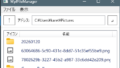
実行例
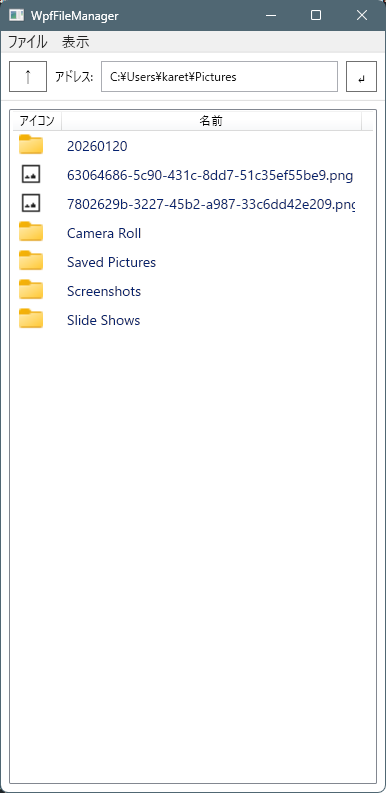
- 起動時は一覧表示
![]()
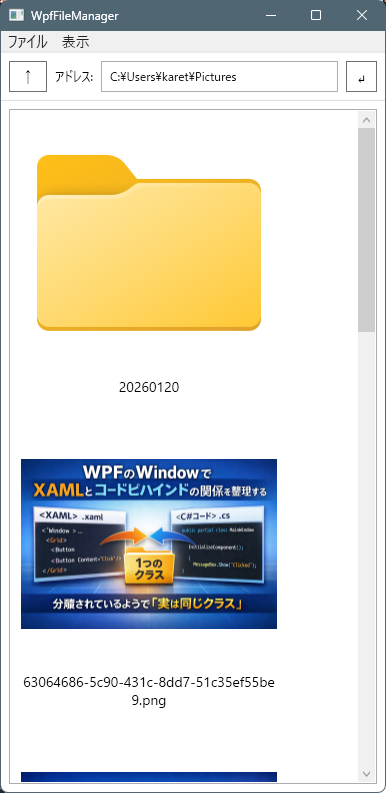
- メニュー:表示→サムネ
![]()
機能説明
ファイルマネージャとしての機能は以下の通り。
- 親ディレクトリへ移動(「↑」ボタンを押す)
- パスを指定してディレクトリへ移動(アドレスバーにパスを入力し「↵」ボタンを押す)
- サブディレクトリへ移動(ディレクトリアイコンをダブルクリック)
- ファイルを関連付けで開く(ファイルアイコンダブルクリック)
- ファイルをほかアプリへのドラック
ファイルのコピーや削除などの機能は無いです。
コメント