タブでUserControlを切り替えるサンプルコードを以前に記事にしました。
こちらの方法だと、UserControlが増えるたびタブを追加するコードを記述する必要があります。
今回のプログラムでは、UserControlを作ると、タブに自動登録される仕組みにしてみました。
ソースコード
ファイル名:AutoTabSample.csproj
<Project Sdk="Microsoft.NET.Sdk">

  <PropertyGroup>
    <OutputType>WinExe</OutputType>
    <TargetFramework>net10.0-windows</TargetFramework>
    <Nullable>enable</Nullable>
    <ImplicitUsings>enable</ImplicitUsings>
    <UseWPF>true</UseWPF>
  </PropertyGroup>

</Project>
ファイル名:Helpers\TabAttribute.cs
namespace AutoTabSample.Helpers;

[AttributeUsage(AttributeTargets.Class, AllowMultiple = false, Inherited = false)]
public sealed class TabAttribute : Attribute
{
    public string Header { get; }

    public int Order { get; }

    public TabAttribute(string header, int order)
    {
        Header = header;
        Order = order;
    }
}
ファイル名:Helpers\TabLoader.cs
using System.Reflection;
using System.Windows.Controls;
using AutoTabSample.Models;

namespace AutoTabSample.Helpers;

public static class TabLoader
{
    public static List<TabItemInfo> LoadTabs()
    {
        var asm = Assembly.GetExecutingAssembly();

        var tabs = asm.GetTypes()
            .Where(t =>
                t.IsClass &&
                !t.IsAbstract &&
                typeof(UserControl).IsAssignableFrom(t))
            .Select(t => new
            {
                Type = t,
                Attribute = t.GetCustomAttribute<TabAttribute>()
            })
            .Where(x => x.Attribute is not null)
            .Select(x => new TabItemInfo
            {
                Header = x.Attribute!.Header,
                Order = x.Attribute.Order,
                ViewType = x.Type
            })
            .OrderBy(x => x.Order)
            .ThenBy(x => x.Header)
            .ToList();

        return tabs;
    }
}
ファイル名:Helpers\ViewTypeToInstanceConverter.cs
using System.Globalization;
using System.Windows.Controls;
using System.Windows.Data;

namespace AutoTabSample.Helpers;

public class ViewTypeToInstanceConverter : IValueConverter
{
    public object? Convert(object value, Type targetType, object parameter, CultureInfo culture)
    {
        if (value is not Type type)
            return null;

        if (!typeof(UserControl).IsAssignableFrom(type))
            return null;

        return Activator.CreateInstance(type) as UserControl;
    }

    public object ConvertBack(object value, Type targetType, object parameter, CultureInfo culture)
    {
        throw new NotSupportedException();
    }
}
ファイル名:MainWindow.xaml
<Window x:Class="AutoTabSample.MainWindow"
        xmlns="http://schemas.microsoft.com/winfx/2006/xaml/presentation"
        xmlns:x="http://schemas.microsoft.com/winfx/2006/xaml"
        xmlns:d="http://schemas.microsoft.com/expression/blend/2008"
        xmlns:mc="http://schemas.openxmlformats.org/markup-compatibility/2006"
        xmlns:vm="clr-namespace:AutoTabSample.ViewModels"
        xmlns:helpers="clr-namespace:AutoTabSample.Helpers"
        mc:Ignorable="d"
        Title="AutoTabSample"
        Width="900"
        Height="600">

    <Window.Resources>
        <helpers:ViewTypeToInstanceConverter x:Key="ViewTypeToInstanceConverter"/>
    </Window.Resources>

    <Window.DataContext>
        <vm:MainWindowViewModel/>
    </Window.DataContext>

    <Grid>
        <TabControl ItemsSource="{Binding Tabs}"
                    SelectedItem="{Binding SelectedTab}">
            <TabControl.ItemTemplate>
                <DataTemplate>
                    <TextBlock Text="{Binding Header}" />
                </DataTemplate>
            </TabControl.ItemTemplate>

            <TabControl.ContentTemplate>
                <DataTemplate>
                    <ContentControl Content="{Binding ViewType, Converter={StaticResource ViewTypeToInstanceConverter}}" />
                </DataTemplate>
            </TabControl.ContentTemplate>
        </TabControl>
    </Grid>
</Window>
ファイル名:MainWindow.xaml.cs
using System.Text;
using System.Windows;
using System.Windows.Controls;
using System.Windows.Data;
using System.Windows.Documents;
using System.Windows.Input;
using System.Windows.Media;
using System.Windows.Media.Imaging;
using System.Windows.Navigation;
using System.Windows.Shapes;

namespace AutoTabSample;

/// <summary>
/// Interaction logic for MainWindow.xaml
/// </summary>
public partial class MainWindow : Window
{
    public MainWindow()
    {
        InitializeComponent();
    }
}
ファイル名:Models\TabItemInfo.cs
namespace AutoTabSample.Models;

public class TabItemInfo
{
    public int Order { get; set; }

    public string Header { get; set; } = "";

    public Type ViewType { get; set; } = null!;
}
ファイル名:ViewModels\MainWindowViewModel.cs
using System.Collections.ObjectModel;
using System.ComponentModel;
using System.Runtime.CompilerServices;
using AutoTabSample.Helpers;
using AutoTabSample.Models;

namespace AutoTabSample.ViewModels;

public class MainWindowViewModel : INotifyPropertyChanged
{
    public event PropertyChangedEventHandler? PropertyChanged;

    protected void OnPropertyChanged([CallerMemberName] string? propertyName = null)
    {
        PropertyChanged?.Invoke(this, new PropertyChangedEventArgs(propertyName));
    }

    public ObservableCollection<TabItemInfo> Tabs { get; }

    private TabItemInfo? _selectedTab;
    public TabItemInfo? SelectedTab
    {
        get => _selectedTab;
        set
        {
            if (_selectedTab == value) return;
            _selectedTab = value;
            OnPropertyChanged();
        }
    }

    public MainWindowViewModel()
    {
        Tabs = new ObservableCollection<TabItemInfo>(TabLoader.LoadTabs());
        SelectedTab = Tabs.FirstOrDefault();
    }
}
ファイル名:Views\HomeTabView.xaml
<UserControl x:Class="AutoTabSample.Views.HomeTabView"
             xmlns="http://schemas.microsoft.com/winfx/2006/xaml/presentation"
             xmlns:x="http://schemas.microsoft.com/winfx/2006/xaml"
             MinWidth="200"
             MinHeight="100">
    <Grid Margin="16">
        <StackPanel>
            <TextBlock FontSize="24" Text="Home" />
            <TextBlock Margin="0,8,0,0" Text="これはホームタブです。" />
            <Button Width="140" Margin="0,16,0,0" Content="ボタン" />
        </StackPanel>
    </Grid>
</UserControl>
ファイル名:Views\HomeTabView.xaml.cs
using System.Windows.Controls;
using AutoTabSample.Helpers;

namespace AutoTabSample.Views;

[Tab("ホーム", 10)]
public partial class HomeTabView : UserControl
{
    public HomeTabView()
    {
        InitializeComponent();
    }
}
ファイル名:Views\LogTabView.xaml
<UserControl x:Class="AutoTabSample.Views.LogTabView"
             xmlns="http://schemas.microsoft.com/winfx/2006/xaml/presentation"
             xmlns:x="http://schemas.microsoft.com/winfx/2006/xaml"
             MinWidth="200"
             MinHeight="100">
    <Grid Margin="16">
        <DockPanel>
            <TextBlock DockPanel.Dock="Top" FontSize="24" Text="Log" />
            <ListBox Margin="0,12,0,0">
                <ListBoxItem Content="Application started." />
                <ListBoxItem Content="File loaded." />
                <ListBoxItem Content="Processing completed." />
            </ListBox>
        </DockPanel>
    </Grid>
</UserControl>
ファイル名:Views\LogTabView.xaml.cs
using System.Windows.Controls;
using AutoTabSample.Helpers;

namespace AutoTabSample.Views;

[Tab("ログ", 20)]
public partial class LogTabView : UserControl
{
    public LogTabView()
    {
        InitializeComponent();
    }
}
ファイル名:Views\SettingsTabView.xaml
<UserControl x:Class="AutoTabSample.Views.SettingsTabView"
             xmlns="http://schemas.microsoft.com/winfx/2006/xaml/presentation"
             xmlns:x="http://schemas.microsoft.com/winfx/2006/xaml"
             MinWidth="200"
             MinHeight="100">
    <Grid Margin="16">
        <StackPanel>
            <TextBlock FontSize="24" Text="Settings" />
            <CheckBox Margin="0,12,0,0" Content="起動時に自動読み込み" />
            <CheckBox Margin="0,8,0,0" Content="ログを保存する" />
        </StackPanel>
    </Grid>
</UserControl>
ファイル名:Views\SettingsTabView.xaml.cs
using System.Windows.Controls;
using AutoTabSample.Helpers;

namespace AutoTabSample.Views;

[Tab("設定", 30)]
public partial class SettingsTabView : UserControl
{
    public SettingsTabView()
    {
        InitializeComponent();
    }
}
ファイル構成

実行
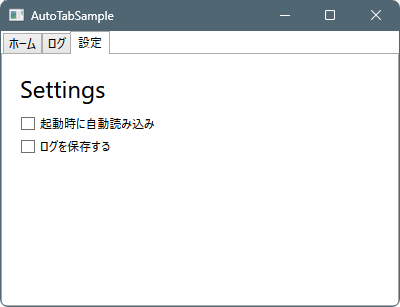
dotnet runタブの切り替えが動作していることが確認できる。


感想
リフレクションを使って、UserControlを探して、タブに登録する仕組みです。
難しいことはしていないのですが、コード量が多くなりました。
シンプルさを考えると以前の記事のコードでも良い感じがします。

コメント