ソースコード
ファイル名:VideoFrameDiff.csproj
<Project Sdk="Microsoft.NET.Sdk">

  <PropertyGroup>
    <OutputType>WinExe</OutputType>
    <TargetFramework>net10.0-windows</TargetFramework>
    <Nullable>enable</Nullable>
    <ImplicitUsings>enable</ImplicitUsings>
    <UseWPF>true</UseWPF>
  </PropertyGroup>

  <ItemGroup>
    <PackageReference Include="OpenCvSharp4" Version="4.11.0.20250507" />
    <PackageReference Include="OpenCvSharp4.runtime.win" Version="4.11.0.20250507" />
    <PackageReference Include="OpenCvSharp4.WpfExtensions" Version="4.11.0.20250507" />
  </ItemGroup>

</Project>
ファイル名:AppCommands.cs
using System.Windows;
using System.Windows.Input;

static  partial class AppCommands
{
    public static void Bind(
        Window w,
        ICommand cmd,
        ExecutedRoutedEventHandler exec,
        CanExecuteRoutedEventHandler? can = null)
    {
        w.CommandBindings.Add(
            new CommandBinding(
                cmd,
                exec,
                can ?? ((_, e) => e.CanExecute = true)
            ));
    }


}
ファイル名:MainWindow.xaml.cs
using System.ComponentModel;
using System.Diagnostics;
using System.Windows;
using System.Windows.Input;


namespace VideoFrameDiff;


static  partial class AppCommands
{
    // アプリ専用コマンド
    public static readonly RoutedUICommand Seek =
        new RoutedUICommand(
            "Seek",
            "Seek",
            typeof(AppCommands));
}
public partial class MainWindow : Window
{
    MainWindowViewModel VM => (MainWindowViewModel)DataContext;
    string _filePath = "";
    CancellationTokenSource? _seekCts;
    public MainWindow()
    {
        InitializeComponent();

        // ★ D&D ひな形
        Wiring.AcceptFilesPreview(
            MainGrid,
            async files =>
            {
                var f = files.FirstOrDefault();
                if (f == null) return;

                _filePath = f;
                var maxFrames = await VideoUtil.GetMaxFrameCountAsync(_filePath);
                if (maxFrames < 2) return;
                VM.SliderMax = (int)maxFrames - 2;
                VM.SliderValue = 0;

            },
            ".avi", ".mp4"
        );

        DataContext = new MainWindowViewModel
        {
            SliderValue = -1,
        };

        CommandBindings.Add(
            new CommandBinding(
                AppCommands.Seek,
                Seek_ExecutedAsync,
                Seek_CanExecute));

        VM.PropertyChanged += Vm_PropertyChanged;
    }
    // Seek コマンドの実行処理
    async void Seek_ExecutedAsync(object sender, ExecutedRoutedEventArgs e)
    {
        _seekCts?.Cancel();
        _seekCts = new CancellationTokenSource();
        var token = _seekCts.Token;

        try
        {
            var result =
                await VideoUtil.GetFramePairAndCompareAsync(
                    _filePath,
                    VM.SliderValue,
                    token);

            if (token.IsCancellationRequested)
                return;

            Image1.Source = result.Frame1;
            Image2.Source = result.Frame2;

            VM.ResultValue = $"Diff={result.DiffValue:F2}  Same={result.AlmostSame}";
        }
        catch (OperationCanceledException)
        {
            // 正常キャンセル
        }
    }


    // Seek コマンドの実行可否判定
    void Seek_CanExecute(object sender, CanExecuteRoutedEventArgs e)
    {
        e.CanExecute = true;

        if (VM.SliderMax <= 0)
        {
            e.CanExecute = false;
            return;
        }
    }
    private async void Vm_PropertyChanged(
        object? sender,
        PropertyChangedEventArgs e)
    {
        if (e.PropertyName == nameof(VM.SliderValue))
        {
            if (_filePath == "") return;

            AppCommands.Seek.Execute(null, this);
        }
    }

}
ファイル名:MainWindowViewModel.cs
using System.ComponentModel;
using System.Runtime.CompilerServices;

namespace VideoFrameDiff;

public class MainWindowViewModel : INotifyPropertyChanged
{
    public event PropertyChangedEventHandler? PropertyChanged;

    void Raise([CallerMemberName] string? name = null)
        => PropertyChanged?.Invoke(this, new PropertyChangedEventArgs(name));

    int _sliderValue = 0;
    public int SliderValue
    {
        get => _sliderValue;
        set
        {
            if (_sliderValue == value) return;
            _sliderValue = value;
            Raise();
        }
    }
    int _sliderMin = 0;
    public int SliderMin
    {
        get => _sliderMin;
        set
        {
            if (_sliderMin == value) return;
            _sliderMin = value;
            Raise();
        }
    }
    int _sliderMax = 0;
    public int SliderMax
    {
        get => _sliderMax;
        set
        {
            if (_sliderMax == value) return;
            _sliderMax = value;
            Raise();
        }
    }
    string _resultValue = "判定結果表示領域";
    public string ResultValue
    {
        get => _resultValue;
        set
        {
            if (_resultValue == value) return;
            _resultValue = value;
            Raise();
        }
    }
}
ファイル名:VideoUtil.cs
using OpenCvSharp;
using OpenCvSharp.WpfExtensions;
using System.Windows.Media.Imaging;

public sealed class FrameCompareResult
{
    public required BitmapSource Frame1 { get; init; }
    public required BitmapSource Frame2 { get; init; }

    public double DiffValue { get; init; }

    public bool AlmostSame => DiffValue < 3.0;
}

static class VideoUtil
{

    // 最大フレーム数を取得
    public static Task<double> GetMaxFrameCountAsync(string filePath)
    {
        return Task.Run(() =>
        {
            using var capture = new VideoCapture(filePath);

            if (!capture.IsOpened())
                throw new Exception("Cannot open video file: " + filePath);

            return capture.Get(VideoCaptureProperties.FrameCount);
        });
    }

   // 2つのフレーム間の差分を計算する(平均絶対差分)
    static double CalcFrameDiff(Mat a, Mat b)
    {
        if (a.Size() != b.Size())
            return double.MaxValue;

        using var diff = new Mat();
        Cv2.Absdiff(a, b, diff);

        Scalar mean = Cv2.Mean(diff);

        return (mean.Val0 + mean.Val1 + mean.Val2) / 3.0;
    }

    // 動画の前後フレームを取得し相違を判定する。
    public static Task<FrameCompareResult>
    GetFramePairAndCompareAsync(
        string filePath,
        int frameIndex,
        CancellationToken token)
    {
        return Task.Run(() =>
        {
            token.ThrowIfCancellationRequested();

            using var cap = new VideoCapture(filePath);

            token.ThrowIfCancellationRequested();

            cap.Set(VideoCaptureProperties.PosFrames, frameIndex);

            using var mat1 = new Mat();
            if (!cap.Read(mat1) || mat1.Empty())
                throw new Exception();

            token.ThrowIfCancellationRequested();

            using var mat2 = new Mat();
            if (!cap.Read(mat2) || mat2.Empty())
                throw new Exception();

            token.ThrowIfCancellationRequested();

            double diff = CalcFrameDiff(mat1, mat2);

            var bmp1 = mat1.ToBitmapSource();
            var bmp2 = mat2.ToBitmapSource();

            bmp1.Freeze();
            bmp2.Freeze();

            return new FrameCompareResult
            {
                Frame1 = bmp1,
                Frame2 = bmp2,
                DiffValue = diff
            };
        }, token);
    }
}
ファイル名:Wiring.cs
using System.Windows;

public static class Wiring
{
    /*
     * コントロールにファイルのドラッグアンドドロップするヘルパー(Preview版)
     * 受け入れ拡張子をオプション指定する機能あり。
     */
    public static void AcceptFilesPreview(
        FrameworkElement el,
        Action<string[]> onFiles,
        params string[] exts)
    {
        el.AllowDrop = true;

        DragEventHandler? over = null;
        DragEventHandler? drop = null;

        over = (_, e) =>
        {
            if (e.Data.GetDataPresent(DataFormats.FileDrop))
                e.Effects = DragDropEffects.Copy;
            else
                e.Effects = DragDropEffects.None;

            // このイベントはここで処理済みであることを通知する
            // (以降のコントロールへイベントを伝播させない)
            e.Handled = true;
        };

        drop = (_, e) =>
        {
            if (!e.Data.GetDataPresent(DataFormats.FileDrop))
                return; // ファイルドロップ以外は処理せず、次の要素へイベントを流す

            var files = (string[])e.Data.GetData(DataFormats.FileDrop)!;

            if (exts?.Length > 0)
            {
                files = files
                    .Where(f => exts.Any(x =>
                        f.EndsWith(x, StringComparison.OrdinalIgnoreCase)))
                    .ToArray();
            }

            if (files.Length > 0)
                onFiles(files);

            // 外部ファイルのドロップはここで責任を持って処理したことを示す
            // (以降の RoutedEvent の伝播を終了させる)
            e.Handled = true;
        };

        el.PreviewDragEnter += over; // Preview(Tunnel)段階で受信
        el.PreviewDrop += drop;     // Preview(Tunnel)段階で受信
    }
}
ファイル名:MainWindow.xaml
<Window x:Class="VideoFrameDiff.MainWindow"
        xmlns="http://schemas.microsoft.com/winfx/2006/xaml/presentation"
        xmlns:x="http://schemas.microsoft.com/winfx/2006/xaml"
        xmlns:d="http://schemas.microsoft.com/expression/blend/2008"
        xmlns:mc="http://schemas.openxmlformats.org/markup-compatibility/2006"
        xmlns:local="clr-namespace:VideoFrameDiff"
        mc:Ignorable="d"
        Title="MainWindow" Height="450" Width="800">
    <Grid Margin="20"
        x:Name="MainGrid"
        Background="GreenYellow">

       <Grid.RowDefinitions>
            <RowDefinition Height="Auto"/>
            <RowDefinition Height="*"/>
        </Grid.RowDefinitions>

        <!-- 上グリッド -->
        <Grid Grid.Row="0" Margin="0,0,0,10">
            <Grid.ColumnDefinitions>
                <ColumnDefinition Width="*"/>
                <ColumnDefinition Width="*"/>
            </Grid.ColumnDefinitions>
            <!-- 左側のコンテンツ -->
            <Image Grid.Column="0" x:Name="Image1" Stretch="Uniform" Margin="0,0,10,0" />
            <!-- 右側のコンテンツ -->
            <Image Grid.Column="1" x:Name="Image2" Stretch="Uniform" Margin="0,0,10,0" />
        </Grid>

        <!-- 下グリッド -->
        <Grid Grid.Row="1" Margin="0,0,0,10">

            <Grid Margin="20">
                <Grid.RowDefinitions>
                    <RowDefinition Height="Auto"/>
                    <RowDefinition Height="Auto"/>
                    <RowDefinition Height="Auto"/>
                </Grid.RowDefinitions>

                <TextBlock
                        Grid.Row="0"
                        FontSize="28"
                        HorizontalAlignment="Center"
                        Text="{Binding SliderValue,
                                        StringFormat=現在値: {0:F0}}"/>

                <Slider Grid.Row="1"
                        Height="30"
                        Minimum="{Binding SliderMin}"
                        Maximum="{Binding SliderMax}"
                        Value="{Binding SliderValue,
                                        Mode=TwoWay,
                                        UpdateSourceTrigger=PropertyChanged}"/>

                <TextBlock
                        Grid.Row="2"
                        FontSize="28"
                        HorizontalAlignment="Center"
                        Text="{Binding ResultValue}"/>
            </Grid>

        </Grid>
    </Grid>
</Window>
実行例
スクリーンショット
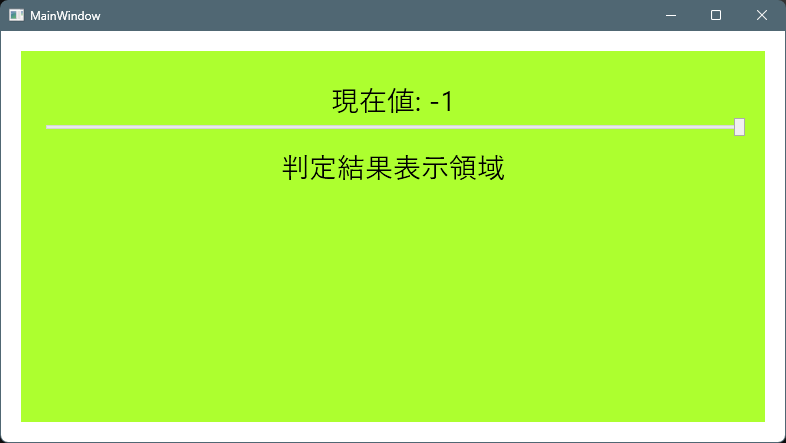
起動した状態。動画ファイル(.mp4)をD&Dします。
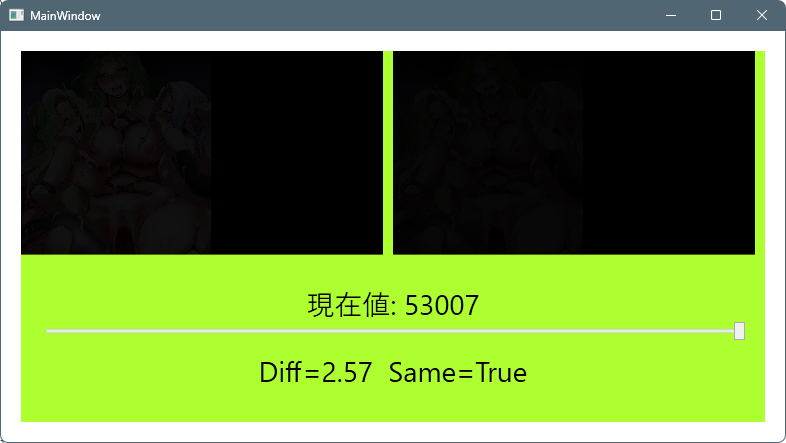
スライダーを動かすとフレームが移動し、前後のフレームが同一か判定され結果が表示されます。
シーク時に非同期処理のキャンセルのコードが実行されるようにしていていて、デバック実行では毎回例外が発生し止まります。
dotnet runでは問題なさそうですが、余り細かくコードを精査していません。

コメント