後からフィルターを追加する方式の画像加工ツールの雛形とそれを使った細線化フィルターを作成しました。
細線化(Thinning)は、2値画像の図形を1ピクセル幅の線に変換する画像処理です。
太い線や領域を外側から少しずつ削り、形状や連結関係を保ったまま中心線(スケルトン)だけを残します。
この処理により、文字認識や図形解析などで形状の特徴を扱いやすくなります。
代表的な手法として Zhang-Suen アルゴリズム などがあります。
ソースコード
MainWindow.xaml
<Window x:Class="WpfEasyImageToolTemplate.MainWindow"
        xmlns="http://schemas.microsoft.com/winfx/2006/xaml/presentation"
        xmlns:x="http://schemas.microsoft.com/winfx/2006/xaml"
        xmlns:d="http://schemas.microsoft.com/expression/blend/2008"
        xmlns:mc="http://schemas.openxmlformats.org/markup-compatibility/2006"
        xmlns:local="clr-namespace:WpfEasyImageToolTemplate"
        xmlns:h="clr-namespace:Maywork.WPF.Helpers"
        mc:Ignorable="d"
        Title="ImageTools" Height="800" Width="600">
    <Window.DataContext>
        <local:MainWindowViewModel/>
    </Window.DataContext>
    <Grid
        h:FileDropHelper.Enable="True"
        h:FileDropHelper.DropCommand="{Binding FileDropCommand}">
        <Grid.RowDefinitions>
            <RowDefinition Height="Auto"/>
            <RowDefinition Height="*"/>
        </Grid.RowDefinitions>
        <StackPanel Grid.Row="0"
            Margin="4"
            Orientation="Horizontal">
            <Button Content="実行"
                Command="{Binding ApplyCommand}"
                Margin="4,0,0,0"
                FontSize="16" />
            <Button Content="コピー"
                Command="{Binding CopyCommand}"
                Margin="4,0,0,0"
                FontSize="16" />

        </StackPanel>

        <TextBlock Grid.Row="1"
            Text="ここにファイルをドロップ"
            HorizontalAlignment="Center"
            VerticalAlignment="Center"/>

        <ScrollViewer Grid.Row="1"
            h:ImageScaleHelper.Enable="True">
            <Canvas>
                <Image Source="{Binding ViewImage}" />
            </Canvas>
        </ScrollViewer>
    </Grid>
</Window>
MainWindowViewModel.cs
using System.Windows.Media.Imaging;
using Maywork.WPF.Helpers;

namespace WpfEasyImageToolTemplate;
public class MainWindowViewModel : ViewModelBase
{
    // フィールド
    bool IsProcessing = false;

    // プロパティ
    private BitmapSource? _viewImage;
    public BitmapSource? ViewImage
    {
        get => _viewImage;
        set => SetProperty(ref _viewImage, value, _ =>
        {
            ApplyCommand.RaiseCanExecuteChanged();
            CopyCommand.RaiseCanExecuteChanged();
        });
    }
    // コマンド
    public RelayCommand<string []> FileDropCommand { get; }
    public RelayCommand ApplyCommand { get; }
    public RelayCommand CopyCommand { get; }
    // コンストラクタ
    public MainWindowViewModel()
    {
        // 画像ドロップ
        FileDropCommand = new RelayCommand<string []>
        (
            async files =>
            {
                var images = files
                    .Where(f => ImageHelper.IsSupportedImage(f))
                    .ToArray();

                foreach(var file in images)
                {
                    ViewImage = await Task.Run(()=>
                    {
                        var bmp = ImageHelper.Load(file);
                        return ImageHelper.To96Dpi(bmp);
                    });
                }
            }
        );
        // フィルター実行
        ApplyCommand = new RelayCommand
        (
            async ()=>
            {
                var src = ViewImage;
                if (src is null) return;

                IsProcessing = true;
                ApplyCommand!.RaiseCanExecuteChanged();
                CopyCommand!.RaiseCanExecuteChanged();

                ViewImage = await Task.Run(()=>Filter(src));

                IsProcessing = false;
                ApplyCommand!.RaiseCanExecuteChanged();
                CopyCommand!.RaiseCanExecuteChanged();
            }
            ,()=>( ViewImage is not null && !IsProcessing )
        );
        // クリップボードへコピー
        CopyCommand = new RelayCommand
        (
            ()=>
            {
                if (ViewImage is not null)
                    ClipboardImageHelper.SetImage(ViewImage);
            }
            ,()=>( ViewImage is not null && !IsProcessing )
        );
    }
    // フィルター
    static BitmapSource Filter(BitmapSource src)
    {
        /*
        // グレースケール化
        BitmapSource tmp1 = ImageFilters.ToGray(src);
        // 2値化
        BitmapSource tmp2 = ImageFilters.ToBinary(tmp1);
        // 反転
        BitmapSource tmp3 = ImageFilters.Invert(tmp2);
        // 細線化
        BitmapSource tmp4 = ImageFilters.Thinning(tmp3);
        // 反転
        BitmapSource dst = ImageFilters.Invert(tmp4);
        */
        BitmapSource dst =
            ImageFilters.ToGray(src)
            .ToBinary()
            .Invert()
            .Thinning()
            .Invert();

        return dst;
    }
}
ImageFilters.cs
using System.Windows.Media.Imaging;
using ImageBuffer = Maywork.WPF.Helpers.ImageBufferHelper.ImageBuffer;

namespace Maywork.WPF.Helpers;

public static class ImageFilters
{

    // グレースケール化
    public static BitmapSource ToGray(this BitmapSource bmp)
    {
        ImageBuffer src = ImageBufferHelper.FromBitmapSource(bmp);

        int width = src.Width;
        int height = src.Height;

        if (src.Channels == 1)
        {
            bmp.Freeze();
            return bmp;
        }

        var dst = ImageBufferHelper.Create(width, height, 1);

        byte[] sp = src.Pixels;
        byte[] dp = dst.Pixels;

        Parallel.For(0, height, y =>
        {
            int si = y * src.Stride;
            int di = y * width;

            for (int x = 0; x < width; x++)
            {
                byte b = sp[si];
                byte g = sp[si + 1];
                byte r = sp[si + 2];

                int gray = (299 * r + 587 * g + 114 * b) / 1000;

                dp[di] = (byte)gray;

                si += src.Channels;
                di++;
            }
        });

        BitmapSource result = ImageBufferHelper.ToBitmapSource(dst);
        result.Freeze();
        return result;
    }

    // 2値化
    public static BitmapSource ToBinary(this BitmapSource bmp, byte threshold = 128)
    {
        ImageBuffer src = ImageBufferHelper.FromBitmapSource(bmp);

        int width = src.Width;
        int height = src.Height;

        var dst = ImageBufferHelper.Create(width, height, 1);

        byte[] sp = src.Pixels;
        byte[] dp = dst.Pixels;

        Parallel.For(0, height, y =>
        {
            int si = y * src.Stride;
            int di = y * width;

            for (int x = 0; x < width; x++)
            {
                int gray;

                if (src.Channels == 1)
                {
                    gray = sp[si];
                }
                else
                {
                    byte b = sp[si];
                    byte g = sp[si + 1];
                    byte r = sp[si + 2];

                    gray = (299 * r + 587 * g + 114 * b) / 1000;
                }

                dp[di] = (byte)(gray >= threshold ? 255 : 0);

                si += src.Channels;
                di++;
            }
        });

        BitmapSource result = ImageBufferHelper.ToBitmapSource(dst);
        result.Freeze();
        return result;
    }
    // 細線化
    public static BitmapSource Thinning(this BitmapSource bmp)
    {
        ImageBuffer src = ImageBufferHelper.FromBitmapSource(bmp);

        int width = src.Width;
        int height = src.Height;

        if (src.Channels != 1)
            throw new Exception("Binary image required");

        byte[] p = src.Pixels;

        bool changed;

        do
        {
            changed = false;

            List<int> remove = new();

            // step 1
            for (int y = 1; y < height - 1; y++)
            {
                int row = y * width;

                for (int x = 1; x < width - 1; x++)
                {
                    int i = row + x;

                    if (p[i] == 0) continue;

                    int p2 = p[i - width] > 0 ? 1 : 0;
                    int p3 = p[i - width + 1] > 0 ? 1 : 0;
                    int p4 = p[i + 1] > 0 ? 1 : 0;
                    int p5 = p[i + width + 1] > 0 ? 1 : 0;
                    int p6 = p[i + width] > 0 ? 1 : 0;
                    int p7 = p[i + width - 1] > 0 ? 1 : 0;
                    int p8 = p[i - 1] > 0 ? 1 : 0;
                    int p9 = p[i - width - 1] > 0 ? 1 : 0;

                    int B = p2 + p3 + p4 + p5 + p6 + p7 + p8 + p9;

                    if (B < 2 || B > 6) continue;

                    int A =
                        (p2 == 0 && p3 == 1 ? 1 : 0) +
                        (p3 == 0 && p4 == 1 ? 1 : 0) +
                        (p4 == 0 && p5 == 1 ? 1 : 0) +
                        (p5 == 0 && p6 == 1 ? 1 : 0) +
                        (p6 == 0 && p7 == 1 ? 1 : 0) +
                        (p7 == 0 && p8 == 1 ? 1 : 0) +
                        (p8 == 0 && p9 == 1 ? 1 : 0) +
                        (p9 == 0 && p2 == 1 ? 1 : 0);

                    if (A != 1) continue;

                    if (p2 * p4 * p6 != 0) continue;
                    if (p4 * p6 * p8 != 0) continue;

                    remove.Add(i);
                }
            }

            foreach (var i in remove)
            {
                p[i] = 0;
                changed = true;
            }

            remove.Clear();

            // step 2
            for (int y = 1; y < height - 1; y++)
            {
                int row = y * width;

                for (int x = 1; x < width - 1; x++)
                {
                    int i = row + x;

                    if (p[i] == 0) continue;

                    int p2 = p[i - width] > 0 ? 1 : 0;
                    int p3 = p[i - width + 1] > 0 ? 1 : 0;
                    int p4 = p[i + 1] > 0 ? 1 : 0;
                    int p5 = p[i + width + 1] > 0 ? 1 : 0;
                    int p6 = p[i + width] > 0 ? 1 : 0;
                    int p7 = p[i + width - 1] > 0 ? 1 : 0;
                    int p8 = p[i - 1] > 0 ? 1 : 0;
                    int p9 = p[i - width - 1] > 0 ? 1 : 0;

                    int B = p2 + p3 + p4 + p5 + p6 + p7 + p8 + p9;

                    if (B < 2 || B > 6) continue;

                    int A =
                        (p2 == 0 && p3 == 1 ? 1 : 0) +
                        (p3 == 0 && p4 == 1 ? 1 : 0) +
                        (p4 == 0 && p5 == 1 ? 1 : 0) +
                        (p5 == 0 && p6 == 1 ? 1 : 0) +
                        (p6 == 0 && p7 == 1 ? 1 : 0) +
                        (p7 == 0 && p8 == 1 ? 1 : 0) +
                        (p8 == 0 && p9 == 1 ? 1 : 0) +
                        (p9 == 0 && p2 == 1 ? 1 : 0);

                    if (A != 1) continue;

                    if (p2 * p4 * p8 != 0) continue;
                    if (p2 * p6 * p8 != 0) continue;

                    remove.Add(i);
                }
            }

            foreach (var i in remove)
            {
                p[i] = 0;
                changed = true;
            }

        } while (changed);

        BitmapSource result = ImageBufferHelper.ToBitmapSource(src);
        result.Freeze();
        return result;
    }
    // 反転
    public static BitmapSource Invert(this BitmapSource bmp)
    {
        ImageBuffer src = ImageBufferHelper.FromBitmapSource(bmp);

        int width = src.Width;
        int height = src.Height;

        byte[] p = src.Pixels;

        Parallel.For(0, height, y =>
        {
            int i = y * src.Stride;

            for (int x = 0; x < width; x++)
            {
                p[i] = (byte)(255 - p[i]);
                i++;
            }
        });

        BitmapSource result = ImageBufferHelper.ToBitmapSource(src);
        result.Freeze();
        return result;
    }

}
その他
ClipboardImageHelper.cs
FileDropHelper.cs
ImageBufferHelper.cs
ImageHelper.cs
ImageHistogramHelper.cs(未使用)
ImageScaleHelper.cs
ViewModelBase.cs
RelayCommand.cs
実行例
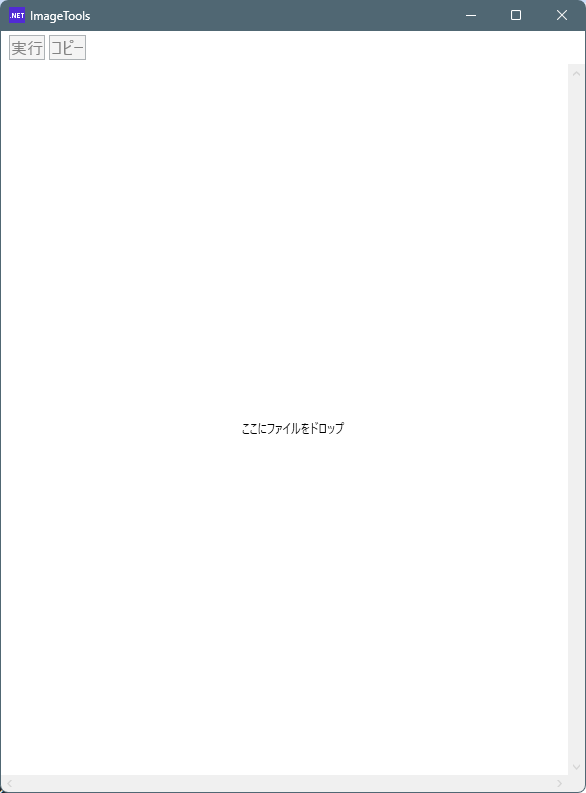
起動した状態
画像をドロップ
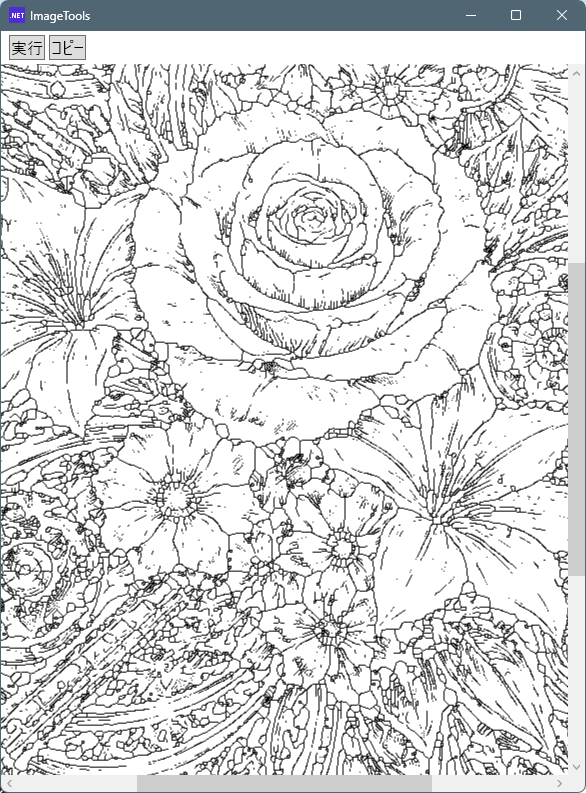
実行ボタンを押し細線化処理が行われた状態
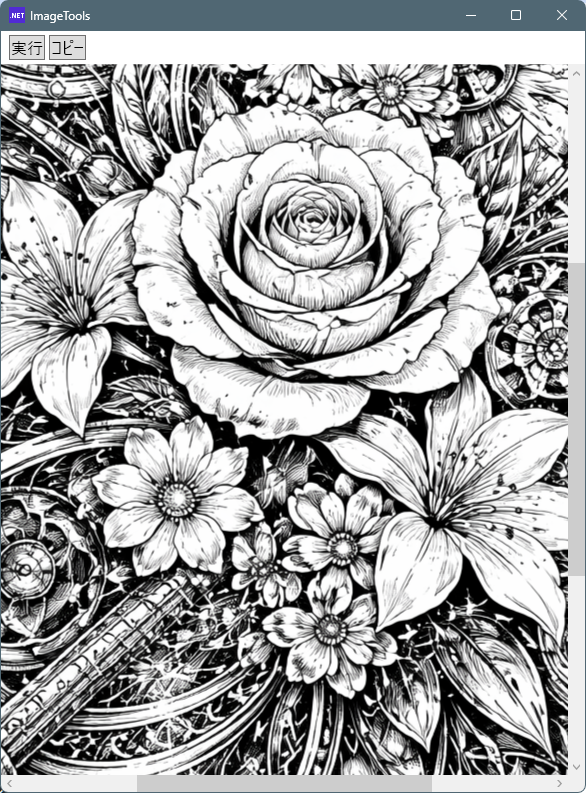
ドロップした画像

細線化は、2値化された画像に対して行う処理です。
2値化の段階で元画像の細かなディテールは失われてしまうため、
画像を綺麗に加工するためのフィルターというより、
図形の構造や形状を把握する用途に向いた処理と言えるでしょう。
今回は、細線化の効果が分かりやすそうな線画の画像をChatGPTに生成してもらいました。
また、文字画像など2値化しやすい画像では比較的きれいな結果になりますが、
一般的なカラー画像に適用すると、なんとなく元画像が想像できる程度の骨格だけが残るような結果になります。
そのため、画像加工用のフィルターというよりは、図形の構造を解析する用途で使われることが多い処理で、
実際の画像処理では使いどころが少し難しいフィルターだと感じました。
UIとフィルター処理を分離した構造にしているため、
フィルター部分を差し替えるだけで、同じUIをそのまま再利用することができます。
また、フィルターのメソッドは引数に BitmapSource を取り、戻り値も BitmapSource を返す形にしており、純粋関数として扱えるようにしています。
そのため C# の拡張メソッドとして実装でき、呼び出し側ではメソッドチェーンによる LINQ のようなスタイルでフィルター処理を書くことができます。
一つのアプリに多くの機能を詰め込みたくなるところですが、機能が増えるとUIの管理も複雑になります。
そのため、このツールでは「1アプリ1フィルター」というシンプルな構成を保ち、フィルターごとにアプリを作るような使い方を想定しています。
コメント