
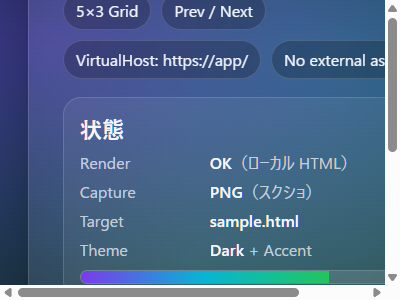
HTMLファイルをレンダリングした状態で、スクリーンショットを取得し画像ファイル化するサンプルコードです。
レンダリングにWebView2を使うのは、大掛かりかつ、遅いですがとりあえず出来ることが確認出来たので、何かでつかう場面もあるかもしれません。
ソースコード
ファイル名:WpfWebView2Capture.csproj
<Project Sdk="Microsoft.NET.Sdk">

  <PropertyGroup>
    <OutputType>WinExe</OutputType>
    <TargetFramework>net8.0-windows</TargetFramework>
    <Nullable>enable</Nullable>
    <ImplicitUsings>enable</ImplicitUsings>
    <UseWPF>true</UseWPF>
  </PropertyGroup>

  <ItemGroup>
    <PackageReference Include="Microsoft.Web.WebView2" Version="1.0.3650.58" />
  </ItemGroup>

</Project>
ファイル名:MainWindow.xaml.cs
using Microsoft.Web.WebView2.Core;
using System;
using System.IO;
using System.Threading.Tasks;
using System.Windows;

namespace WpfWebView2Capture;

public partial class MainWindow : Window
{
    // 対象フォルダ(html が入っている)
    private readonly string _folder = @"J:\csharp\WpfCB\WpfWebView2Capture\";
    private readonly string _htmlFile = "sample.html";

    public MainWindow()
    {
        InitializeComponent();
        Loaded += MainWindow_Loaded;
    }

    private async void MainWindow_Loaded(object sender, RoutedEventArgs e)
    {
        // WebView2 初期化
        var userDataFolder = Path.Combine(
            Environment.GetFolderPath(Environment.SpecialFolder.LocalApplicationData),
            "WebView2CaptureSample",
            "WebView2");

        Directory.CreateDirectory(userDataFolder);

        var env = await CoreWebView2Environment.CreateAsync(
            null,
            userDataFolder);

        await WebView.EnsureCoreWebView2Async(env);

        // ★ VirtualHost(必須)
        WebView.CoreWebView2.SetVirtualHostNameToFolderMapping(
            "app",
            _folder,
            CoreWebView2HostResourceAccessKind.Allow);

        // 表示サイズ(サムネ解像度)
        WebView.Width  = 400;
        WebView.Height = 300;

        // HTML を表示
        WebView.Source = new Uri($"https://app/{_htmlFile}");

        // 読み込み完了待ち
        await WaitForDOMContentLoaded();

        // 念のため少し待つ(CSS / 画像安定用)
        await Task.Delay(200);

        // キャプチャ
        await CaptureAsync(@"J:\csharp\WpfCB\WpfWebView2Capture\thumb.png");

        MessageBox.Show("Capture completed");
    }

    private Task WaitForDOMContentLoaded()
    {
        var tcs = new TaskCompletionSource();

        void Handler(object? s, CoreWebView2DOMContentLoadedEventArgs e)
        {
            WebView.CoreWebView2.DOMContentLoaded -= Handler;
            tcs.SetResult();
        }

        WebView.CoreWebView2.DOMContentLoaded += Handler;
        return tcs.Task;
    }

    private async Task CaptureAsync(string outputPath)
    {
        using var fs = new FileStream(outputPath, FileMode.Create, FileAccess.Write);
        await WebView.CoreWebView2.CapturePreviewAsync(
            CoreWebView2CapturePreviewImageFormat.Png,
            fs);
    }
}
ファイル名:MainWindow.xaml
<Window x:Class="WpfWebView2Capture.MainWindow"
        xmlns="http://schemas.microsoft.com/winfx/2006/xaml/presentation"
        xmlns:x="http://schemas.microsoft.com/winfx/2006/xaml"
        xmlns:d="http://schemas.microsoft.com/expression/blend/2008"
        xmlns:mc="http://schemas.openxmlformats.org/markup-compatibility/2006"
        xmlns:wv2="clr-namespace:Microsoft.Web.WebView2.Wpf;assembly=Microsoft.Web.WebView2.Wpf"
        xmlns:local="clr-namespace:WpfWebView2Capture"
        mc:Ignorable="d"
        Title="WebView2 Capture Sample" Height="600" Width="800">
    <Grid>
        <wv2:WebView2 x:Name="WebView"/>
    </Grid>
</Window>
VirtualHostを使うことによりfile制限回避しています。
ローカルのパスのhtmlファイルをhttpsとして扱います。
WebView.Source = new Uri($"https://app/{_htmlFile}");実行結果画像


コメント