Code Library
- AppPathHelper.cs
アプリケーション固有の保存パスを一元管理するヘルパー - BoolToVisibilityConverter.cs
Bool型とVisibility型を変換するコンバーター - ClipboardImageHelper.cs
BitmapSourceをクリップボードへコピーするヘルパー - DriveUtil.cs
ドライブ情報取得ヘルパー - ExceptionHandlerHelper.cs
アプリケーション例外を捕まえる例外ハンドラ - DisposeDataContextBehavior.cs
Windowのクローズ時DataContextをDispose()する - FileDropBehavior.cs
ファイルのドラックアンドドロップのビヘイビア - FileDropHelper.cs
ファイルDropをサポートするための Attached Property を提供するクラス - FreeDraw.cs
Canvas上にフリーハンドで線を引く - Gd.cs
GirdのColumnDefinitionsとRowDefinitionsの定義を短くするヘルパー - ImageBufferHelper.cs
画像のピクセル構造を byte 配列で扱う ImageBuffer ヘルパー - ImageHistogramHelper.cs
ヒストグラム画像を生成するヘルパー - ImageHelper.cs
BitmapSource関連ヘルパー「画像ファイル読み込み・DPI96化・拡張子判定」 - ImageScaleHelper.cs
画像のズームとパンを提供するヘルパークラス「AttachedProperty版」 - ImageScaleHelper.cs
画像のズームとパンを提供するヘルパークラス - MayworkTheme.xaml
WPFでResourceDictionaryを使い共通のスタイルをテーマファイルとして集約する。 - NumericInput.cs
TextBoxを数値入力用にするAttached Property を提供するクラス - OpenCvHelper.cs
OpenCVSharp関連ヘルパー「グレースケール読み込み・2値化・範囲指定マスク生成」 - RelayCommand.cs
ICommand の簡易実装クラス。 - SelectionCropper.cs
矩形選択 - ShortcutHelper.cs
ショートカットファイルの情報を取得するヘルパー - ViewModelBase.cs
INotifyPropertyChanged の実装を簡略化する基底クラス。 - ViewModelBaseRx.cs
INotifyPropertyChanged の実装を簡略化する基底クラス。 - Wiring.cs
イベントなどの配線関連のヘルパー群
スクレピング
<#
.SYNOPSIS
meaywork.netに掲載されているライブラリへのアクセスツール
.EXAMPLE

#>

$uri = "https://maywork.net/wpf-maywork-wpf-library/"
$html = Invoke-WebRequest -Uri $uri


$items = [regex]::Matches(
    $html.Content,
     '<li[^>]*>.*?</li>',
    'Singleline'
)

$snippets = foreach ($item in $items) {
    $name = [regex]::Match($item.Value, 'data-name="([^"]+)"').Groups[1].Value
    $desc = [regex]::Match($item.Value, 'class="desc"\>([^\<]+)').Groups[1].Value
    $url  = [regex]::Match($item.Value, 'href="([^"]+)"').Groups[1].Value
    if ($name -eq "") { continue }

    [PSCustomObject]@{
        Name = $name
        Desc = $desc
        Url  = $url
    }
}

# GUIで選択
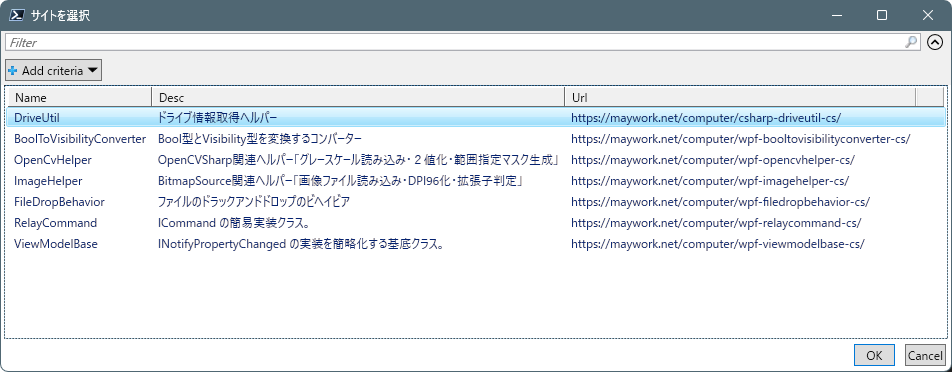
$selected = $snippets | Out-GridView -Title "サイトを選択" -PassThru

if ($selected) {

    $Url = $selected.Url
    $Name = $selected.Name
    $OutputDir = "."

    # HTML取得
    $response = Invoke-WebRequest -Uri $Url -UseBasicParsing
    $html = $response.Content

    # HTMLエンコード解除用
    Add-Type -AssemblyName System.Web


    # すべての code ブロック取得
    $codeBlocks = [regex]::Matches(
        $html,
        '<pre.*?<code.*?>(.*?)</code>.*?</pre>',
        [System.Text.RegularExpressions.RegexOptions]::Singleline
    )

    if ($codeBlocks.Count -eq 0) {
        Write-Host "No code blocks found."
        return
    }

    foreach ($block in $codeBlocks) {

        $rawCode = $block.Groups[1].Value
        $decoded = [System.Web.HttpUtility]::HtmlDecode($rawCode)


        # C#クラス名検出
        if ($decoded -match 'class\s+([A-Za-z_][A-Za-z0-9_]*)') {

            $className = $matches[1]
            $fileName  = "$className.cs"

            if ($className.ToLower() -eq $Name.ToLower()) {
                $path = Join-Path $OutputDir $fileName

                Set-Content -Path $path -Value $decoded -Encoding UTF8

                Write-Host "Saved: $fileName"
            }
        }
    }
}
スクリーンショット